
Amazing Update: BLC Now Detects Dead YouTube & Vimeo Videos, Not Just Broken URLs – 3 Game-Changing Benefits
Dead video embeds can silently ruin your WordPress site’s user experience and SEO when videos get deleted or made private.
BLC Now Detects Dead YouTube & Vimeo Videos, Not Just Broken URLs , and that single change solves one of the most frustrating hidden problems on WordPress sites.
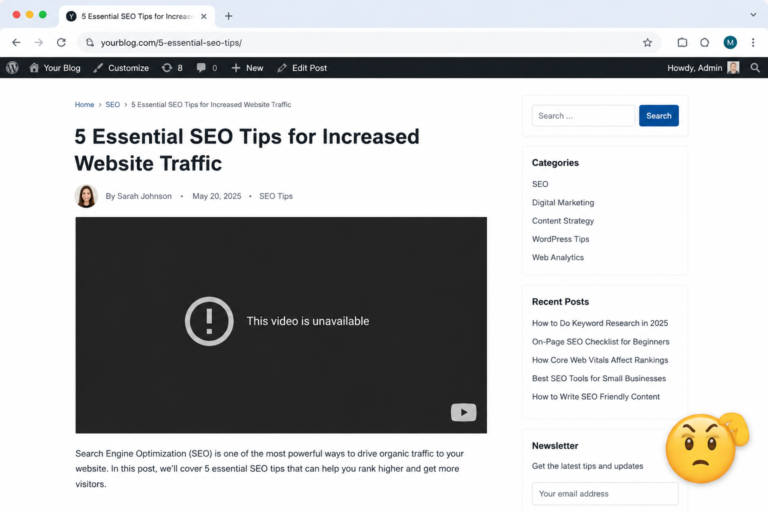
You embed a helpful YouTube tutorial or a polished Vimeo demo. Months later a visitor lands on the page and sees a black box or an error message. The URL still returns a healthy 200 status, so every ordinary broken-link tool tells you everything is fine. Your readers see a broken experience. Search engines notice the poor user signals. Traffic and trust quietly slip away.
That gap is now closed. With version 1.3.0, Broken Link Checker by AIOSEO goes beyond HTTP status codes. It checks whether the video itself is still live and accessible. Deleted, private, unlisted, or region-restricted videos get flagged automatically. No extra setup. No manual hunting through posts.
In this guide you will learn exactly how the new video detection works, why standard tools miss these problems, how BLC compares with Screaming Frog and the WPMU DEV option, what the pricing looks like, and practical steps to clean up dead embeds on your site.
Why Dead Video Embeds Hurt SEO and User Experience More Than Regular Broken Links
A classic 404 is obvious. A dead video embed is sneaky.
YouTube, Vimeo, TikTok and most other platforms still serve a page even after the video is gone. The HTTP response looks perfect. Standard broken-link scanners, including many free online checkers and open-source tools, therefore report the link as healthy. Visitors, however, stare at an empty player or a “this video is unavailable” message.
The damage is real:
- Higher bounce rates on content pages that rely on video
- Lower time-on-page and engagement metrics
- Lost conversions when a product demo or how-to tutorial disappears
- Gradual erosion of trust when readers repeatedly hit dead media
Content creators delete old videos, change privacy settings, or lose channels to copyright claims all the time. Recipe blogs, tutorial sites, review sites and agency portfolios are especially vulnerable. Until now most site owners had no efficient way to catch these failures at scale.
How BLC Now Detects Dead YouTube & Vimeo Videos Beyond Ordinary Broken URLs
Broken Link Checker by AIOSEO always scanned internal links, external links and broken images. Version 1.3.0 adds a platform-level video check on top of the normal HTTP request.
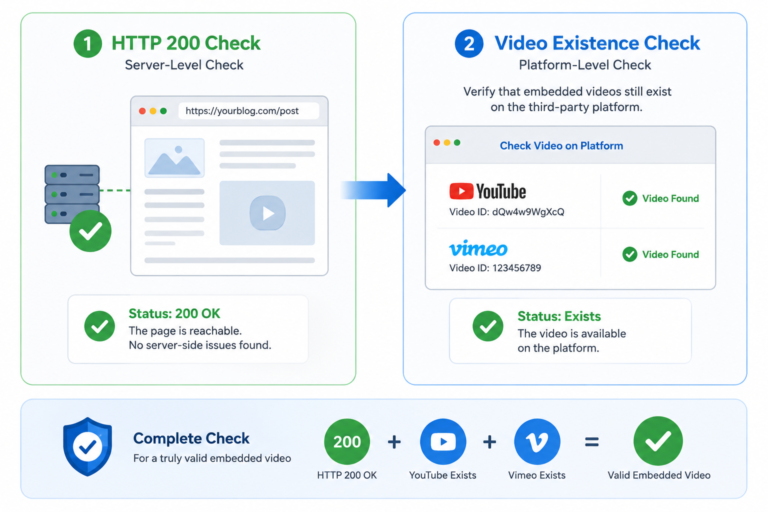
When BLC spots a link that points to a supported video host, it performs an extra verification step. It asks the platform whether the specific video is still accessible — not merely whether the page loads. The result appears in the same dashboard you already use. You can edit the URL, replace the embed or unlink it without opening the post in the editor.
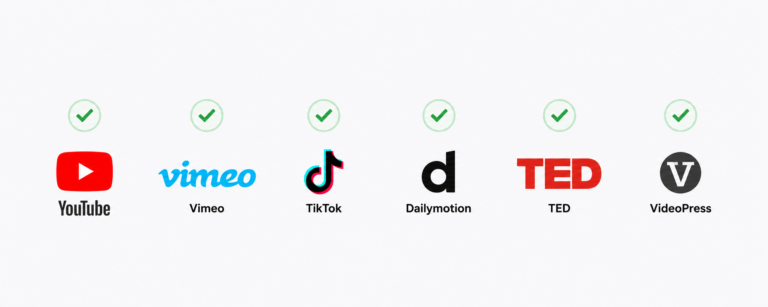
Supported platforms include:
- YouTube
- Vimeo
- TikTok
- Dailymotion
- TED
- VideoPress
- And more than ten others
The check runs automatically during your normal scheduled scan. Update the plugin to 1.3.0 and the next scan includes video links. You can also trigger a manual scan from the dashboard if you want results immediately.
Additional improvements in the same release reduce false negatives (a second client-side check helps when a WAF or timeout interferes) and improve link editing reliability on WordPress 6.6 and newer.
3 Game-Changing Benefits of the New Video Detection Feature
Catch problems that every other tool misses
Standard scanners and even many professional SEO spiders only look at status codes. BLC now flags the exact category of failure that used to stay invisible: deleted, private or restricted videos that still return 200.
Fix everything from one place
Flagged video links appear alongside ordinary broken links and images. Update, redirect or remove them directly in the BLC interface. No need to search through dozens of posts.
Protect SEO and user experience without extra work
Video support is included on every paid plan and requires zero configuration. Once the plugin is updated, the protection runs in the background.
These benefits matter most for sites that publish a lot of media-rich content. One thorough scan after the update often reveals surprising numbers of dead embeds that have been sitting unnoticed for months or years.
Broken Link Checker by AIOSEO vs Screaming Frog, WPMU DEV and Other Options
Many site owners reach for desktop crawlers or free plugins first. Here is how the current landscape looks for video-aware checking.
Screaming Frog broken links
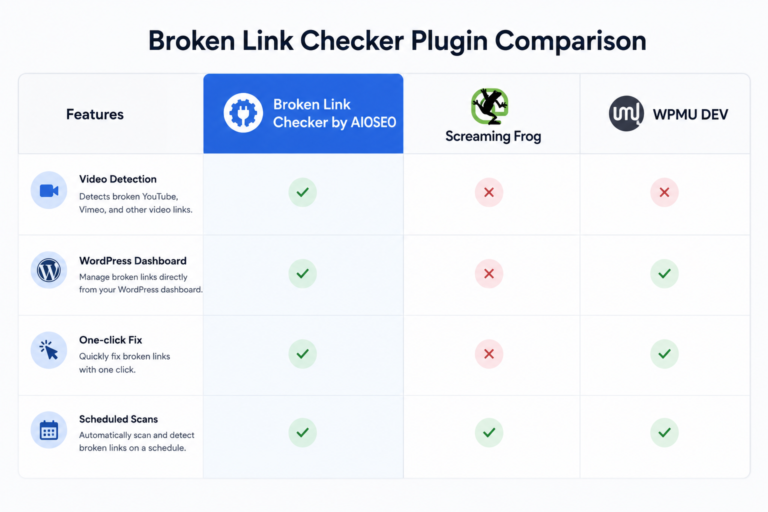
Screaming Frog is excellent for technical SEO audits and bulk 404 detection. The free version crawls up to 500 URLs; the paid licence removes the limit. It reports HTTP status codes reliably. It does not, however, perform the platform-level video existence check that BLC now offers. You still need a separate process to verify whether embedded YouTube or Vimeo content is actually playable.
WPMU DEV Broken Link Checker
The long-standing free plugin from WPMU DEV scans for broken links and images and offers cloud or local engines. It is popular and widely installed. Like most traditional checkers, it relies primarily on status codes and does not currently match BLC’s dedicated video-platform verification for YouTube, Vimeo and the wider list of hosts.
Open-source and free online broken link checkers
Command-line tools and simple web-based checkers are useful for quick one-page tests. They generally lack continuous monitoring, one-click fixes inside WordPress, and any video-existence logic. They also tend to miss the subtle failures that return 200 but show no playable media.
Broken Link Checker by AIOSEO
It lives inside the WordPress dashboard, handles internal and external links plus images, and now adds true video detection. Fixes happen without leaving the admin area. Scans can be scheduled and credits renew monthly. The free tier covers a modest number of internal links; paid plans unlock higher volumes, external links and the full video feature set.
For pure technical crawling and large-scale link-building research, Screaming Frog remains strong. For ongoing WordPress maintenance that includes dead video embeds, BLC currently offers the most complete in-dashboard solution.
Broken Link Checker Price and Plan Options
Pricing is straightforward and starts low enough for individual bloggers while scaling for agencies.
- Free tier: up to 250 internal links per month
- Starter: $4.99 per month — single site, higher link volume
- Plus: $9.99 per month — multiple sites
- Premium: $29.99 per month — larger link allowances
- Elite: $49.99 per month — up to 100 sites and very high monthly link quotas
Video support is available on all paid plans. A 14-day money-back guarantee reduces risk. Agencies can use the Elite licence across client sites or purchase individual licences as needed.
Compared with the cost of lost traffic from unnoticed dead videos, even the entry-level paid plan is usually inexpensive insurance.
Practical Steps: How to Start Catching Dead YouTube and Vimeo Videos Today
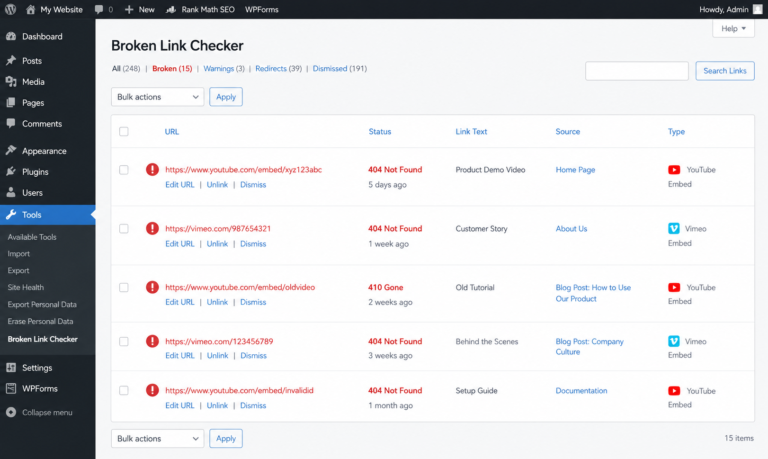
- Install or update Broken Link Checker by AIOSEO to version 1.3.0 or later.
- Connect or confirm your AIOSEO account so link credits are available.
- Run a manual scan or wait for the next scheduled scan.
- Review the results in the BLC dashboard. Dead video links appear with clear status indicators.
- Edit, replace or unlink the problematic embeds directly from the list.
- Set a realistic scan frequency that matches your publishing volume and available credits.
After the first full scan many site owners are surprised by how many older posts contain unavailable media. Cleaning them up improves both reader experience and the signals search engines receive.
Conclusion: Stop Letting Dead Videos Quietly Damage Your Site
BLC Now Detects Dead YouTube & Vimeo Videos, Not Just Broken URLs. That capability closes a long-standing blind spot that ordinary link checkers, Screaming Frog crawls and many free plugins simply cannot see.
Dead embeds no longer hide behind healthy status codes. You get clear reports, one-click fixes and continuous monitoring without leaving WordPress. Whether you run a single blog or manage dozens of client sites, the update turns a hidden problem into a manageable routine task.
Update Broken Link Checker to 1.3.0, run a scan, and clear out the dead media that has been sitting unnoticed. Your visitors will thank you with longer visits and higher engagement. Search engines will notice the improved experience. And you will finally have visibility into a category of broken content that used to stay invisible.
FAQs
Does the video feature need special configuration?
No. After updating to 1.3.0, video links are included automatically in the next scan.
Which platforms does BLC check for dead videos?
YouTube and Vimeo are fully supported, along with TikTok, Dailymotion, TED, VideoPress and more than ten additional hosts.
Why do ordinary broken link checkers miss deleted YouTube videos?
Those platforms return a 200 status code even when the video is gone. BLC performs an extra platform-level check that confirms the video itself is still accessible.
Is there a free open-source alternative that does the same video check?
Most open-source and free online checkers focus on HTTP status. None currently match BLC’s automatic multi-platform video existence verification inside WordPress.
How does BLC pricing compare with other SEO broken link tools?
The free tier covers light use. Paid plans begin at $4.99 per month and include the video feature. Desktop tools such as Screaming Frog use a different pricing model focused on crawl volume rather than continuous WordPress monitoring.
No. After updating to 1.3.0, video links are included automatically in the next scan.
YouTube and Vimeo are fully supported, along with TikTok, Dailymotion, TED, VideoPress and more than ten additional hosts.
Those platforms return a 200 status code even when the video is gone. BLC performs an extra platform-level check that confirms the video itself is still accessible.
Most open-source and free online checkers focus on HTTP status. None currently match BLC’s automatic multi-platform video existence verification inside WordPress.
The free tier covers light use. Paid plans begin at $4.99 per month and include the video feature. Desktop tools such as Screaming Frog use a different pricing model focused on crawl volume rather than continuous WordPress monitoring.
Ready to protect every video embed on your site?
Install or upgrade Broken Link Checker by AIOSEO today and let the next scan do the hard work for you.