
Choosing an SEO plugins for WordPress can get confusing fast.
Yoast SEO, Rank Math, AIOSEO, SEOPress, The SEO Framework, and several newer tools all handle the basic SEO jobs. Then you have plugins built for specific tasks such as redirects, schema, internal links, sitemaps, and broken links.
So which one should you install?
For most WordPress websites, one main SEO plugin is enough. The right choice depends on how much control you want, how much automation you prefer, whether you run WooCommerce, and whether you need features such as rank tracking or local SEO.
I compared the main WordPress SEO plugins available in 2026, including their current features, free versions, paid plans, and intended users.
Quick comparison of the best SEO Plugins for WordPress
| Plugin | Best for | Free version | Paid version |
|---|---|---|---|
| Yoast SEO | Beginners and content teams | Yes | From $118.80/year |
| Rank Math | Feature-rich SEO | Yes | From €8.99/month |
| AIOSEO | All-in-one WordPress SEO | Yes | From $49.50/year introductory |
| SEOPress | Agencies and multiple sites | Yes | From $49/year |
| The SEO Framework | Lightweight SEO | Yes | Paid extensions |
| Slim SEO | Automatic SEO setup | Yes | Paid Pro features |
| Squirrly SEO | SEO and AI search | Yes | From $9.99/month |
| WP Meta SEO | Bulk SEO management | Yes | Paid Pro |
| Schema & Structured Data for WP | Schema markup | Yes | Paid Pro |
| Redirection | 301 redirects and 404s | Yes | Free |
| Internal Link Juicer | Automatic internal links | Yes | Paid Pro |
| Broken Link Checker by AIOSEO | Broken links | Yes | Paid plans available |
| XML Sitemap & Google News | Sitemaps | Yes | Paid extensions |
| Site Kit by Google | Search Console and analytics | Yes | Free |
| Schema Pro | Advanced schema setup | No full free version | Paid |
Pricing can change, so check the plugin’s current pricing page before purchasing.
1. Yoast SEO
Yoast SEO remains one of the most familiar names in WordPress SEO.
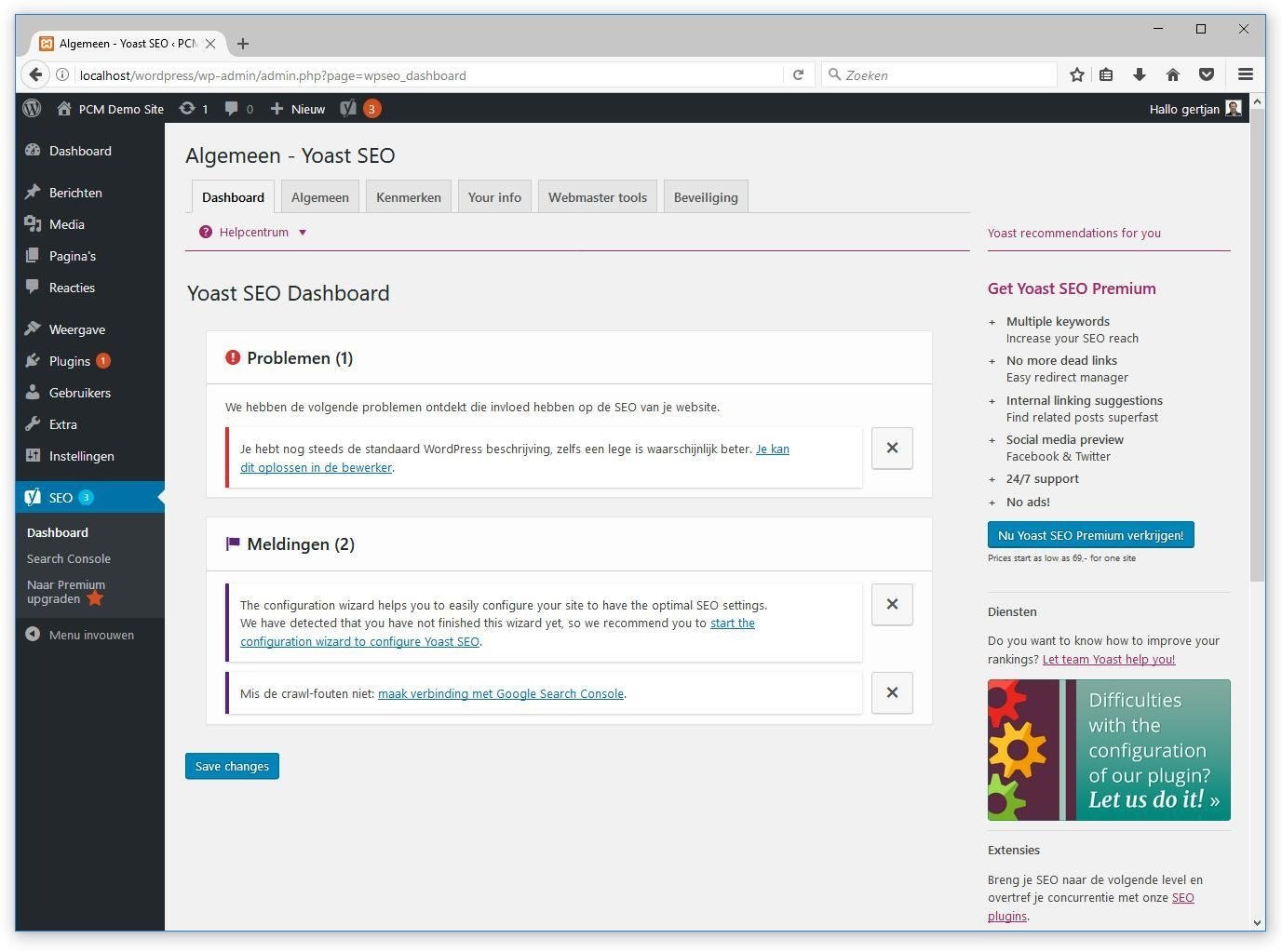
It has been around since 2008 and currently has more than 10 million active installations on WordPress.org. The free version includes SEO analysis, readability checks, XML sitemaps, schema support, breadcrumbs, SERP previews, and other core features.
The Premium version adds tools such as internal linking suggestions, redirect management, multiple keyphrases, social previews, and AI-assisted titles and meta descriptions. Yoast Premium is currently listed at $118.80 per year before VAT for 1 site.
Best for: Beginners, bloggers, publishers, and content teams.
Why I like it: The interface is easy to understand, especially if you’re learning on-page SEO for the first time.
Watch out for: Some of the more advanced features require Premium.
2. Rank Math
Rank Math is one of the most feature-heavy WordPress SEO plugins.
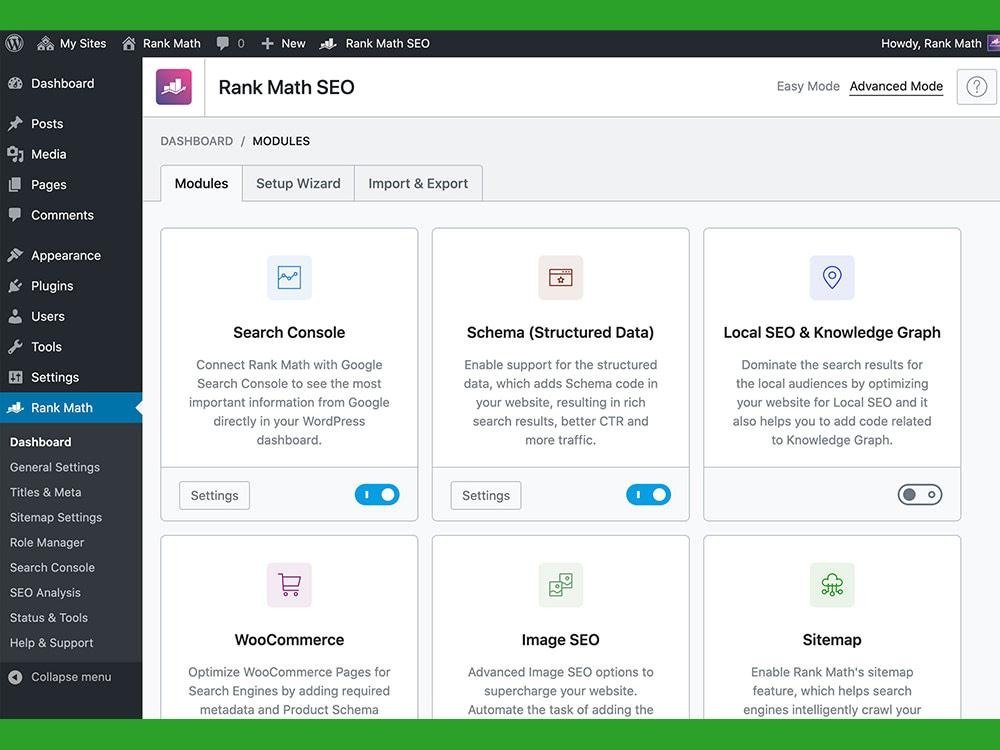
The free version includes features such as XML sitemaps, schema tools, SEO analysis, redirections, and keyword-focused content checks. The Pro plans add rank tracking, more advanced schema tools, AI features, and other site management tools.
Rank Math’s current pricing page lists the Pro plan at €8.99 per month when billed annually. Its Business plan is €24.99 per month and supports up to 100 client websites.
Best for: Bloggers, freelancers, agencies, and users who want lots of SEO controls.
Why I like it: You can do a surprising amount from the free version.
Watch out for: The number of settings can feel overwhelming if you’re new to WordPress SEO.
3. DefiniteSEO
DefiniteSEO AI SEO Plugin takes an AI-powered, all rounder approach to WordPress SEO plugin. It helps with technical SEO audits, content optimization, internal linking, structured data, and ongoing SEO monitoring, while using AI to reduce repetitive SEO work.
It suits agencies, freelancers, marketers, and site owners who want deeper SEO insights and a more streamlined workflow instead of managing multiple SEO tasks manually.
Best for: Agencies, SEO professionals, freelancers, and WordPress site owners looking for AI-assisted SEO optimization and workflow automation
4. All in One SEO
All in One SEO, commonly called AIOSEO, has been around since 2007 and currently reports more than 3 million users.
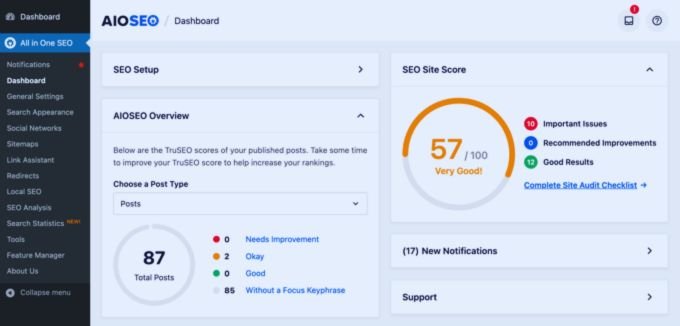
It covers technical SEO, XML sitemaps, schema, local SEO, WooCommerce SEO, redirects, internal linking, SEO audits, Search Console data, and keyword tracking. Its current feature set also includes AI tools for titles, meta descriptions, FAQs, images, and content.
The current introductory Basic price is $49.50 per year for 1 site. Plus starts at $99.50, while Pro starts at $199.50. These are promotional first-year prices, so check the renewal price before buying.
Best for: Business websites, bloggers, WooCommerce stores, and users who want SEO tools in one dashboard.
Why I like it: The setup wizard makes the initial configuration easy.
Watch out for: Advanced features can push the cost up quickly.
5. SEOPress
SEOPress is a strong choice if you manage several WordPress websites.
The free version covers many core SEO tasks. SEOPress PRO adds local SEO, WooCommerce SEO, site audits, analytics, redirects, 404 monitoring, schema, Google News and video XML sitemaps, AI integrations, and white-label features.
SEOPress PRO currently starts at $49 per year for 1 site. The 5-site plan is $59 per year, while unlimited sites cost $149 per year. The company says renewals remain at the same price.
Best for: Freelancers, agencies, and site owners who want clean pricing.
Why I like it: The unlimited-site plan is useful for people managing many small WordPress sites.
Watch out for: Some beginners may find the settings less guided than Yoast.
6. The SEO Framework
The SEO Framework takes a different approach.
The core plugin is free and doesn’t use advertising or upgrade notices inside the WordPress interface. It handles metadata, canonical URLs, robots settings, XML sitemaps, Open Graph data, and structured data.
Additional functions are available through extensions, including local SEO, focus keywords, analytics connections, and extra structured data tools.
Best for: Users who want a lightweight SEO plugin with fewer distractions.
Why I like it: The dashboard stays clean.
Watch out for: It doesn’t try to include every SEO feature in one plugin.
7. Slim SEO
Slim SEO is aimed at people who don’t want to spend hours configuring SEO settings.
The plugin automatically handles many common SEO tasks and includes metadata, schema, XML sitemaps, Open Graph data, breadcrumbs, and other technical settings. Its current version also includes AI-assisted meta title and description generation, including bulk generation tools.
Best for: Beginners, small business websites, and bloggers who prefer automatic configuration.
Why I like it: There are fewer settings to work through.
Watch out for: Advanced SEO users may want more manual control.
8. Squirrly SEO
Squirrly SEO has expanded beyond traditional WordPress SEO.
Its current plugin focuses on SEO, AEO, and GEO, with tools for keyword research, content analysis, rank tracking, internal links, schema, AI crawler controls, and AI-search readiness.
The free plan is available for 1 site. Paid plans currently start at $9.99 per month for the listed Pro plan.
Best for: Marketers interested in Google search as well as AI answer engines.
Why I like it: It has a wider focus on how content can be discovered through AI systems.
Watch out for: Some of its terminology and tools are more advanced than what a new blogger needs.
9. WP Meta SEO
WP Meta SEO is designed around managing SEO information across a WordPress site.
Its main appeal is bulk editing. If you’ve inherited a website with hundreds of pages containing missing or weak titles, descriptions, and image information, bulk management can save a lot of time.
Best for: Existing websites with lots of old content.
Why I like it: Bulk editing is useful when you’re cleaning up a large site.
Watch out for: If you only publish a few posts each month, a larger all-purpose SEO plugin may make more sense.
10. Schema & Structured Data for WP
Schema & Structured Data for WP & AMP is built around structured data.
The plugin supports more than 35 schema types, including Article, Recipe, Product, Local Business, Video, Course, JobPosting, Event, and others. It also supports schema templates and conditional display rules.
The plugin is particularly useful when your main SEO plugin doesn’t provide the schema type or level of control you need.
Best for: Websites that need specific schema types.
Why I like it: The number of supported schema formats is impressive.
Watch out for: Don’t install a second schema plugin without checking whether your main SEO plugin already generates the same markup. Duplicate schema can create problems.
11. Redirection
Redirection isn’t a traditional all-in-one SEO plugin. It’s a specialist tool for redirects and 404 management.
You can create 301 redirects, monitor 404 errors, import and export redirect rules, and create conditional redirects. The plugin is free and has been maintained for more than 10 years.
The September 2026 release added improvements to importing and exporting redirect files and a Yoast SEO redirect importer.
Best for: Websites that frequently change URLs or have a large archive.
Why I like it: It does one job very well.
Watch out for: You don’t need it if your existing SEO plugin already handles your redirect requirements.
12. Internal Link Juicer
Internal Link Juicer is built specifically for internal linking.
You define keywords and linking rules, then the plugin can create internal links automatically. The free version includes a large set of controls, while Pro adds more advanced functions.
For a blog with hundreds of articles, this can reduce the amount of manual linking work.
Best for: Content-heavy blogs and affiliate websites.
Why I like it: Internal linking becomes easier to manage at scale.
Watch out for: Review automatically created links regularly. Relevance matters more than link volume.
13. Broken Link Checker by AIOSEO
Broken Link Checker by AIOSEO focuses on finding broken links, images, and video links.
The free service currently scans up to 250 internal links per month. It runs the scanning through AIOSEO’s cloud service rather than using your WordPress server for the crawl.
You can edit or remove broken links directly from the plugin dashboard.
Best for: Older blogs, large sites, and websites with lots of external references.
Why I like it: Broken links are easy to forget, especially on older content.
Watch out for: Larger websites may need a paid plan for more scans.
14. XML Sitemap & Google News
XML Sitemap & Google News is a specialist sitemap plugin.
It gives you control over WordPress XML sitemaps and can generate a Google News sitemap. It also connects with Google Search Console and Bing Webmaster Tools and supports custom robots.txt rules.
Best for: Publishers, news websites, and users who need more sitemap control.
Why I like it: It gives you detailed control over which content enters your sitemaps.
Watch out for: Most sites already have XML sitemap functionality through WordPress or their main SEO plugin.
15. Site Kit by Google
Site Kit by Google comes directly from Google.
It connects WordPress with Google services such as Search Console, Analytics, AdSense, and PageSpeed Insights, then displays key information inside the WordPress dashboard. The plugin is free.
Site Kit isn’t a replacement for Yoast, Rank Math, or AIOSEO. Think of it as a reporting and Google-service connection tool that works alongside your SEO plugin.
Best for: Beginners who want Search Console and Analytics data inside WordPress.
Why I like it: It’s useful for checking whether your SEO work is bringing impressions and clicks.
Watch out for: It doesn’t provide the same on-page SEO controls as a dedicated SEO plugin.
16. Schema Pro
Schema Pro is another specialist option for structured data.
It’s useful when you need more advanced schema controls across different content types and want to reduce repetitive manual schema setup.
Best for: Businesses, publishers, and websites with specific schema requirements.
Why I like it: Schema can be managed across many pages from a central setup.
Watch out for: A dedicated schema plugin isn’t necessary when your primary SEO plugin already handles everything your site needs.
Which WordPress SEO plugin should you choose?
For a new blog, I’d narrow the list down to 3 main choices: Yoast SEO, Rank Math, and AIOSEO.
Yoast is a good fit if you want clear content guidance and a familiar interface.
Rank Math makes sense if you want a large number of features and more control from the free version.
AIOSEO is a strong choice if you want SEO, local SEO, WooCommerce tools, redirects, internal linking, audits, and reporting under one roof.
For a lightweight setup, look at The SEO Framework or Slim SEO.
For AI-search-focused work, Squirrly SEO is one of the more specialized options in 2026.
Do you need more than one SEO plugin?
Usually, no.
Running Yoast and Rank Math together, for example, can create conflicts because both plugins may try to manage titles, descriptions, canonical URLs, XML sitemaps, robots settings, and schema.
Pick one main SEO plugin.
Then add a specialist plugin only when there’s a clear reason.
For example:
- Yoast SEO + Redirection
- Rank Math + Internal Link Juicer
- AIOSEO + Broken Link Checker
- The SEO Framework + a specialist schema plugin
Check overlapping features before activating anything. Two plugins doing the same SEO job can create duplicate output or confusing settings.
What should you look for in a WordPress SEO plugin?
Start with the basics.
1. Title and meta description controls
You should be able to control how important pages appear in search results.
2. XML sitemaps
Your plugin should make it easy for search engines to discover your important content.
3. Canonical URLs
Canonical controls help search engines understand the preferred version of a page when similar URLs exist.
4. Schema markup
Look for the schema types your website actually needs. A recipe website has different requirements from a local service business.
5. Redirect management
If you change URLs, a proper redirect system can help visitors and search engines reach the new page.
6. Content analysis
A content checklist can be useful, especially when you’re learning on-page SEO. Treat the suggestions as guidance rather than a score you must chase.
7. Search Console integration
Seeing clicks, impressions, queries, and indexing information beside your WordPress content can make routine SEO checks easier.
Final verdict
There isn’t one WordPress SEO plugin that fits every website.
For most beginners, Yoast SEO, Rank Math, and AIOSEO are the main plugins worth comparing first.
If you want a cleaner and lighter setup, The SEO Framework and Slim SEO deserve a look. If your problem is more specific, specialist tools such as Redirection, Internal Link Juicer, Broken Link Checker, and Schema & Structured Data for WP can handle individual SEO tasks.
The bigger mistake is installing several plugins that perform the same job.
Choose one main SEO plugin, configure it properly, and spend your time improving the things search engines and readers actually use: useful content, clear page structure, good internal links, accurate metadata, and a technically healthy website.
FAQs
What is the best SEO plugin for WordPress in 2026?
Yoast SEO, Rank Math, and AIOSEO are the main all-purpose choices. The right one depends on the features you need and how much control you want over your WordPress SEO setup.
Is Yoast SEO still good in 2026?
Yes. Yoast remains one of the most widely installed WordPress SEO plugins, with more than 10 million active installations listed on WordPress.org. Its free version covers core SEO functions, while Premium adds advanced tools and AI features.
Is Rank Math better than Yoast?
They take different approaches. Rank Math puts a large number of SEO features into its plugin, while Yoast focuses heavily on content guidance, technical SEO, structured data, and a familiar editing experience. Your choice should depend on the workflow you prefer.
Can I use 2 SEO plugins on WordPress?
It’s usually better to use one main SEO plugin. Multiple plugins can generate overlapping metadata, schema, sitemaps, and other SEO output.
Are WordPress SEO plugins free?
Many have free versions. Yoast SEO, Rank Math, AIOSEO, SEOPress, The SEO Framework, Slim SEO, Squirrly SEO, Redirection, Site Kit, and several specialist plugins can be started without paying.
Do SEO plugins improve Google rankings automatically?
Installing a plugin doesn’t guarantee higher rankings. SEO plugins help you manage technical settings, metadata, schema, sitemaps, redirects, and content checks. Rankings still depend on the quality and relevance of your pages, competition, site health, links, and many other factors.
Which SEO plugin is best for beginners?
Yoast SEO is a simple starting point for beginners because its content analysis and settings are easy to understand. AIOSEO and Slim SEO are also worth considering if you prefer guided or automatic setup.
Which WordPress SEO plugin is best for WooCommerce?
AIOSEO, Rank Math, SEOPress, and Yoast all have WooCommerce-related SEO features. Compare the exact features you need, especially product schema, product metadata, redirects, and ecommerce-specific controls.
Should I install a separate schema plugin?
Only if your main SEO plugin doesn’t provide the schema type or control you need. Check for overlapping schema output before installing another plugin.
Do I need a separate redirection plugin?
Maybe. If your main SEO plugin already has a redirect manager that meets your needs, you may not need another one. Redirection is useful when you want a dedicated tool for managing large numbers of redirects and monitoring 404 errors.
Which SEO plugin is best for AI search?
Squirrly SEO currently has a strong focus on AEO and GEO, with tools aimed at AI crawlers, AI-answer readiness, schema, and AI search systems. Yoast and AIOSEO also include newer AI-related features.
Can SEO plugins slow down WordPress?
A poorly configured or overloaded plugin setup can add unnecessary work to a site. Keep your plugin list focused, remove tools you don’t use, and test site performance after major changes.
How many SEO plugins should I use?
For most websites, 1 main SEO plugin is enough. Add specialist plugins only when they provide a function your main plugin doesn’t handle well.