
Running a small business already gives you enough to do.
You’re handling customers, invoices, products, staff, suppliers, and probably a dozen other things. SEO can easily end up on the “I’ll deal with that later” list.
That’s a problem because your customers are already searching Google for what you sell.
If your business doesn’t appear when they search, another business gets the click.
The good news is that you don’t need a huge SEO budget or a team of 10 people to improve your search visibility. You can start with a few practical changes and build from there.
Here are 10 SEO tips for small business that can make a real difference for a small business.
1. Find the keywords your customers actually search
Start with the words your customers type into Google.
If you run a local bakery, for example, your customers might search:
- bakery near me
- birthday cakes in Lahore
- custom cakes Lahore
- chocolate cake delivery
- wedding cakes near me
These phrases tell you what people want and where they want it.
You can find keyword ideas with tools such as Google Keyword Planner, Ahrefs, Semrush, or even Google’s own search suggestions.
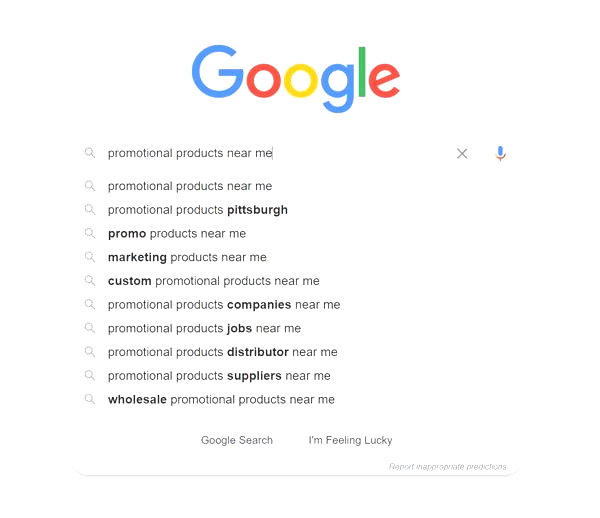
Search for your main service and look at the suggestions Google gives you. Then check the “People also ask” questions.
Write these phrases down.
You don’t need 500 keywords. Start with 10 to 20 terms that closely match your products or services.
Then create pages around those terms.
2. Create a separate page for each main service
One common problem with small business websites is putting everything on one page.
For example, a digital marketing agency might list SEO, web design, social media marketing, PPC, and content writing on one Services page.
Google has a harder time understanding which service the page should rank for.
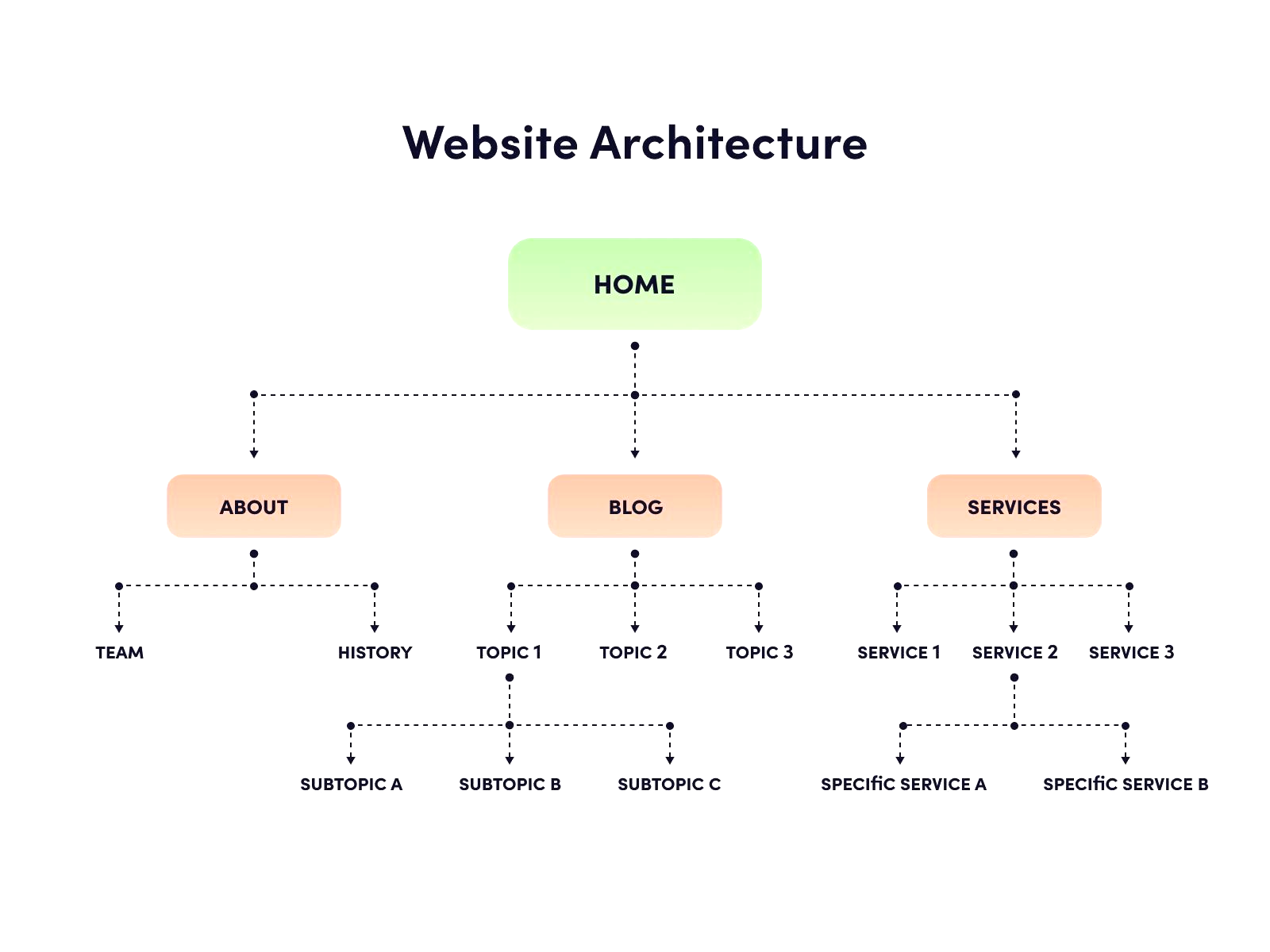
Create separate pages instead.
You could have:
- /seo-services/
- /web-design/
- /social-media-marketing/
- /content-writing/
Each page can target its own search intent.
Talk about the service, explain how it works, answer common questions, show relevant examples, and give visitors an easy way to contact you.
This also gives Google more specific pages to understand and rank.
3. Make your Google Business Profile complete
If you serve customers locally, your Google Business Profile deserves attention.
Your profile can appear in Google Maps and local search results when people search for businesses like yours.
Fill out the important details:
- Business name
- Address
- Phone number
- Website
- Opening hours
- Business category
- Services
- Photos
Keep your information accurate.
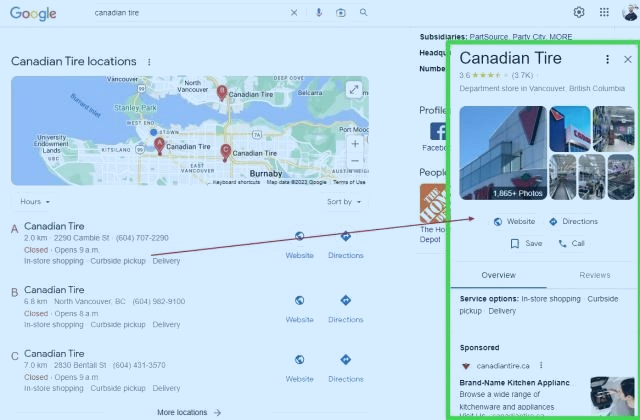
If your phone number says one thing on your website and something different on your Google profile, fix it.
Photos matter too. Add real pictures of your shop, team, products, office, vehicles, or completed work.
A local customer wants to know what they’re dealing with before they call.
4. Write content that answers real customer questions
A business blog can bring in search traffic, but only when the content has a reason to exist.
Think about the questions customers ask before buying.
A roofing company might get questions like:
“How much does roof repair cost?”
“How often should a roof be inspected?”
“How do I know if my roof is leaking?”
Those questions can become blog posts.
A skincare store could write:
“How often should you exfoliate?”
“What ingredients work well for dry skin?”
“What should you use after washing your face?”
You already have access to a useful source of content: your customers.
Check emails, WhatsApp messages, sales calls, support tickets, and comments. Repeated questions are often excellent content ideas.
5. Fix your page titles and meta descriptions
Your page title tells Google and searchers what a page is about.
A title such as:
SEO Services for Small Businesses | Maryam SEO
is much clearer than:
Home | Welcome to Our Website
Your title should describe the actual page and include the main search phrase when it fits naturally.
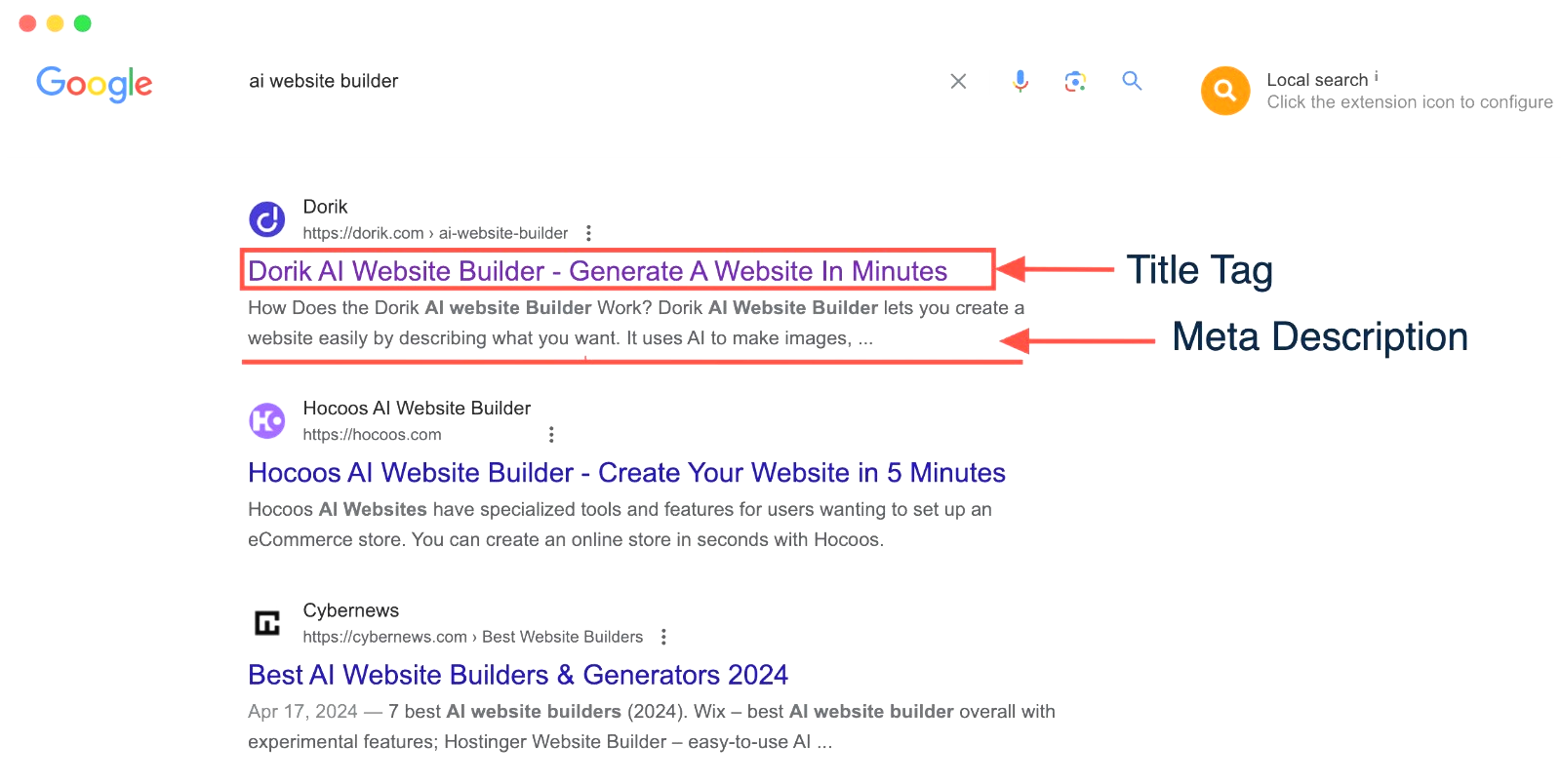
Meta descriptions don’t directly decide rankings, but they can influence whether someone clicks your result.
Keep the description specific.
For example:
Get practical SEO services for small businesses, including keyword research, on-page SEO, technical fixes, and content strategy.
Avoid stuffing the same keyword into the title and description several times. It looks awkward and gives the reader no extra information.
6. Improve your website speed
People are impatient online.
If your website takes several seconds to load, some visitors will leave before they even see your offer.
Check your site with Google’s PageSpeed Insights.
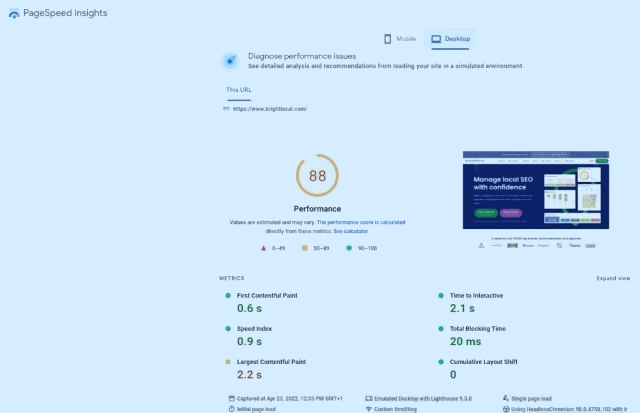
Look at the issues it reports, especially on mobile.
Large images are a common problem. Compress them before uploading them and use modern formats such as WebP when your setup supports them.
You should also review unnecessary plugins, heavy scripts, animations, and third-party tools.
A small business website doesn’t need 25 plugins doing things you aren’t using.
Keep the site clean.
7. Make your website easy to use on mobile
Open your website on your phone.
Actually use it.
Can you read the text without zooming?
Can you tap the menu easily?
Does the contact button work?
Can someone fill out your form without fighting with tiny fields?
Mobile usability matters because a large share of searches happen on phones.
Your visitor might find your business while sitting in a car, waiting for coffee, or standing in a shop. They aren’t going to pinch and zoom their way through a broken website.
Check your important pages on several screen sizes.
Fix anything that feels annoying.
8. Build relevant backlinks
Links from other websites can help Google discover your pages and understand that other sites reference your business.
But random backlinks aren’t a good strategy.
Focus on links that make sense for your business.
For example, a local restaurant could get mentioned by a local food publication. A web designer might appear in a business directory or contribute an expert comment to an industry website.
You can also look for:
- Local business directories
- Industry associations
- Supplier websites
- Relevant publications
- Local news websites
- Business partnerships
Quality matters more than collecting a huge number of links.
If a website has nothing to do with your business and exists only to publish links, skip it.
9. Add internal links between related pages
Internal links connect one page on your website to another.
They’re easy to create, and many small businesses barely use them.
Suppose you have a blog post called:
How to Choose the Right SEO Keywords
You could link from that article to your SEO services page using relevant anchor text such as SEO services for small businesses.
You can also link between related blog posts.
For example:
Keyword research guide → On-page SEO guide → SEO services
This helps visitors find related information without going back to Google.
It also gives search engines more context about how your pages relate to each other.
10. Track what is actually bringing results
SEO takes time, so you need a way to see what is happening.
Set up Google Search Console and Google Analytics.
Search Console can show you things such as:
- Search queries
- Impressions
- Clicks
- Click-through rate
- Average search position
- Indexed pages
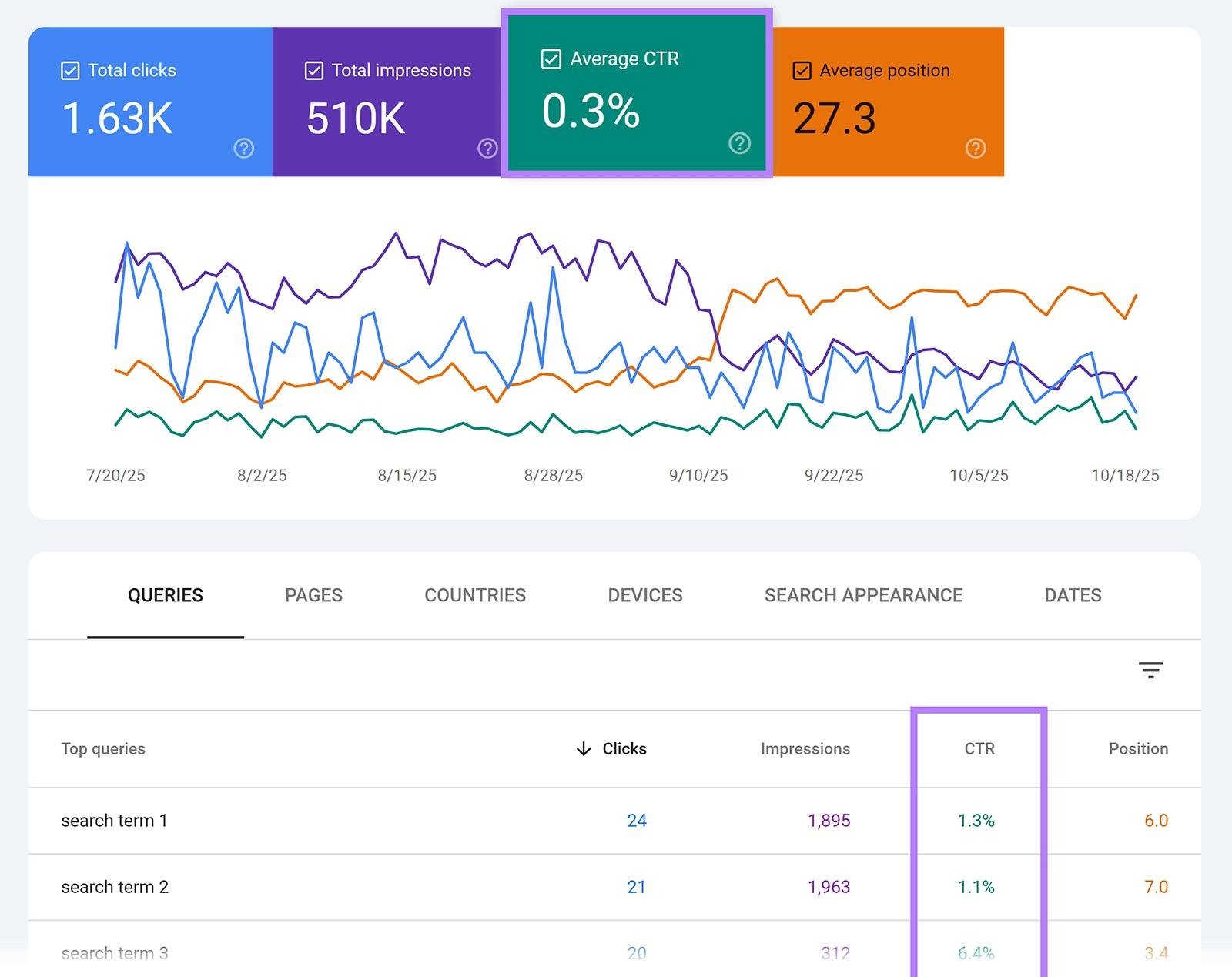
Look at the queries bringing impressions but few clicks.
Those pages may need better titles or meta descriptions.
Also check pages that receive traffic but don’t generate enquiries or sales. A page can attract visitors and still fail to bring business.
SEO isn’t finished when traffic goes up.
The real question is whether the traffic helps your business.
A simple SEO routine for small businesses
You don’t need to spend every day working on SEO.
Try this schedule:
Once a week
Check Search Console for new queries, ranking changes, and indexing problems.
Twice a month
Publish one useful article based on a real customer question.
Once a month
Review your main service pages, internal links, page titles, and website speed.
Every few months
Check your Google Business Profile, business information, backlinks, and older content.
Small improvements add up.
A business that publishes useful content for 12 months, fixes technical problems, earns relevant links, and keeps its website updated will have a much stronger search presence than a business that changes nothing and waits for Google to notice it.
Where should you start?
Start with the pages that can bring you customers.
Pick your main service. Find the search terms people use for it. Improve that service page, then create useful content around related questions.
After that, work through the technical issues and local SEO basics.
You don’t have to fix the entire website in one weekend.
Give Google clearer pages. Give visitors better answers. Then keep improving the parts that bring real business results.
FAQs
1. What are the best SEO tips for small business websites?
Start with keyword research, dedicated service pages, a complete Google Business Profile, useful customer-focused content, strong page titles, good website speed, mobile usability, relevant backlinks, internal links, and regular performance tracking.
2. How can a small business improve its Google ranking?
Create pages that match what customers search for, improve your on-page SEO, publish useful content, build relevant backlinks, improve your website experience, and keep your Google Business Profile accurate.
3. How many keywords should a small business target?
Start with around 10 to 20 keywords that closely match your products or services. Focus on search terms that have a clear connection to what you sell.
4. Is local SEO important for small businesses?
Yes, especially if you serve customers in a specific area. A complete and accurate Google Business Profile can help your business appear in local search and Google Maps.
5. How long does SEO take for a small business?
SEO usually takes time. The results depend on factors such as competition, website quality, content, backlinks, and the search terms you’re targeting. Track your progress regularly instead of expecting immediate results.