
Local businesses depend on Google Search and Google Maps to reach nearby customers. A dentist wants to appear when someone searches for a dentist nearby. A restaurant wants more customers searching for places to eat in its area. And a plumbing company wants calls from people who need its services locally.
Local SEO software helps businesses monitor these search results, manage Google Business Profiles, track competitors, check business listings, and monitor customer reviews.
But which software should you choose?
BrightLocal is my top all-round recommendation for agencies and businesses in supported countries. Local Falcon is a strong choice for Google Maps rank tracking, while Semrush Local works well for businesses that want several local SEO features in one platform.
The right choice depends on your location, budget, number of business locations, and the SEO tasks you need to manage.
Table of Contents
Quick comparison: best local SEO software
Here are 7 Best SEO Software for Local Search:
| Software | Best for |
|---|---|
| BrightLocal | All-in-one local SEO management |
| Semrush Local | Local SEO and business listing management |
| Whitespark | Citation research and local SEO |
| Local Falcon | Google Maps rank tracking |
| Moz Local | Business listing management |
| Yext | Large businesses with multiple locations |
| Google Business Profile | Free local search management |
What is local SEO software?
Local SEO software helps businesses improve their visibility in location-based search results.
For example, when someone searches for coffee shops in Lahore, Google displays relevant businesses in Search and Maps. Local SEO tools help business owners understand how their businesses appear for these searches and where they can improve.
Depending on the software, you can use it to:
- Track Google Maps and local search rankings.
- Manage Google Business Profile information.
- Find business listing and citation opportunities.
- Monitor customer reviews.
- Research local competitors.
- Check name, address, and phone number (NAP) consistency.
- Measure local search performance.
Google says local results are mainly influenced by relevance, distance, and prominence. Your business information, reviews, and online presence can all contribute to how Google understands your business.
Local SEO software helps you monitor and manage many of these activities.
7 best SEO software tools for local search
1. BrightLocal
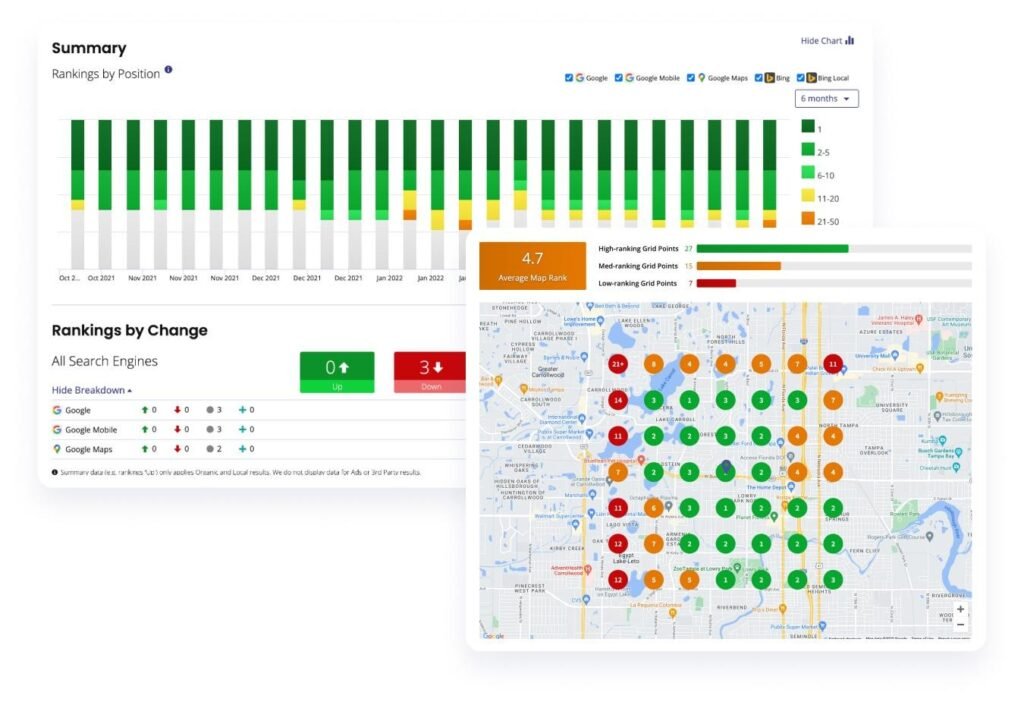
BrightLocal is a local SEO platform built for businesses, freelancers, and marketing agencies. It brings several local SEO tasks into one dashboard.
You can monitor local rankings, audit Google Business Profiles, track citations, and prepare reports for clients.
Key features:
- Local rank tracking.
- Local Search Grid for location-based ranking checks.
- Citation tracking and building.
- Google Business Profile audits.
- Review monitoring and management.
- White-label reporting for agencies.
One useful feature is Local Search Grid. It checks your Google rankings from different points around your business location, helping you see where your business appears in Maps.
For example, a dental clinic might rank in the top 3 near its office but appear much lower in neighborhoods several kilometers away.
BrightLocal helps you identify these differences.
Pricing: BrightLocal has several subscription plans, with features depending on the selected plan. Citation building is available as a separate pay-as-you-go service. Check its current pricing and plans.
Best for: SEO agencies, freelancers, and businesses managing local search campaigns in supported countries.
Limitation: BrightLocal has country restrictions for several tools. Its Local Search Grid and Local Rank Tracker support selected countries, including the US, UK, Canada, Australia, New Zealand, and Ireland. Check country availability before purchasing.
2. Semrush Local
Best for local SEO management
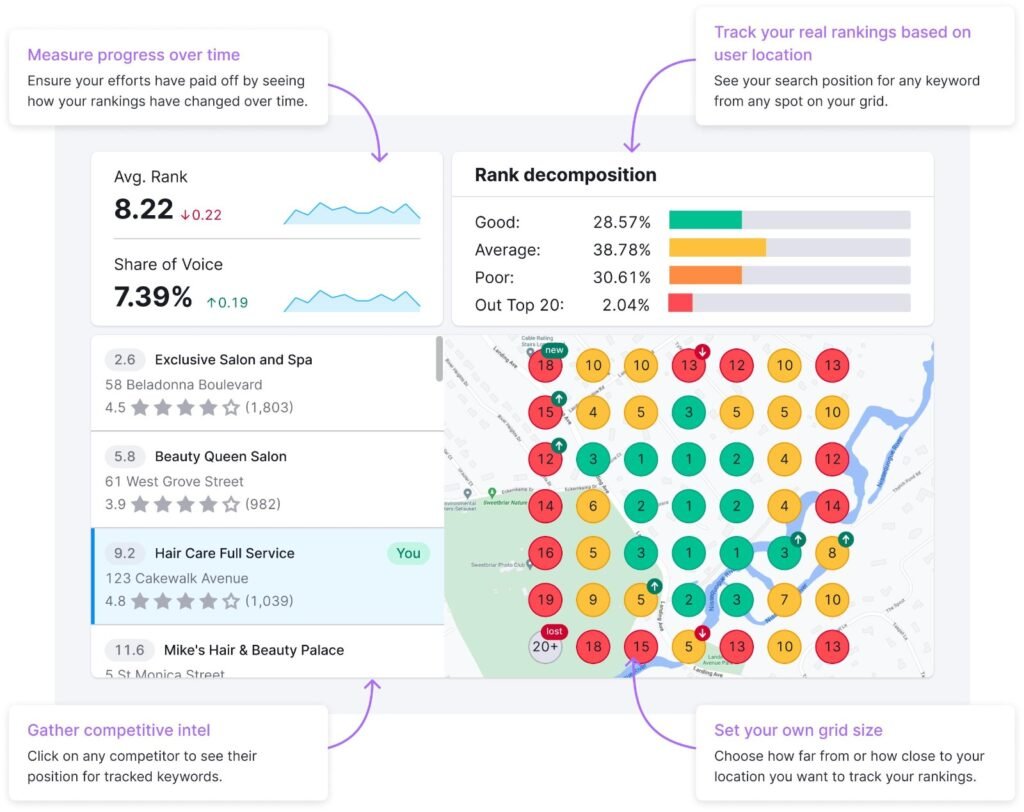
Semrush Local is useful for businesses that want to manage their local search presence and monitor competitors.
It combines Google Business Profile management, business listing distribution, review management, and local rank tracking.
You can use its Map Rank Tracker to check how your business performs across different areas on Google Maps.
Key features:
- Google Business Profile management.
- Local listing management.
- Review monitoring and responses.
- Map Rank Tracker.
- Local competitor research.
- AI-assisted Google Business Profile posting.
The Map Rank Tracker displays rankings through a geographic heatmap. This helps you identify areas where competitors appear ahead of your business.
Pricing: Semrush Local Base starts at $30 per location per month with annual billing. The Pro plan starts at $60 per location per month with annual billing. Features vary by plan.
Best for: Businesses and agencies already using Semrush for keyword research and website SEO.
Limitation: Pricing increases with the number of locations. Check directory coverage for your target country before paying for listing management.
3. Whitespark
Best for citation building.
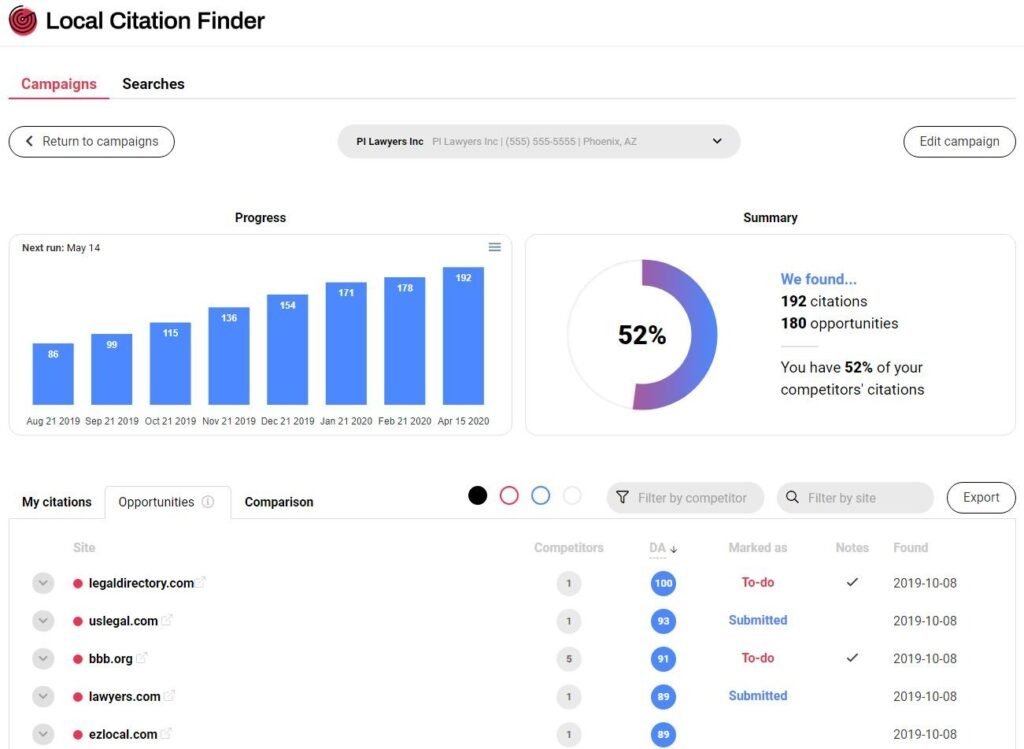
Whitespark is known for its local citation research and Google Business Profile services.
A citation is an online mention of your business name, address, and phone number. These mentions can appear in business directories, industry websites, and local platforms.
Whitespark helps you find citation opportunities and identify websites where your competitors have business listings.
Key features:
- Local Citation Finder.
- Local Rank Tracker.
- Citation building services.
- Google Business Profile management.
- Reputation management.
- Competitor citation research.
For example, if you’re running a local law firm, you can research which directories list competing law firms and identify relevant websites where your business could also be listed.
Pricing: Whitespark has separate products and services, so the cost depends on which features you need. Check its official pricing page.
Best for: Local SEO specialists, freelancers, and businesses that need citation research.
Limitation: Some features are sold separately, so managing several local SEO activities can require more than one subscription.
4. Local Falcon
Best for Google Maps tracking.

Local Falcon is a specialist tool for tracking Google Maps rankings.
Its geo-grid technology checks your business ranking from multiple locations within a selected geographic area.
Why does this matter?
Google Maps rankings can change depending on where a person searches. A business might appear near the top when someone searches close to its address but rank much lower from another neighborhood.
Local Falcon helps you see these differences through a visual map.
Key features:
- Google Maps rank tracking.
- Geo-grid ranking reports.
- Competitor tracking.
- Keyword-based local ranking checks.
- Historical ranking comparisons.
- Local search visibility monitoring.
For example, a restaurant can track its position for the keyword “Italian restaurant” across several neighborhoods. The report can show where it ranks well and where competing restaurants appear more frequently.
Pricing: Local Falcon uses credit-based pricing. The cost depends on your selected plan and the number of ranking checks. Visit its official website for current plans.
Best for: Local SEO agencies and businesses that want detailed Google Maps ranking reports.
Limitation: Local Falcon focuses on ranking analysis. You’ll need other tools for tasks such as website audits, citation management, and review management.
5. Moz Local
Best for listing management.
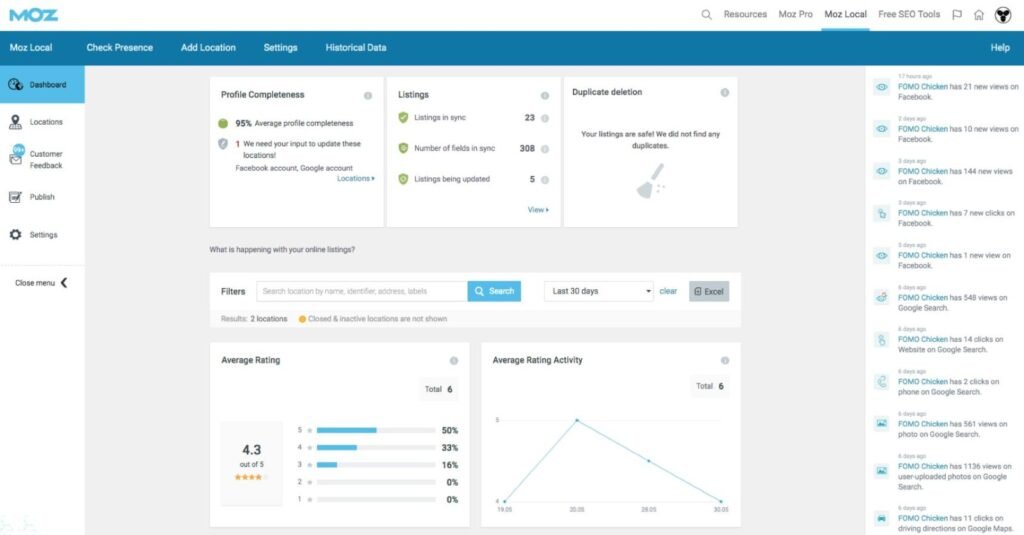
Moz Local helps businesses manage their online listings and maintain consistent business information across supported directories.
Business information can become inconsistent when different websites display different phone numbers, addresses, or opening hours.
Moz Local helps you monitor and manage these listings from a central dashboard.
Key features:
- Business listing management.
- Listing distribution.
- Duplicate listing monitoring.
- Review monitoring.
- Business profile updates.
- Local presence management.
For example, if a business changes its phone number, Moz Local can help distribute updated information across supported platforms.
Pricing: Moz Local uses location-based subscription pricing. Check its official pricing page for current plans and availability.
Best for: Small businesses that need help managing business listings.
Limitation: Its main focus is listing management. You may need another platform for detailed Google Maps geo-grid tracking.
6. Yext
Best for large businesses.
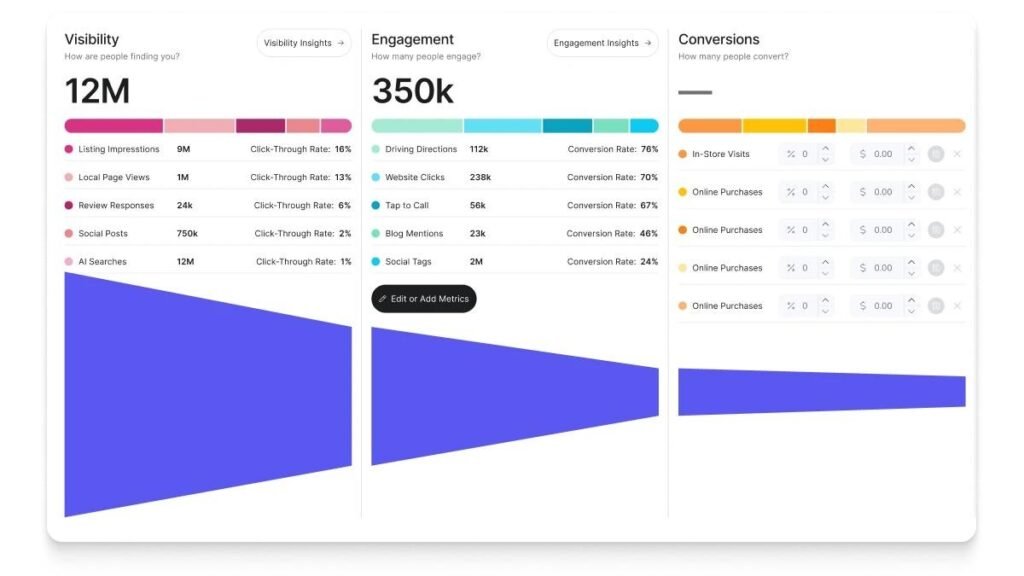
Yext is designed for businesses that manage information across many physical locations.
For example, a restaurant chain with 30 branches needs accurate addresses, contact details, opening hours, and business information for every branch.
Managing these details manually can take considerable time.
Yext helps businesses distribute and manage location information across supported digital platforms.
Key features:
- Centralized listing management.
- Business information distribution.
- Duplicate listing monitoring.
- Review management.
- Multi-location management.
- Location-based reporting.
Yext is particularly useful for franchises, retail chains, healthcare groups, and businesses with many branches.
Pricing: Yext provides different packages depending on business requirements. Visit its official website to request pricing.
Best for: Enterprises and businesses with multiple locations.
Limitation: Its pricing and feature requirements can make it excessive for a small business with just one location.
7. Google Business Profile
Best free option.

Google Business Profile is a free tool that every eligible local business should use.
It allows business owners to manage how their businesses appear on Google Search and Google Maps.
You can add your business address, phone number, opening hours, photos, services, and other relevant information.
Key features:
- Business information management.
- Google Maps visibility.
- Customer review management.
- Business photos and updates.
- Performance reports.
- Customer search queries and interactions.
Its Performance report lets you monitor profile views, searches, calls, website clicks, direction requests, and other available interactions.
For example, a local salon can check how many people clicked its phone number or requested directions through its Google Business Profile.
Pricing: Free.
Best for: Beginners, local businesses, freelancers, and anyone managing a Google Business Profile.
Limitation: It only covers Google’s business profile ecosystem. You’ll need other tools for competitor research, website audits, and detailed local rank tracking.
Comparison of the 7 best local SEO software tools
Use this table to compare the main purpose of each platform before choosing one.
| Tool | Rank tracking | Citations | Reviews | Listings |
|---|---|---|---|---|
| BrightLocal | Yes | Yes | Yes, plan dependent | Yes |
| Semrush Local | Yes | Yes, plan dependent | Yes | Yes |
| Whitespark | Yes | Yes | Yes, services dependent | Yes |
| Local Falcon | Yes | No | No | No |
| Moz Local | Limited | Listing distribution | Yes | Yes |
| Yext | Local search features | Listing management | Yes | Yes |
| Google Business Profile | Basic performance data | No | Yes | Google only |
Feature availability depends on the product and subscription. Check each provider’s documentation before purchasing.
How to choose the best SEO software for local search
Choosing software becomes easier when you know which local SEO tasks you need to manage.
Here are 5 factors to consider.
1. Check your local rank tracking requirements
Start by deciding whether you need traditional keyword tracking or Google Maps geo-grid tracking.
Traditional rank tracking shows your keyword positions for a selected location. Geo-grid tracking checks your visibility across several points within a geographic area.
Choose a tool such as Local Falcon or BrightLocal if you need detailed Google Maps ranking reports.
2. Look for Google Business Profile management
Your Google Business Profile contains important information about your business.
Choose software that helps you:
- Update business information.
- Manage business photos.
- Publish Google Business Profile posts.
- Monitor customer reviews.
- Track profile performance.
Semrush Local and BrightLocal provide several of these management features.
3. Compare citation management features
Citations help establish consistent business information across online directories.
Before choosing a tool, check whether it can:
- Find existing business listings.
- Identify duplicate listings.
- Monitor incorrect business information.
- Discover citation opportunities.
- Distribute updated business details.
Whitespark is a useful option for citation research, while Moz Local focuses on listing management.
4. Consider your business size
A local business with one location has different requirements from an agency managing 40 clients.
Consider the number of locations you need to manage and whether your software charges per location.
For a single-location business, a free Google Business Profile combined with a specialist rank tracker might be enough.
An agency may benefit from BrightLocal’s reporting and multi-location features.
5. Check pricing and country availability
Before purchasing any subscription, check:
- Monthly and annual costs.
- Number of locations included.
- Keyword tracking limits.
- Available directories in your country.
- Reporting limits.
- Free trials and cancellation terms.
Country availability deserves special attention. Some local SEO platforms restrict rank tracking, citation research, or listing distribution to selected countries.
A tool can have excellent features and still be unsuitable for your target market.
How to use local SEO software to improve your search visibility
Buying software is only the first step. You need a consistent process to turn its reports into useful SEO work.
Follow these steps.
Step 1: Set up your Google Business Profile
Start by claiming and verifying your Google Business Profile.
Add accurate information, including:
- Business name.
- Primary and secondary categories.
- Address or service areas.
- Phone number.
- Website URL.
- Business hours.
- Services and products.
Use real business photos and keep your opening hours updated.
Step 2: Research local keywords
Find search terms that potential customers use when looking for your services.
For example, a Lahore-based plumbing company might target:
| Keyword | Search intent |
|---|---|
| Plumber in Lahore | Local service |
| Emergency plumber Lahore | Urgent service |
| Bathroom pipe repair Lahore | Specific service |
| Water leakage repair near me | Nearby service |
You can use Semrush or Google Keyword Planner to research keyword ideas.
Choose terms that match your actual services and the areas you serve.
Step 3: Track your Google Maps rankings
Add your target keywords to a local rank tracking tool.
If you’re using Local Falcon, create a geo-grid around your business location and select the keywords you want to monitor.
Run your first report and save the results.
Repeat the scan regularly using the same settings so you can compare ranking changes over time.
Step 4: Check citations and business listings
Search for your business name, address, and phone number online.
Look for incorrect details, duplicate listings, and relevant local directories.
Use Whitespark or another citation management tool to find opportunities.
Keep your business information consistent across important platforms.
Step 5: Monitor customer reviews
Customer reviews help potential customers evaluate your business.
Check your Google Business Profile regularly and respond to reviews professionally.
Thank customers for positive feedback. For negative reviews, address the specific issue and explain how you can help.
Avoid offering rewards in exchange for positive reviews. Follow Google’s review policies.
Step 6: Measure your results
Check your reports every month.
Pay attention to:
- Local keyword ranking changes.
- Google Maps visibility.
- Google Business Profile interactions.
- Calls and direction requests.
- Website clicks.
- Customer reviews.
Google Business Profile Performance and Google Search Console can help you measure how people find and interact with your business.
Compare these results over time and focus on the activities that bring relevant visitors and enquiries.
Best free tools for local SEO
If you’re starting with a limited budget, you can handle several local SEO tasks without purchasing an expensive subscription.
Here are 5 free tools worth using.
1. Google Business Profile
Manage your business information, customer reviews, photos, and local profile performance.
Best for: Business profile management
2. Google Search Console
Monitor website impressions, clicks, search queries, and indexing issues.
Best for: Organic search performance
3. Google Analytics 4
Understand website traffic, user activity, and conversions.
Best for: Website traffic analysis
How to Use Google Keyword Planner: Step-by-Step Guide
4. Google Keyword Planner
Find keyword ideas and review estimated search volume ranges.
Best for: Local keyword research
5. Google Trends
Compare search interest for different terms and explore regional search patterns.
Best for: Search trend research
These tools cover different parts of SEO. You can combine them to monitor your website, research keywords, and manage your Google Business Profile.
Which local SEO software should you choose?
Your choice depends on the work you need to complete.
| Your requirement | Recommended software |
|---|---|
| All-in-one local SEO | BrightLocal |
| Local SEO management | Semrush Local |
| Citation research | Whitespark |
| Google Maps rank tracking | Local Falcon |
| Business listing management | Moz Local |
| Enterprise listing management | Yext |
| Free local SEO management | Google Business Profile |
For a beginner, I recommend starting with Google Business Profile, Search Console, and Google Analytics 4.
As your requirements grow, add a paid tool for the specific task you need to manage.
An agency handling several clients will probably benefit from BrightLocal or Semrush Local. Someone who mainly needs Google Maps ranking reports can start by evaluating Local Falcon.
Frequently asked questions about local SEO software
1. What is the best SEO software for local search?
BrightLocal is a strong all-round option for local SEO agencies and businesses in supported countries. Semrush Local is useful for business listing management, while Local Falcon is a good choice for Google Maps rank tracking.
2. Which local SEO tool is best for beginners?
Google Business Profile is the best starting point because it’s free and lets you manage your business information on Google Search and Maps.
Google Search Console and Google Analytics 4 are also useful for monitoring website performance.
3. Is BrightLocal better than Semrush Local?
Both tools support local SEO, but they serve slightly different needs.
BrightLocal is particularly useful for local rank tracking, citations, audits, and agency reporting. Semrush Local combines business listing management, Google Business Profile management, review management, and map tracking.
Your country and required features should guide your decision.
4. Can I do local SEO without paid software?
Yes. You can start local SEO using Google Business Profile, Google Search Console, Google Analytics 4, Google Keyword Planner, and Google Trends.
These free tools cover many basic tasks. Paid software becomes useful when you need detailed competitor analysis, automated reports, citation research, or location-based ranking checks.
5. What is geo-grid rank tracking?
Geo-grid rank tracking checks your business’s Google Maps rankings from multiple locations around a selected area.
For example, a restaurant might rank third near its address but appear much lower in another neighborhood.
Tools such as Local Falcon and BrightLocal help visualize these ranking differences.
6. Is local SEO software worth paying for?
Yes, when the software solves a regular business problem.
For example, an agency managing 15 client locations can save time with automated reporting and listing management. A small business with one location might get enough information from Google’s free tools.
Compare the subscription cost with the time and work it saves.
7. Does local SEO software guarantee Google Maps rankings?
No. Local SEO software can help you monitor rankings, manage business information, and identify areas for improvement.
Google determines local results using factors such as relevance, distance, and prominence. No software can guarantee a particular Google Maps position.
Final thoughts
Choosing the best SEO software for local search depends on your business requirements and budget.
BrightLocal is a good all-round choice for local SEO agencies. Semrush Local works well for businesses that need several local management features, while Local Falcon is particularly useful for Google Maps ranking analysis.
Start with Google Business Profile and Google’s free reporting tools. Add paid software when you need more detailed ranking reports, citation research, or multi-location management.
The goal is to understand how customers find your business and use that information to improve your local search presence.