
Meet GPT Image 2 & Nano Banana 2, Now Built Into AIOSEO
Every website needs strong visuals, yet most site owners still spend hours searching stock libraries, checking licenses, or waiting on designers. That friction slows content production and often forces you to settle for average images.
Meet GPT Image 2 & Nano Banana 2, now built into AIOSEO. With the release of AIOSEO 4.9.8, these two leading AI image models are available directly inside the WordPress editor.
You describe what you want, choose a model, and the image is generated and saved to your media library in one flow. No external tools, no extra subscriptions, and no leaving your dashboard.

This guide explains exactly what changed, how the two models differ, when to use each one, and practical steps to get better results.
You will also find prompt tips, credit details, and clear answers to common questions so you can start using the new tools with confidence.
What Changed in AIOSEO 4.9.8
The AI Image Generator has been part of AIOSEO since version 4.8.8. It already let you create original images from text prompts without leaving WordPress. Version 4.9.8 simply expands the model choices.
You now have two powerful options:
- GPT Image 2 from OpenAI
- Nano Banana 2 from Google
Nothing else about the workflow changes. You still open an Image block, click Generate with AI, write a prompt, set quality and aspect ratio, and generate. The only new step is selecting which model you prefer from the dropdown.
Both models use the same AI credit system. Paid plans receive annual credits (Basic 10,000, Plus 25,000, Pro 50,000, Elite 200,000). Free Lite users get 100 credits to test the feature. Extra credits can be purchased as needed.
Version 4.9.8 also introduced AIOSEO MCP, which lets AI agents like Claude, Cursor, and ChatGPT perform SEO tasks directly on your WordPress site. You can read more about it here: Introducing AIOSEO MCP
Lorem ipsum dolor sit amet, consectetur adipiscing elit. Ut elit tellus, luctus nec ullamcorper mattis, pulvinar dapibus leo.
GPT Image 2: Strengths and Best Uses
GPT Image 2 is OpenAI’s latest image generation model. It stands out for precise prompt following, strong text rendering inside images, and clean, high-fidelity results across many styles.
It performs especially well for:
- Product photos and catalog-style shots
- Portraits and people-focused images
- Blog headers and featured images that need a clear focal subject
- Graphics that include readable text (labels, signs, simple posters)
If you have used earlier AI image tools and felt the results often ignored key details in your prompt, GPT Image 2 usually closes that gap. It tends to produce sharper, more controlled outputs when accuracy matters.
Nano Banana 2: Strengths and Best Uses
Nano Banana 2 is Google’s current image model (built on Gemini 3.1 Flash Image). It prioritizes photorealism, natural placement of subjects in environments, accurate in-image text, and flexible creative edits.
It shines when you want:
- Scenes where the subject feels naturally placed in a real environment
- Lifestyle or editorial-style photography
- Fast iteration and creative exploration
- Images that benefit from strong environmental context
The same prompt often produces noticeably different results between the two models. GPT Image 2 may deliver a tight, centered close-up, while Nano Banana 2 opens the frame and integrates the subject more organically into the setting. Neither is wrong — they simply interpret the brief differently.
GPT Image 2 vs Nano Banana 2: Quick Comparison
| Aspect | GPT Image 2 (OpenAI) | Nano Banana 2 (Google) |
|---|---|---|
| Primary strength | Precision & prompt accuracy | Photorealism & natural composition |
| Best for | Product shots, portraits, text-heavy graphics | Lifestyle scenes, environmental photos |
| Text in images | Excellent | Strong |
| Creative flexibility | High control | More interpretive |
| Ideal starting point | When detail and crispness matter | When natural placement and mood matter |
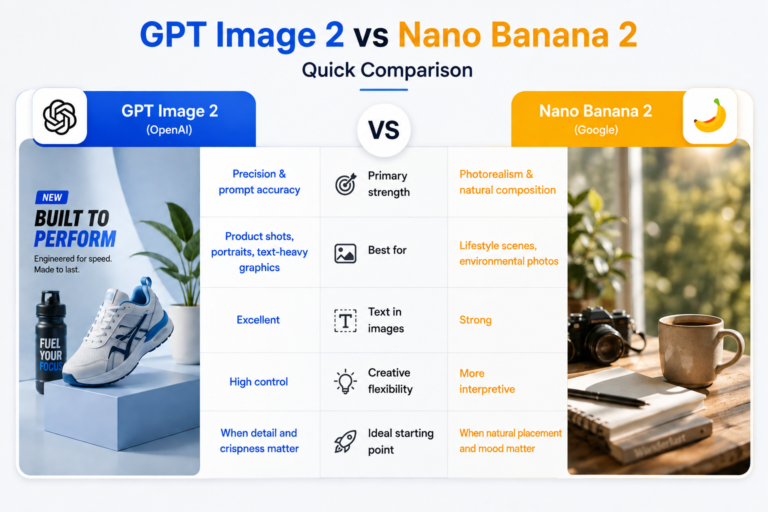
Practical recommendation: Start with GPT Image 2 for most product and blog-header work. Switch to Nano Banana 2 when you want a more atmospheric or lifestyle feel.
The fastest way to decide is to run the exact same prompt through both models and compare.
How to Use the New Models in AIOSEO
The process is straightforward and works the same way on any post or page:
- Open a post or page in the WordPress editor.
- Add an Image block (or select an existing one).
- Click Generate with AI in the block toolbar.
- Type a clear prompt describing the image you want.
- Open the model dropdown and choose GPT Image 2 or Nano Banana 2.
- Adjust quality (Low / Medium / High) and aspect ratio if needed.
- Click Generate.
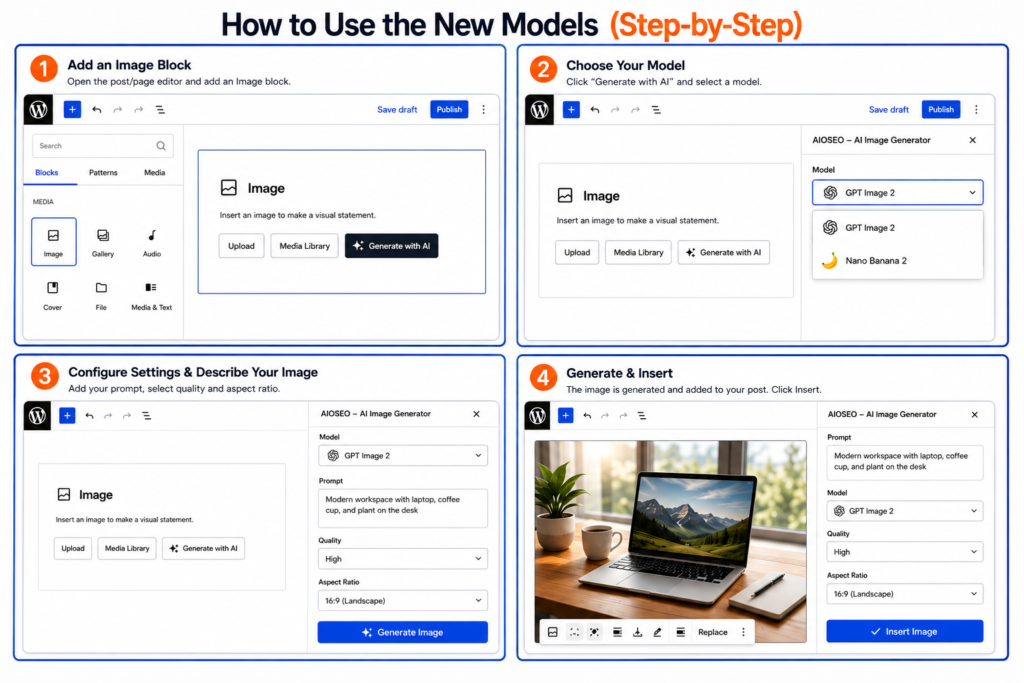
The image is created, saved to your media library, and inserted into the block automatically. You can also upload an existing image and ask the AI to enhance or reimagine it.
Credit cost appears on the Generate button before you confirm, so you always know the cost in advance. Using the same settings on both models costs the same number of credits.
Practical Prompt Tips for Better Results
Good prompts still make the biggest difference. Keep these guidelines in mind:
- Be specific about the subject, setting, lighting, and mood.
- Mention style when it matters (photorealistic, editorial, clean product photography, etc.).
- Include composition cues such as “centered subject,” “wide environmental shot,” or “close-up with shallow depth of field.”
- For text inside images, state exactly what the text should say and where it should appear.
- Test short variations rather than rewriting the entire prompt every time.
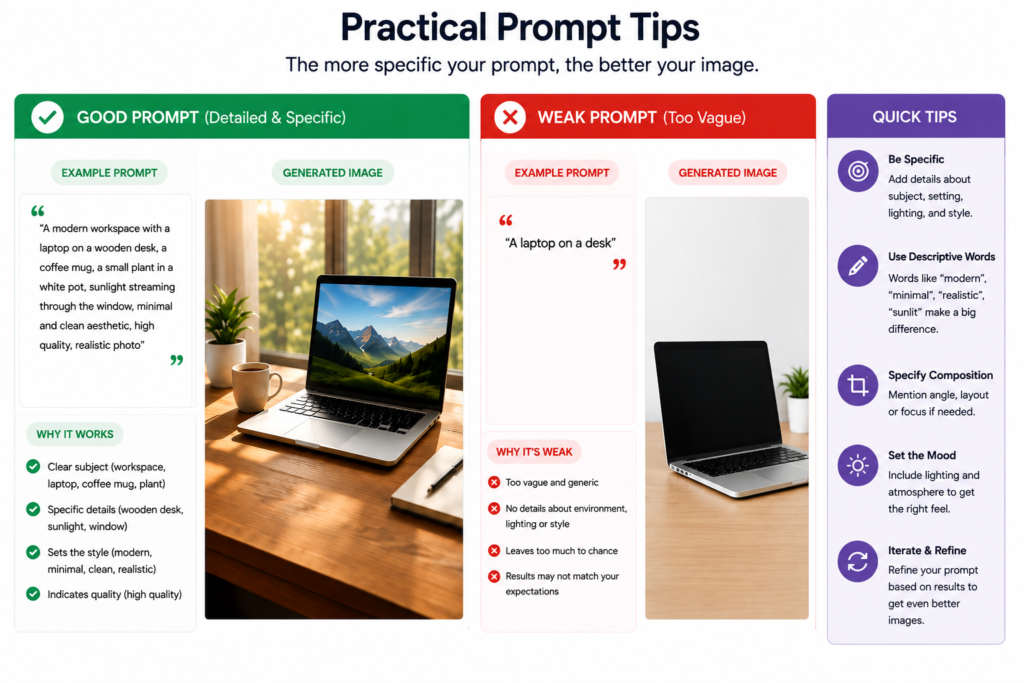
Example prompt structure that works well with both models:
“A [subject] in a [setting], [lighting], [mood or style], [composition note], high detail, photorealistic.”
You can also use the models for simple edits by uploading an existing image and describing the change you want.
Who Can Access GPT Image 2 and Nano Banana 2
Both models are available to every AIOSEO user , paid plans and the free Lite version. You only need AI credits. Lite users receive 100 credits to try the feature. Paid plans include a larger annual allocation, and additional credits can be purchased at any time from the AIOSEO settings.
This means even small sites and new users can experiment without upgrading immediately.
Final Thoughts
Meet GPT Image 2 & Nano Banana 2, now built into AIOSEO, and you no longer have to leave WordPress or manage separate image tools just to get decent visuals. The two models give you meaningful choice: precision and control with GPT Image 2, or more natural photorealism and environmental feel with Nano Banana 2.
Update to AIOSEO 4.9.8, open any post, and run a few test prompts with both models. You will quickly see which style fits your content best. Once you find a workflow you like, creating original, on-brand images becomes a normal part of writing rather than a time-consuming extra step.
Along with the new image models, AIOSEO 4.9.8 also brought AIOSEO MCP, which allows AI agents to handle SEO tasks on your site. Check out the full details here: Introducing AIOSEO MCP
If you already use AIOSEO’s other AI features, these new image models fit naturally into the same credit system and editor experience. Start generating and refine from there.
FAQs
What is the AIOSEO AI Image Generator?
It is a built-in tool that creates original images from text prompts directly inside the WordPress editor. You write a prompt, choose a model and settings, and the image is generated and saved to your media library in one step.
Which model should I choose first , GPT Image 2 or Nano Banana 2?
GPT Image 2 is the stronger default for sharp, detail-rich results where prompt accuracy matters. Nano Banana 2 is often better when you want natural environmental placement and a more lifestyle feel. Test both with the same prompt to see which style you prefer.
Do the new models cost more AI credits?
No. When you use identical quality and aspect-ratio settings, the credit cost is the same for both models. Costs only change if you select different quality levels. The exact cost is shown on the Generate button before you confirm.
Is the AI Image Generator available on the free Lite plan?
Yes. Lite users receive 100 AI credits to try the feature, including both GPT Image 2 and Nano Banana 2. Additional credits can be purchased if needed.
Can I edit existing images with these models?
Yes. You can upload an image and use the AI to enhance, reimagine, or make specific changes based on a new prompt.
Is there anything else new in AIOSEO 4.9.8?
Yes, along with GPT Image 2 and Nano Banana 2, AIOSEO also released AIOSEO MCP. You can learn more about it in this guide: Introducing AIOSEO MCP
It is a built-in tool that creates original images from text prompts directly inside the WordPress editor. You write a prompt, choose a model and settings, and the image is generated and saved to your media library in one step.
GPT Image 2 is the stronger default for sharp, detail-rich results where prompt accuracy matters. Nano Banana 2 is often better when you want natural environmental placement and a more lifestyle feel. Test both with the same prompt to see which style you prefer.
No. When you use identical quality and aspect-ratio settings, the credit cost is the same for both models. Costs only change if you select different quality levels. The exact cost is shown on the Generate button before you confirm.
Yes. Lite users receive 100 AI credits to try the feature, including both GPT Image 2 and Nano Banana 2. Additional credits can be purchased if needed.
Yes. You can upload an image and use the AI to enhance, reimagine, or make specific changes based on a new prompt.
Yes, along with GPT Image 2 and Nano Banana 2, AIOSEO also released AIOSEO MCP. You can learn more about it in this guide: Introducing AIOSEO MCP