
If you keep publishing helpful blog posts but many of them never gain steady organic traffic — or worse, they end up competing with each other — the issue isn’t always your content. More often, it’s your website structure.
SEO silos are a simple way to fix that. They help you group related content into clear themes, so both your readers and search engines know exactly what each section of your website is about.
This guide explains what SEO silos are, how they work, and how to create them step by step for a blog, WordPress website, or small business site. You’ll learn a practical approach you can actually use, even if you’re still building your SEO knowledge.
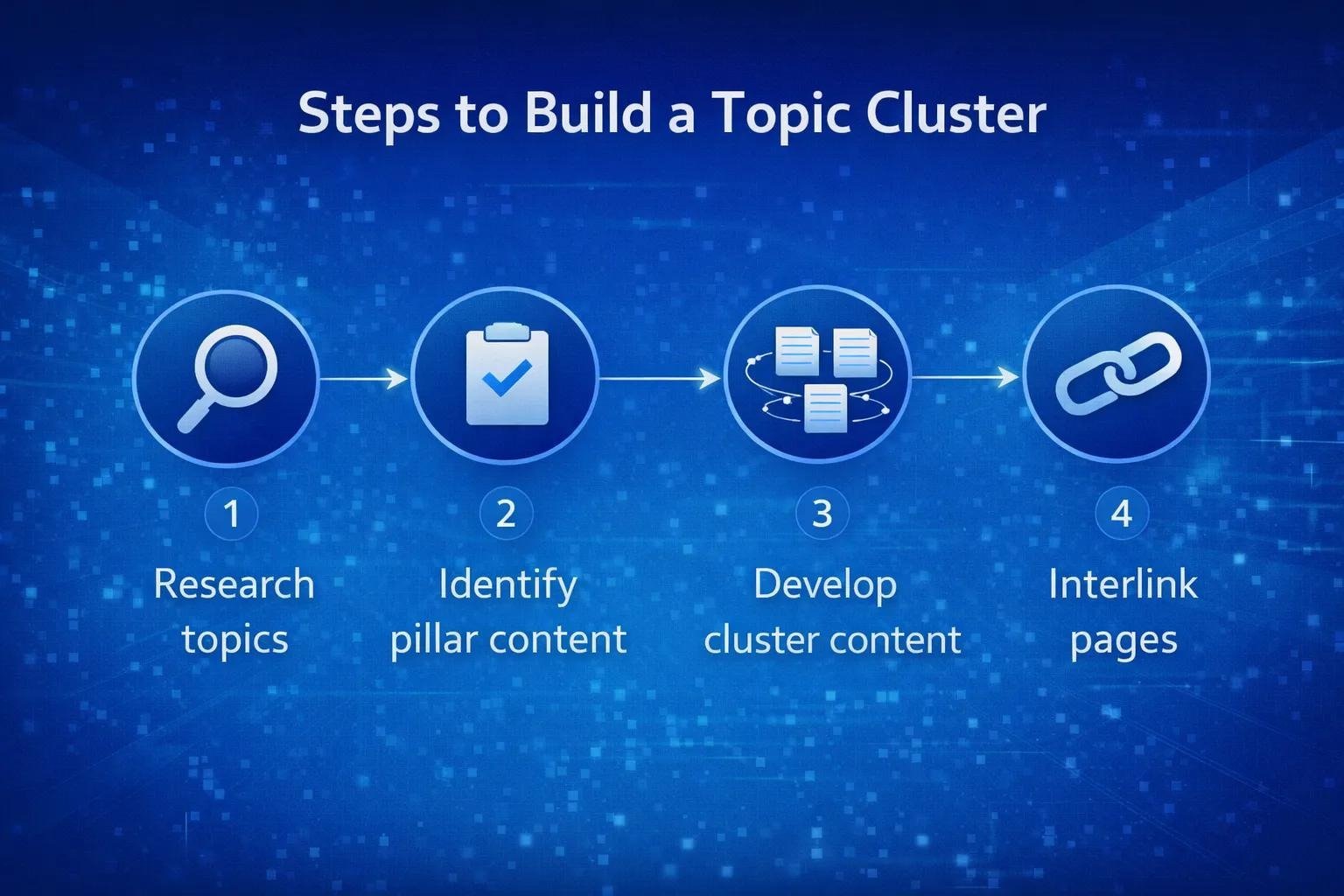
What Are SEO Silos?
SEO silos (also called content silos or topical silos for SEO) are groups of related web pages or blog posts that all focus on one specific subtopic. Each group is connected through internal links, with one main page acting as the central guide for that topic.
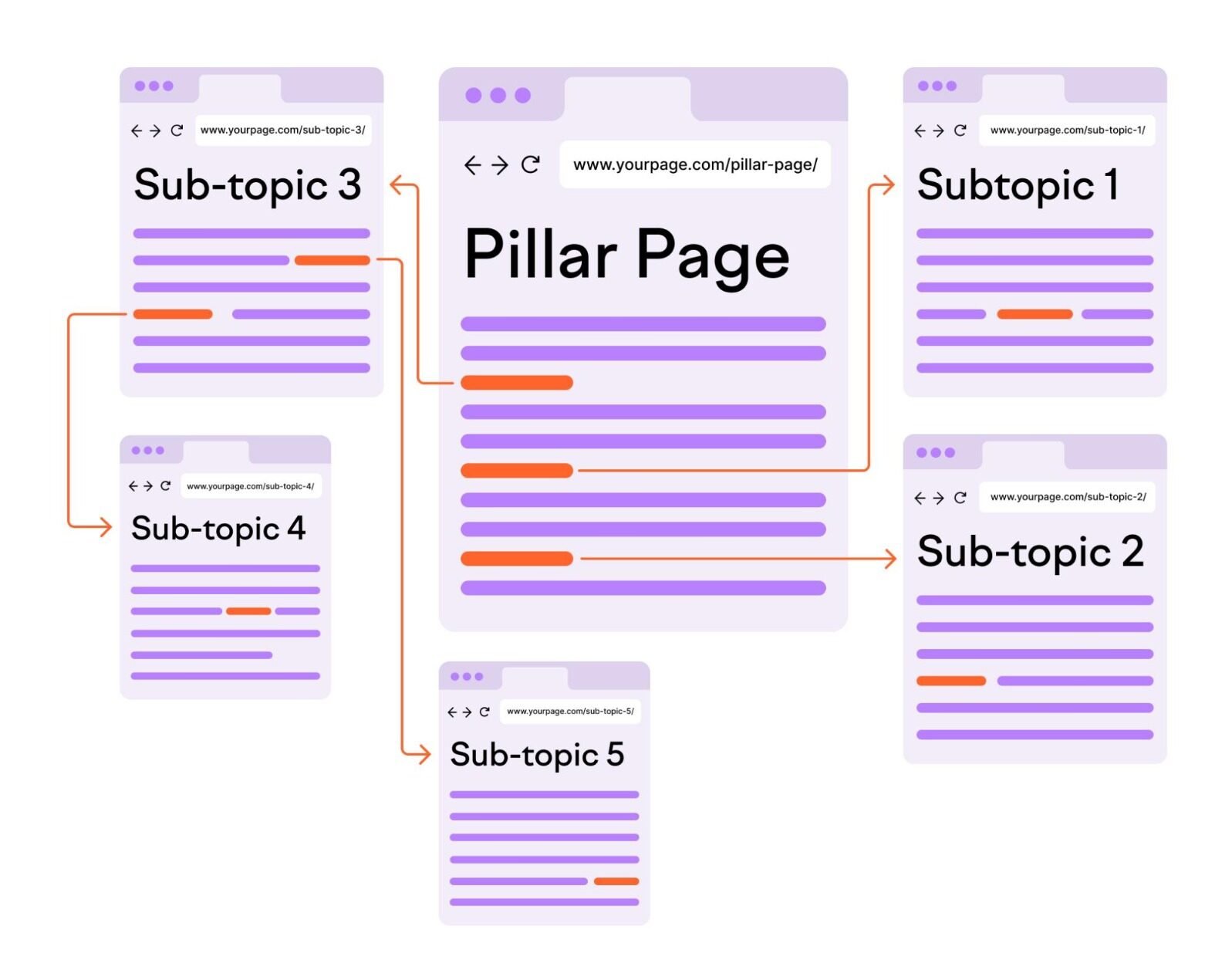
In short: instead of publishing posts randomly, you build focused groups of content that naturally support each other.
Think of a library. Books aren’t placed on shelves at random. They’re grouped by category. If someone walks to the “SEO” section, they expect to find books about on-page SEO, internal linking, or technical SEO — not gardening or fitness.
A website using SEO silos works the same way. Each “shelf” focuses on one clear subtopic, making it easier for visitors to find what they need next.
The direct purpose is this: show topical relevance. By covering one subtopic in depth and linking those pages together, you give clear context about the relationship between your content.
It’s important to be realistic here: SEO silos are an industry practice, not a confirmed direct ranking factor. Their value comes from clearer site structure, stronger topical context, better internal linking, and easier navigation for real people.
Why SEO Silos Matter for Organic Visibility
Most growing websites don’t have a traffic problem because they publish too little. They have a structure problem because their content covers many ideas with no clear organisation.
When pages have no clear relationship to one another, search engines have to work harder to figure out which topics your site truly covers. At the same time, readers have no obvious path to learn more.
Here’s why a solid SEO silo structure actually helps:
- Clearer topical focus – Helps show what subtopics your website covers in detail.
- Stronger context through internal links – Links between related pages give each page useful context.
- Better user experience – Readers can move from a basic post to a more specific one without leaving the topic.
- Less chance of keyword cannibalisation – When each page has a distinct role, multiple pages are less likely to compete for very similar queries.
- Easier crawling – A logical structure helps search engines discover and understand your important pages.
- Builds depth over time – Covering one subtopic fully looks far more helpful than covering ten subtopics with only one post each.
The biggest benefit isn’t complexity. It’s clarity.
Who Should Use SEO Silos?
SEO silos are most useful for websites that plan to grow their content library over time.
They’re particularly practical for:
- Bloggers who publish regularly and want their older and newer posts to work together
- Website owners looking to improve their site’s overall structure
- Small businesses with a blog that supports their main service
- WordPress website owners who already use categories and blog posts
- Content creators building long-term organic visibility
- Beginner and intermediate SEO users who want a practical structure to follow from the start
If your site only has 5–10 pages total, silos aren’t urgent. If you have 15, 30, or more posts with growing topics, they’re worth applying.
Physical SEO Silos vs Virtual SEO Silos
Before building anything, you need to know the two ways to create SEO silos. You don’t have to pick just one. For most websites, using virtual silos with a logical URL structure works best.
1. Physical SEO Silos
Physical SEO silos use your URL structure to group content. Posts or pages for one topic sit inside the same folder or category path.
Example:
yourdomain.com/internal-linking/contextual-internal-links/
yourdomain.com/internal-linking/how-to-fix-orphan-pages/
Here, the /internal-linking/ folder clearly shows all pages belong to the same silo.
Best for: New websites planning structure from day one.
Main limitation: If your site already has many published posts, changing URLs can create unnecessary work and redirect needs.
2. Virtual SEO Silos
Virtual SEO silos rely mainly on contextual internal linking. The URLs don’t need to follow a strict folder structure. What matters is that you only link supporting pages to other pages within the same theme and back to their pillar page.
Example:
- Pillar page:
yourdomain.com/internal-linking-for-seo/ - Supporting post: links naturally to that pillar page and to two other posts about internal linking
- None of those posts link heavily to unrelated topics
Best for: Existing blogs, WordPress websites, and small business sites with published content.
Main advantage: You can create silos without changing a single existing URL.
Quick Comparison
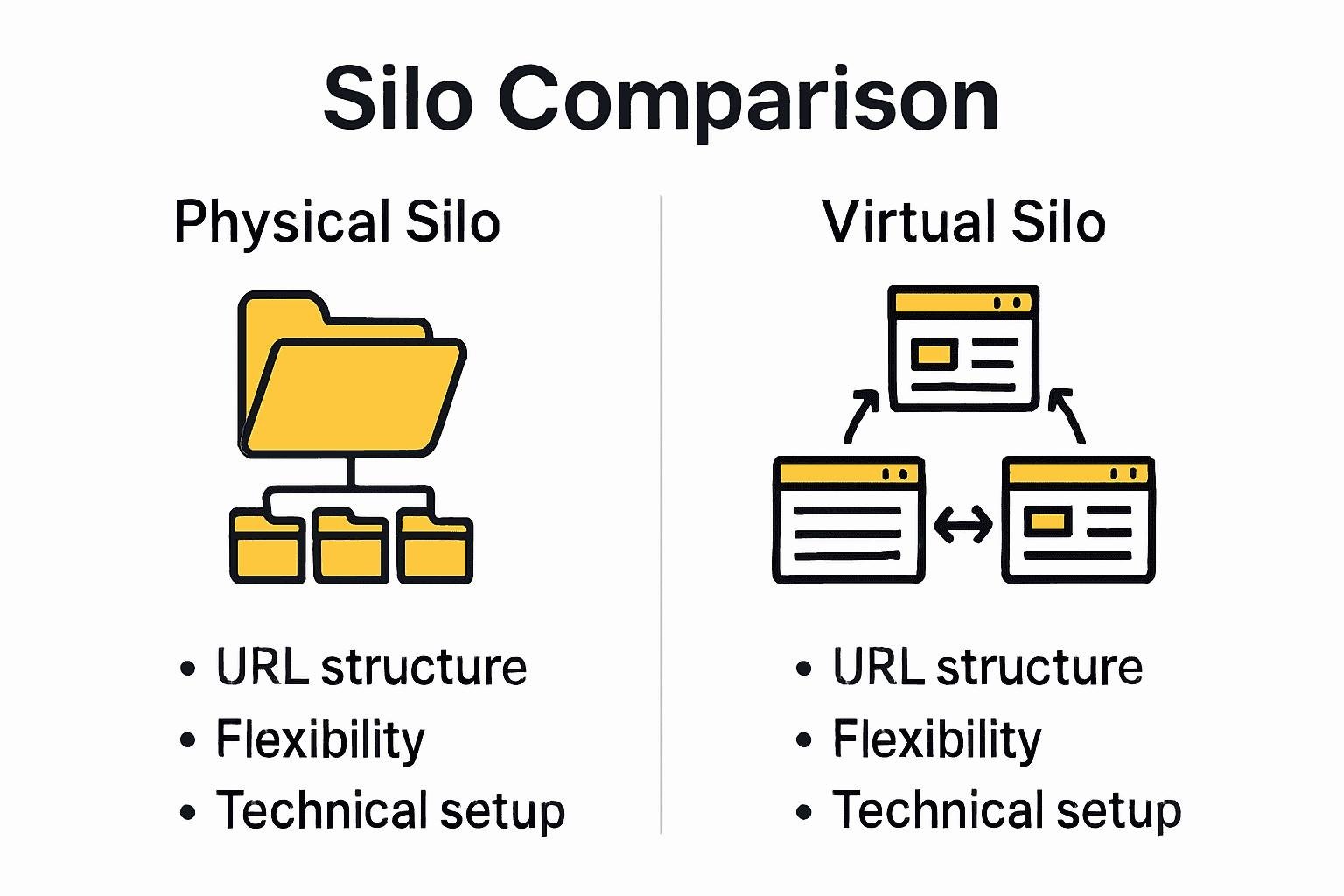
| Feature | Physical SEO Silos | Virtual SEO Silos |
|---|---|---|
| Based on | URL/folder structure | Contextual internal links |
| Works on existing sites | Less practical | Very practical |
| Easy to adjust later | Harder | Easier |
| Focus on user experience | Yes | Yes |
| Effective for SEO structure | Yes | Yes |
| Recommended for beginners | Moderate | Highly recommended |
SEO Silos vs Topic Clusters: What’s the Difference?
These two terms often appear together, and they overlap. But they don’t mean exactly the same thing.
SEO silos focus on organising your entire website into themed groups to keep unrelated topics separate.
Topic clusters focus on covering one topic completely around real search intent using a pillar page and cluster pages.
A simple way to see it: Topic clusters are the method. SEO silos are the wider structure.
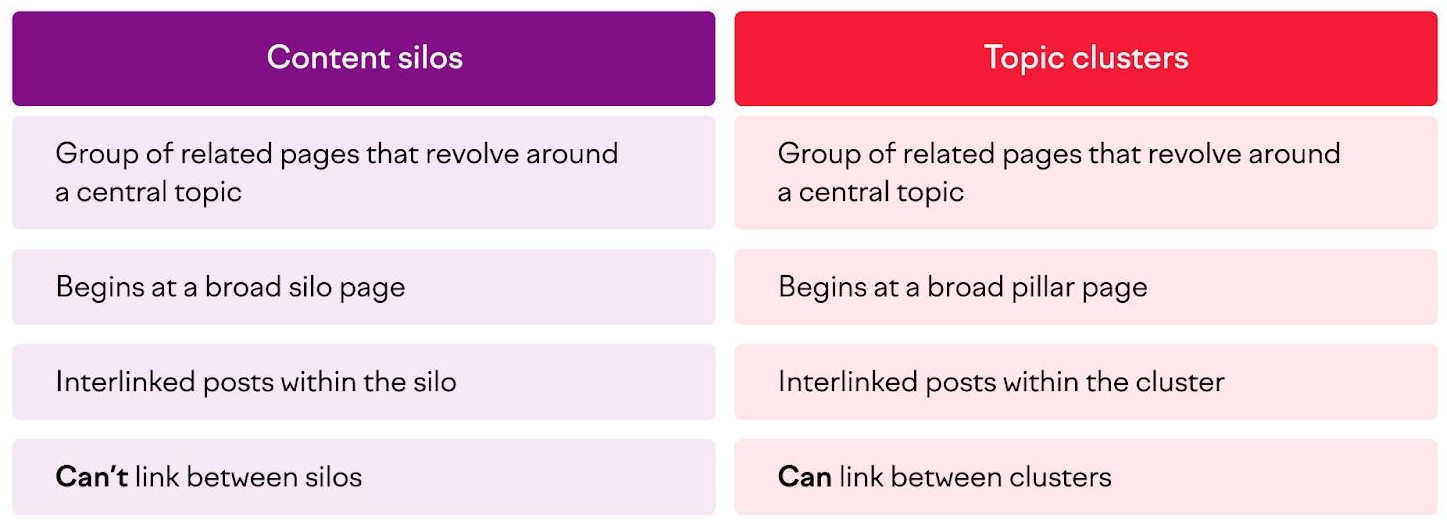
When done correctly, a topical silo uses the topic cluster model inside it.
| Comparison Point | SEO Silos | Topic Clusters |
|---|---|---|
| Goal | Create clear separation between topics on a site | Cover one topic fully for a specific audience |
| Focus | Site-wide content organisation | One subtopic at a time |
| Main structure | Multiple silos across the website | One pillar + related cluster pages |
| Linking approach | Keep most links within the same silo | Intentional links between pillar and cluster pages |
| Best use | Planning long-term site architecture | Planning content around a single topic |
Pragmatic takeaway: Don’t choose one over the other. Use topic clusters to build each SEO silo.
How to Create SEO Silos: A Step-by-Step Guide
The key here is to build gradually. You don’t need to restructure your whole website in a day. You only need to do this correctly for one silo to see the logic clearly.
Follow these steps in order.
Step 1: Define Your Core Topic
Start with one question: What should this website be known for?
Your answer should be specific enough to guide content decisions, but broad enough to cover helpful subtopics.
Ask yourself:
- Who am I writing for?
- What problem do I consistently help solve?
- What topic do I want this site to cover consistently?
Realistic example: Instead of “SEO”, use “Practical SEO for bloggers and small website owners”.
Step 2: Find 3–5 Strong Subtopics for Your Silos
Break your core topic into 3–5 subtopics. Each one will become a separate SEO silo.
Only pick subtopics that can realistically have at least 5–8 helpful pages or posts over time.
Look for subtopics based on tasks, not just keywords. Focus on things your reader needs to do or understand.
Example for “Practical SEO for Bloggers”:
- On-Page SEO
- Internal Linking
- Content Structure for SEO
- Keyword Research for Beginners
- Technical SEO Basics
Each of these stands on its own, yet all support the same core topic.
Step 3: Create a Pillar Page for Each Silo
For each silo you plan to build first, create (or update) a pillar page.
A pillar page is an overview guide. It explains the subtopic clearly and points readers to more detailed pages that answer specific questions.
A good pillar page should:
- Explain what the subtopic is and why it matters
- Cover the main ideas without going too deep into every small detail
- Link to your supporting posts using natural anchor text
- Help a complete beginner know where to start
Example: For the Internal Linking silo, use: “Internal Linking for SEO: A Practical Guide for Bloggers”.
Keep it helpful for readers first. Don’t write it only to link out.
Step 4: Find or Create Supporting Content
Next, list the specific questions people ask about that subtopic. Each answer deserves its own focused page or blog post.
The goal isn’t to write longer posts. It’s to write more focused ones.
Think of real, practical questions:
- What is contextual internal linking?
- How do I add internal links in WordPress?
- What’s the difference between internal and external links?
- How do I fix orphan pages on my blog?
- How many internal links should a blog post have?
Each of these has a different intent. Each deserves its own page.
Tip: Focus on questions you know a beginner would actually type into search, not complex technical terms alone.
Step 5: Build Intentional Internal Links
This step turns a group of posts into an actual content silo. Publishing related posts isn’t enough. You need to connect them deliberately.
Use this simple linking rule for every silo:
- Pillar → Supporting – From your pillar page, link to every relevant supporting post.
- Supporting → Pillar – From each supporting post, link back to the pillar page at least once using natural anchor text.
- Supporting → Supporting – Link between supporting posts only when one naturally helps explain the next step.
- Stay inside the silo – Avoid linking to unrelated silos unless it genuinely solves an immediate problem for the reader.
Use descriptive anchor text. Write what the page is about, not generic phrases.
Good: “how to add internal links in WordPress”
Weak: “read more”
Also, link contextually. Add links inside sentences where they naturally fit, not only in a “related posts” list.
Step 6: Start With Just One Silo
Don’t build five silos at the same time. Pick one subtopic with the most existing content, or the one most helpful for your website’s goal.
Here’s a realistic action plan:
- Choose 1 silo
- Update or write your pillar page
- Gather 5–8 existing posts that belong to it
- Write 2–4 missing posts to cover obvious gaps
- Add all internal links using the rule above
- Review the group and read it as a new visitor would
- Only move to the next silo once this one feels complete and logical
This is far more effective than partially building multiple silos at once.
A Practical Example of an SEO Silo in Action
Let’s use a realistic example for a blog called MaryamSEO.blog.
Core Topic: Practical SEO for Bloggers and Small Website Owners
Chosen Silo: Internal Linking for SEO
Structure:
- Pillar Page: Internal Linking for SEO: A Practical Guide for Bloggers
- Supporting Posts:
- What Are Contextual Internal Links? (With Simple Examples)
- Internal Links vs External Links: Key Differences Explained
- How to Add Internal Links in WordPress (Step by Step)
- How to Fix Orphan Pages on a Blog
- Internal Linking for New Blog Posts: What to Do First
- Anchor Text for Internal Links: Best Practices That Keep It Natural
How they connect:
- The pillar links to all six supporting posts.
- Each supporting post links back to the pillar page.
- Posts like “Internal Linking for New Blog Posts” naturally link to “Anchor Text for Internal Links” because one step leads to the next.
A new reader landing on any of these posts can quickly reach the full guide or find the exact next step. A search engine also sees a tightly connected group of pages around one clear subtopic.
Common SEO Silo Mistakes and How to Avoid Them
Even a good idea loses value if applied incorrectly. Avoid these mistakes when building your content silos for SEO.
| Mistake | Why It Hurts | How to Fix It |
|---|---|---|
| Mixing unrelated posts | Weakens topical focus | Only group posts that answer questions about the same subtopic |
| Creating silos with only 1–2 posts | Too thin to show depth | Aim for at least 5–8 solid, helpful pages per silo |
| Linking across silos everywhere | Blurs topic boundaries | Keep links inside the silo by default |
| Using exact-match anchor text repeatedly | Looks forced and unnatural | Vary with natural, descriptive phrases |
| Ignoring orphan pages | Pages with no internal links lack context | Add each orphan page to the correct silo with relevant links |
| Treating categories alone as silos | A category page with no internal linking strategy isn’t a silo | Connect category/pillar pages to supporting content through contextual links |
| Forcing old posts into the wrong group | Creates weak or misleading connections | Only link if the connection genuinely helps the reader |
| Building all silos at once | Leads to rushed, incomplete work | Build one complete silo first, then expand |
SEO Silos for WordPress, Blogs and Small Business Websites
You don’t need advanced technical knowledge to use SEO silos. The approach works well on most content-based websites.
For WordPress Website Owners
WordPress makes this easier than most platforms.
- Categories – Use them to reflect your main silos
- Pages – Best for your pillar pages (stable, guide-style content)
- Posts – Best for supporting, question-focused content
- Block Editor/Classic Editor – Use contextual links directly inside your content
Focus more on in-content links than relying only on category archives.
For Bloggers
If you already have published posts, you don’t need to delete or rewrite everything. Do a simple content audit: group your existing posts by subtopic in a spreadsheet. You’ll quickly see which silo is strongest — and which has the biggest gaps.
Start with that existing group. Strengthen it with links first.
For Small Business Websites
Small business sites often mix service pages and blog posts. SEO silos help connect them with purpose.
Practical example: A website offering website SEO services could build silos around “Local SEO for Small Businesses”, “On-Page SEO for Service Websites” or “SEO for WordPress Business Sites”. Blog posts inside each silo support the topic and guide readers towards helpful information about that area.
The goal isn’t to write for every topic. It’s to build depth around the topics your ideal reader actually searches for.
How to Maintain Your SEO Silo Structure Over Time
Building SEO silos is not a one-time task. A little maintenance keeps your structure logical as your website grows.
Keep these simple habits in mind:
- Review new posts before publishing – Ask: Which silo does this belong to? If it doesn’t clearly belong to any existing silo, think twice before publishing it.
- Link new posts on day one – When you publish a supporting post, link to it from its pillar page and from any relevant existing post inside the same silo.
- Fix orphan pages regularly – Check for posts with little or no internal links and place them in the right silo.
- Update pillar pages – As you add new supporting posts, add them to your pillar page so it stays useful and complete.
- Keep silos focused – If a silo keeps growing in two very different directions, it may be two silos, not one.
- Prioritise helpfulness – Only add pages that answer a real question or explain a missing step for that topic.
Limitations of SEO Silos You Should Know
Being practical means knowing the limits. SEO silos won’t fix every SEO issue.
- They don’t replace helpful content – A well-structured weak post still needs to be genuinely useful.
- Results take time – Structure improves clarity, but changes won’t show overnight.
- Not ideal for very mixed websites – If your site covers completely unrelated topics with no shared audience, silos become hard to keep logical.
- Technical issues still matter – Crawlability, page speed, indexing and core usability still play their part.
- No guaranteed outcome – As with any site structure approach, visibility depends on many factors beyond structure alone.
Acknowledging these limits is far more accurate than making exaggerated claims.
Practical Takeaway
Don’t organise your website by publish date. Organise it by topic.
The simplest way to use SEO silos is this: pick one subtopic, create one pillar page, publish or connect 5–8 focused supporting posts, and link them all together with intent.
Do that once. Make it genuinely helpful for a beginner. Then repeat for your next silo.
That’s more practical — and more sustainable — than rebuilding your entire website at once.
9. FAQs
1. What are SEO silos in simple terms?
SEO silos are groups of related blog posts or pages on your website. Each group focuses on one subtopic and links together, with a main pillar page guiding the group. This helps readers and search engines understand how your content connects.
2. How do SEO silos help with SEO?
They create clearer topical context, improve internal linking, help with site structure, make navigation easier for users, and reduce the chance of similar pages competing with each other. Their main benefit is clarity, not guaranteed rankings.
3. What’s the difference between physical SEO silos and virtual SEO silos?
Physical SEO silos use your URL structure (folders/categories) to group content. Virtual SEO silos use contextual internal links to group content without changing URLs. For most existing blogs, virtual SEO silos are the most practical option.
4. How many pages should be in one SEO silo?
Aim for 5–8 focused, helpful pages minimum. A stronger silo usually has 8–12 pages that together cover the main questions around that subtopic. Quality and relevance matter more than reaching a high number.
5. Are SEO silos the same as topic clusters?
No. SEO silos focus on organising your website into themed groups. Topic clusters focus on covering one topic fully using a pillar page and cluster pages. In practice, each SEO silo is best built using the topic cluster method.
6. How do I create SEO silos on a WordPress blog?
Start by choosing one subtopic. Create a pillar page, use relevant blog posts as supporting content, and link them together contextually. Use WordPress Categories to reflect your silos, and focus mainly on in-content internal links between related posts and pages.