
Publishing a recipe on WordPress is easy. Getting Google to understand that page as a recipe and show it in the right search features takes a little more work.
If you run a food blog, recipe website, or simply publish cooking content on WordPress, there are 3 areas worth getting right:
- Create a useful, well-structured recipe page.
- Add Recipe structured data through WordPress.
- Test the page and monitor it in Google Search Console.
Google supports Recipe structured data for recipe pages and can use information such as the recipe name, image, cooking time, ingredients, instructions, ratings, and nutrition to better understand the content. Eligible recipes can appear with enhanced results in Google Search and Google Images.
Here’s Simple 3-Step WordPress Recipe SEO
Table of Contents
Step 1: Create a search-friendly recipe page
Your first priority should be the recipe itself.
A recipe page needs to help someone understand the dish and prepare it successfully. SEO comes after that.
Start by choosing a clear topic for the recipe.
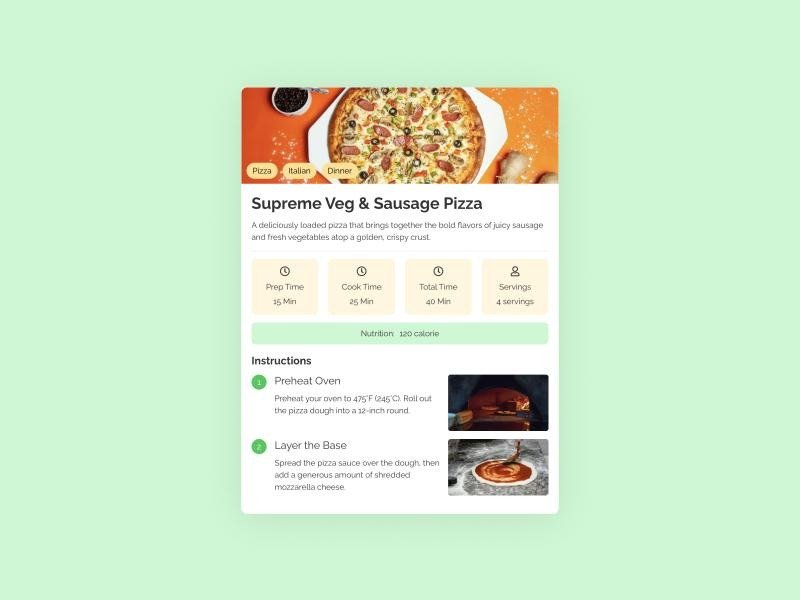
For example, suppose you’re publishing a chicken pasta recipe.
Instead of creating a vague title such as:
Chicken Pasta
You could use:
Easy Chicken Pasta Recipe in 30 Minutes
This gives readers more information and creates a clearer connection between the page and searches for a quick chicken pasta recipe.
Choose one main search topic
Before writing the recipe, decide what someone would type into Google to find it.
For example:
Primary keyword: easy chicken pasta recipe
Related searches might include:
- quick chicken pasta
- creamy chicken pasta
- chicken pasta for dinner
- 30-minute chicken pasta
- easy pasta recipe with chicken
You don’t need to use every variation in your article.
Use the main topic naturally in the title, introduction, URL, headings where appropriate, and relevant sections.
Keep the URL simple
A recipe URL should tell users and search engines what the page contains.
For example:
example.com/easy-chicken-pasta-recipe/
Avoid unnecessarily long URLs such as:
example.com/2026/10/04/our-best-family-friendly-easy-creamy-chicken-pasta-recipe-for-busy-weeknights/
A short, descriptive URL is easier to read and share.
Put useful recipe information near the top
Readers shouldn’t have to search through several paragraphs before finding basic information about the dish.
A useful recipe introduction can quickly explain:
- What the dish is
- How long it takes
- How many people it serves
- What makes the recipe useful or different
For example:
This easy chicken pasta recipe combines tender chicken, creamy sauce, and pasta for a simple weeknight dinner. It takes about 30 minutes from start to finish.
You can then provide the full recipe card below.
Make ingredients easy to scan
Don’t bury ingredients inside long paragraphs.
Use a proper list:
Ingredients
- 300g chicken breast
- 250g pasta
- 2 cloves garlic
- 1 cup cream
- ½ cup Parmesan cheese
- 1 tablespoon olive oil
- Salt and black pepper
This is easier for readers to use while cooking and gives the page a clear structure.
Write clear cooking instructions
Your instructions should tell the reader exactly what to do.
For example:
- Cook the pasta according to the package instructions.
- Cut the chicken into bite-sized pieces and season with salt and pepper.
- Heat the oil and cook the chicken until fully cooked.
- Add garlic and cook briefly.
- Stir in the cream and Parmesan.
- Add the cooked pasta and mix well.
- Serve immediately.
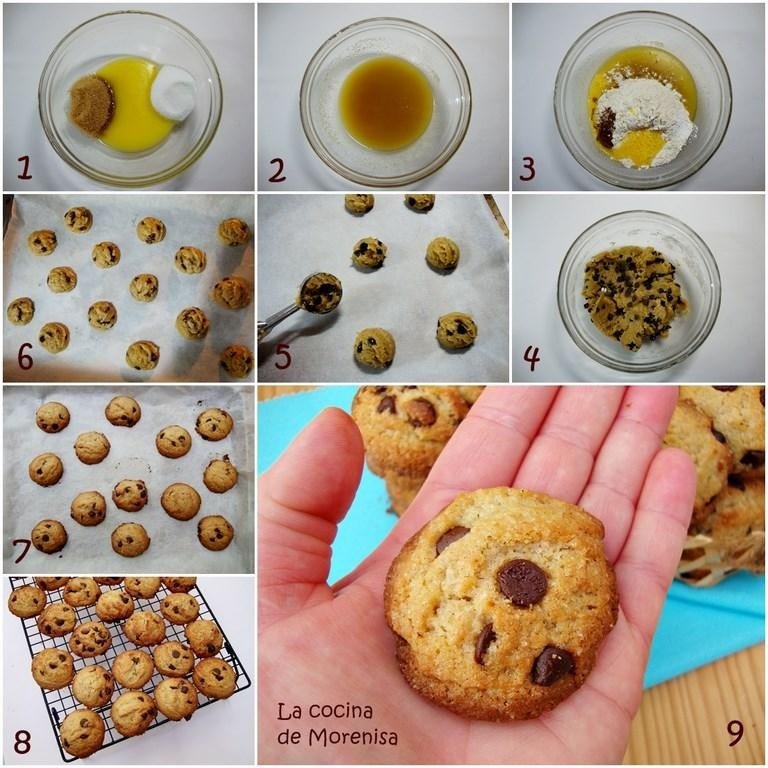
If a step requires special attention, explain it.
For example, instead of simply saying “cook the chicken,” tell the reader what result to look for.
This makes the recipe more useful and reduces confusion.
Step 2: Add Recipe structured data in WordPress
Recipe structured data helps Google understand that your page contains a recipe.
Google’s Recipe documentation supports properties such as:
- Recipe name
- Image
- Author
- Description
- Preparation time
- Cooking time
- Total time
- Ingredients
- Instructions
- Servings
- Recipe category
- Recipe cuisine
- Nutrition information
- Video
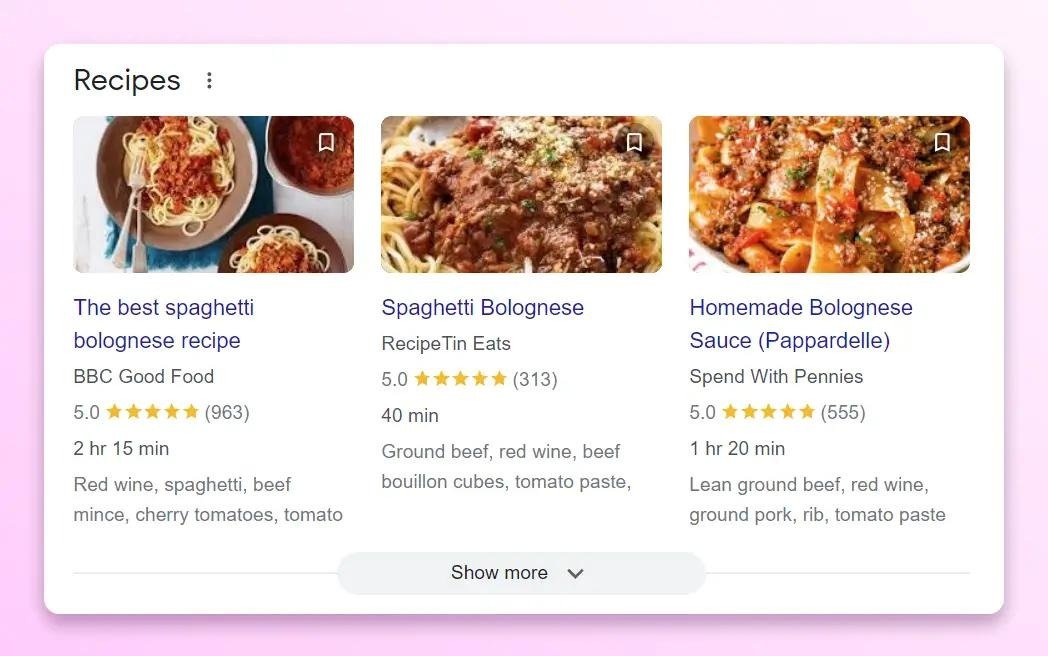
Some properties are required for eligibility, while others are recommended.
You don’t have to manually write JSON-LD code if you’re using WordPress.
A recipe plugin can handle much of the technical work.
Use a WordPress recipe plugin
One established option is WP Recipe Maker.
Its current WordPress.org listing shows more than 50,000 active installations. It provides automatic JSON-LD metadata for recipes and supports integrations with popular WordPress SEO plugins such as Yoast SEO and Rank Math.
You can also find other recipe plugins in the official WordPress plugin directory, including Recipe Card Blocks, Cooked, WP Delicious, and Tasty Recipes Lite.
The exact plugin you choose matters less than making sure it produces valid Recipe structured data and fits your publishing workflow.
How to add a recipe card
In WordPress, the process will depend on the plugin, but the general workflow is:
WordPress Dashboard → Plugins → Add New Plugin
Search for your chosen recipe plugin, install it, and activate it.
Then open the post where you want to add the recipe.
Add the plugin’s recipe block or recipe card and fill in the available fields.
For example:
Recipe name: Easy Chicken Pasta
Prep time: 10 minutes
Cook time: 20 minutes
Total time: 30 minutes
Servings: 4
Category: Dinner
Cuisine: Italian-inspired
Then add the ingredients and cooking instructions.
The plugin can use this information to generate structured data for the page.
Keep your structured data accurate
This part matters.
If the recipe says it serves 4 people, don’t mark it up as serving 8.
If the recipe takes 30 minutes, don’t enter 10 minutes simply because a shorter time looks better.
The information in your structured data should accurately represent the visible recipe.
Google also requires recipe images to represent the completed dish and recommends high-resolution images in multiple aspect ratios for the best results.
Don’t add fake ratings
Some recipe pages display star ratings.
If you use ratings or reviews, they should represent genuine review information.
Don’t add a 5-star rating to your structured data just to try to make the search result look better.
Google’s structured-data guidelines apply to Recipe markup, and violations can prevent the page from being eligible for rich results.
The same principle applies to nutrition information.
Only add nutritional values when you have reliable information for the recipe.
Step 3: Test your recipe and monitor Google Search
Adding the recipe card is not the final step.
You should check whether Google can actually read the structured data.
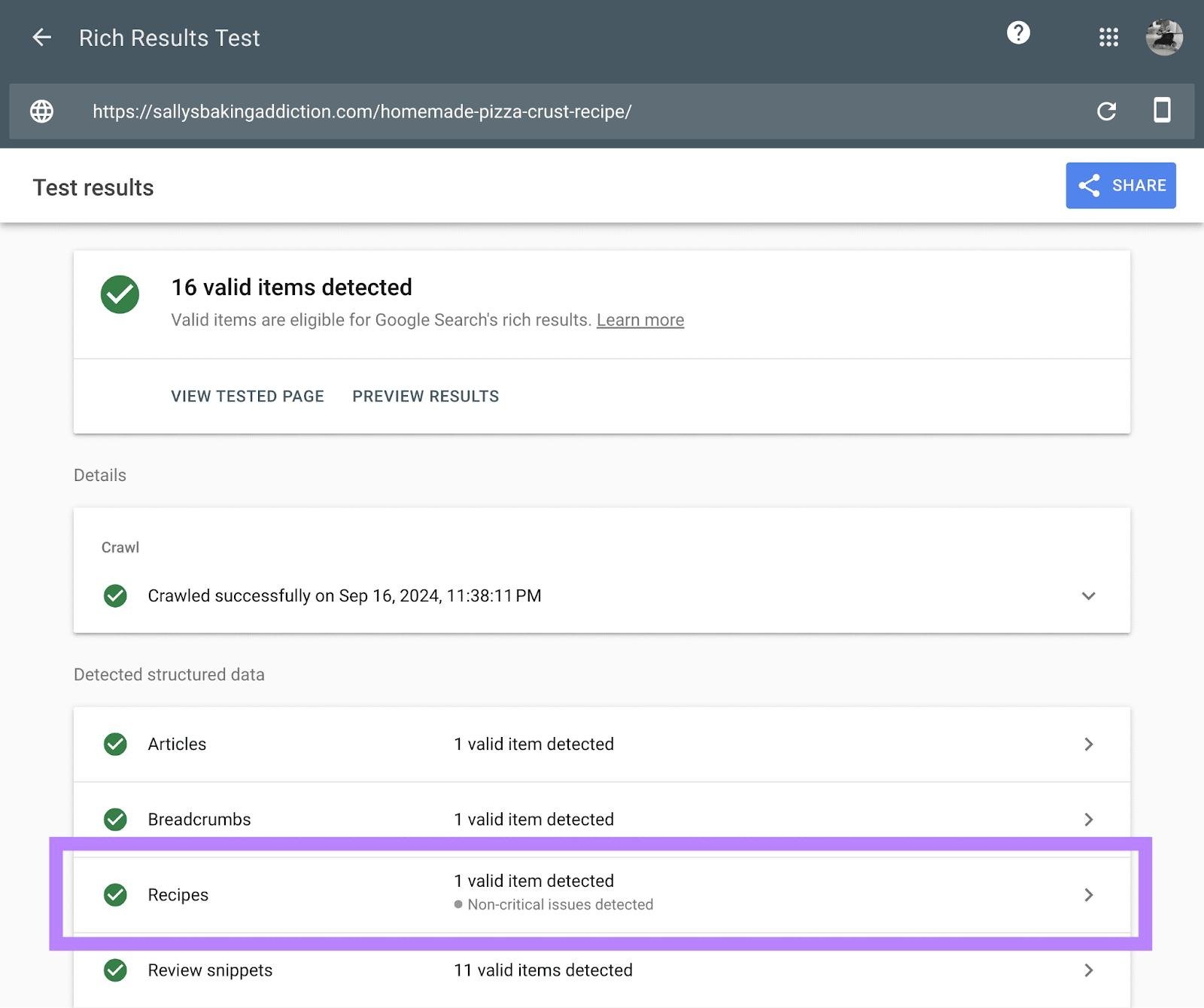
Google recommends testing structured data with the Rich Results Test and using URL Inspection to check how Google sees the page.
Test the recipe with Rich Results Test
Open Google’s Rich Results Test and enter the URL of your published recipe.
The tool can show whether Google detects supported structured data and whether there are errors.
Pay attention to:
- Missing required properties
- Invalid structured data
- Recipe information
- Images
- Instructions
- Other warnings
Fix errors before moving on.
Warnings don’t always prevent eligibility, but they can point to information that could make your structured data more complete.
Check the page in Search Console
After Google has crawled your page, open Google Search Console.
Go to the relevant rich result report under Enhancements.
Google Search Console provides a specific report for Recipes when Google detects supported Recipe structured data on your property. The report can show valid and invalid items and help you identify structured-data problems.
This gives you a practical way to monitor recipe pages after publication.
For example, if you publish 50 recipes and suddenly see a large increase in invalid Recipe items, check whether you recently:
- Changed your recipe plugin
- Changed your WordPress theme
- Updated a recipe template
- Modified recipe fields
- Changed your structured-data settings
A site-wide problem can affect many recipes at once.
Request indexing when appropriate
If you’ve published a new recipe or made a significant change, you can use URL Inspection in Search Console to check the page.
Google explains that crawling and re-indexing can take time. A valid structured-data implementation doesn’t mean the enhanced search appearance will appear immediately.
And even valid structured data doesn’t guarantee that Google will show a rich result.
Google decides when supported search features appear.
Optimize your recipe images
Recipe websites depend heavily on images.
A reader often decides whether a dish looks appealing before reading the full recipe.
Use a clear photograph of the finished dish as your primary image.
For example, if the recipe is chicken pasta, show the actual finished pasta rather than a generic photograph of chicken or ingredients.
Use descriptive image filenames
Instead of:
IMG_7821.jpg
Use something like:
easy-chicken-pasta-recipe.jpg
The filename gives additional context about the image.
Write useful alt text
Alt text should describe what the image shows.
For example:
Good alt text:
Creamy chicken pasta served in a bowl
Avoid:
easy chicken pasta recipe chicken pasta creamy chicken pasta best chicken pasta
That’s keyword stuffing and doesn’t help someone using a screen reader understand the image.
Google recommends descriptive filenames and alt text and advises against excessive keyword use in image attributes.
Use images where they help
You don’t need a photograph after every instruction.
A practical recipe page might use:
Featured image: Finished dish.
Ingredient image: Main ingredients, if useful.
Process image: A difficult cooking step.
Final image: Finished dish from another angle.
The goal is to help the reader cook the recipe, not fill the page with similar photographs.
Make your recipe page easy to use
Search visibility matters, but usability matters too.
Someone visiting a recipe page may be hungry and ready to start cooking. Make the information easy to find.
Add a Jump to Recipe link
If your recipe article contains a long introduction, cooking tips, substitutions, and other information, a Jump to Recipe button can help visitors get to the recipe quickly.
This is particularly useful for longer recipe posts.
The reader can decide whether they want the background information or simply the ingredients and instructions.
Include useful cooking tips
A good recipe page can answer small questions before the reader has to ask them.
For example:
Can I use chicken thighs instead of chicken breast?
Yes, if they are cooked properly. The cooking time may vary depending on the size of the pieces.
Can I prepare the sauce ahead of time?
Explain whether the sauce can be refrigerated and how it should be reheated.
These details can make the recipe more useful than a basic ingredients-and-instructions page.
Add storage information
If the recipe produces leftovers, explain:
- How to store them
- How long they should be refrigerated, when you can confidently provide that information
- Whether freezing is suitable
- How to reheat the dish
Only provide food-safety information when you can support it with reliable guidance.
Organize recipes into useful categories
As your food blog grows, your recipe library can become difficult to navigate.
Create meaningful categories such as:
- Breakfast
- Lunch
- Dinner
- Desserts
- Chicken recipes
- Pasta recipes
- Vegetarian recipes
- Quick meals
Categories should help readers find related recipes.
They can also provide useful collection pages for search engines to discover your content.
For sites that publish recipe collections, Google supports ItemList structured data for recipe host carousel eligibility. Google says the site needs a summary page listing the recipes in the collection, with each item linking to its individual recipe page.
For example, you could create:
10 Easy Chicken Recipes
and link to individual chicken recipe pages.
Keep these collection pages useful for readers rather than creating thin pages simply to add more URLs.
Common recipe SEO mistakes to avoid
A few problems can reduce the quality of your recipe pages.
Using a generic recipe title
A title like “My Favorite Recipe” tells Google and readers very little.
Use a clear name that describes the dish.
Adding schema without improving the recipe
Structured data doesn’t make poor content useful.
Make sure the recipe itself has clear ingredients, instructions, images, and relevant information.
Marking up information that isn’t visible
Your structured data should accurately represent the page.
Don’t add information to the markup that readers can’t find on the recipe page.
Adding fake reviews
Don’t create ratings or reviews to make a recipe look more popular.
Use genuine review information where appropriate.
Stuffing keywords into alt text
Describe the image naturally.
Alt text should serve accessibility first.
Publishing nearly identical recipes
If you have several pages targeting almost the same recipe with minimal differences, consider whether each page provides a genuinely distinct reason to exist.
A useful recipe library needs clear differences between pages.
A simple 3-step recipe SEO checklist
Before publishing your next WordPress recipe, check these items:
| Task | What to check |
|---|---|
| 1. Recipe content | Clear title, ingredients, instructions, times, servings |
| 2. Structured data | Recipe schema added through a reliable implementation |
| 3. Validation | Rich Results Test shows no critical errors |
| Images | Finished dish is clearly photographed |
| Alt text | Image descriptions are natural and useful |
| URL | Short and descriptive |
| Search Console | Recipe results monitored after Google crawls the page |
| Categories | Recipe is placed in a relevant collection |
You can use this checklist every time you publish a new recipe.
What should you do with existing recipes?
You don’t have to rebuild your entire recipe website in one day.
Start with your most important pages.
Choose recipes that:
- Already receive organic traffic
- Target useful search queries
- Have good images
- Are worth improving
- Have incomplete or missing recipe structured data
Then work through them one by one.
For each page, improve the recipe content, add or check the recipe card, verify the structured data, and monitor the page in Search Console.
This gives you a manageable workflow instead of trying to change hundreds of pages at once.
FAQs
How do I make my WordPress recipes more visible on Google?
Start with useful recipe content, clear titles and URLs, high-quality images, Recipe structured data, and proper validation. Then monitor your pages in Google Search Console. Structured data can make eligible recipes available for supported search enhancements, but it doesn’t guarantee a particular ranking or rich result.
What is Recipe schema in WordPress?
Recipe schema is structured data that describes a recipe to search engines. It can include information such as the recipe name, image, ingredients, instructions, preparation time, cooking time, servings, and nutrition.
Do I need a recipe plugin for WordPress?
No. You can implement Recipe structured data manually, but a dedicated recipe plugin can make the process easier for beginners. Several recipe plugins are available through the official WordPress plugin directory.
Does recipe schema guarantee higher Google rankings?
No. Recipe structured data helps Google understand your content and can make eligible pages available for supported search features. Google doesn’t guarantee that structured data will result in a rich result or higher rankings.
How long does Google take to show recipe rich results?
There isn’t a fixed waiting period. Google needs to crawl and process the page, and the enhanced search appearance isn’t guaranteed even when the structured data is valid. Google recommends allowing time for crawling and re-indexing after publishing or making changes.
Can recipe images help with Google visibility?
Yes. Recipe images are part of the Recipe structured-data requirements, and Google can show recipes in Google Images. Use images that actually represent the completed dish and make sure they are accessible to Google.
Final takeaway
Improving recipe visibility on WordPress doesn’t require a complicated SEO setup.
Start with the recipe itself. Make the title clear, give readers complete ingredients and instructions, use strong images, and organize the page so it’s easy to follow.
Then add Recipe structured data through a suitable WordPress recipe plugin and test it with Google’s Rich Results Test.
Finally, use Search Console to monitor your recipe pages and fix structured-data problems when they appear.
If you have an existing recipe library, start with your most important recipes and work through them systematically. That’s a much better starting point than trying to change every page at once.