
Why a WordPress Recipe Block Is Must for Food Bloggers
If you are a food blogger, a WordPress recipe block is must have for you as it will convert your recipe text into a readable and SEO-friendly card that Google can comprehend and display as a rich result. If you don’t, your recipes will be a regular blog post. One provides star ratings, cook times, pictures and enhanced click-through costs in search.
It solves three problems all in one: it informs Google what the content is about, makes it easy for your readers to follow and print your recipes, and saves you time. In this guide, you will learn how a recipe block works, its importance for 2026 rankings and reader experience, which plugins work best, and how to choose the right plugin for your blog.
What Is WordPress Recipe Block (and How Does It Differ from Regular Content)?
A WordPress recipe block is a special Gutenberg block, otherwise known as a WordPress recipe card or recipe plugin feature that caters for food content.
You enter your ingredients and instructions in structured fields, instead of a paragraph of text and steps.
The plugin then generates a clean and stylized recipe card on the front end and automatically generates JSON-LD schema markup on the back end. Google’s “language” is that schema,the language that is displayed in the eye-catching cards with photos, ratings, and times that show up in search and recipe carousels.
If no dedicated block is provided, you need to write it out manually (and forget to add the schema) or you need to try to squeeze it into regular blocks (and come up with schema problems).
This leaves your formatting often chaotic, there’s no structured data and visibility is reduced. That’s where a good WordPress recipe template or block comes in handy.
Why a WordPress Recipe Block Is Must for Food Bloggers Who Want Better SEO
Recipes are a special type of content in Google. If you have a recipe schema, you can get rich results and the recipe carousel. When these improved listings are included, their click-through rates are 20-40% higher than listings with blue links without photo, rating or time, as people can see the photo and rating and time before they click the link.
This schema is added automatically using a WordPress recipe block. You are not a JSON LD coder. The popular plugins like WP Recipe Maker and WP Tasty recipe plugin handle the management of details such as name, image, ingredients, instructions, times, yield and ratings for Schema.org/Recipe. You can also be featured in carousels with many who add items to the ItemList schema when doing a roundup post.
In addition to rich results, structured data also provides insights into the quality and completeness of the information to Google’s systems. With the newest additions like AI Overviews, clean schema will be one of the most apparent ways to become competitive in 2026.
If you’re a food blogger who doesn’t, then you’re missing some traffic. This is why it is better to use a WordPress recipe block for food bloggers who want to get organic growth.
Better Reader Experience: Print Buttons, Adjustable Servings, and Clean Layouts
SEO is responsible for bringing people to the page. It is because of experience that they stay there and return. A good recipe block enhances both.
Readers want a clear card that they can jump onto, print without ads and blog fluff, scale the servings up or down, and follow on mobile. In addition to capabilities such as “Jump to Recipe,” clean print versions, serving size adjustments, unit conversions (metric/imperial) and mobile-friendly kitchen timers, they address practical issues in the kitchen.
The number of plugins also offer you to add equipment lists, video embeds, nutrition labels, and “Did you make this?” CTAs. These are the little things that help to keep users on site longer, help lower bounce and help promote comments and sharing.
People are more likely to cook a recipe if they can print a clean print-out or if they can change the recipe to four people instead of two.
Key Features Every Strong WordPress Recipe Plugin Should Offer
Not all plugins are created equal. When considering options, tip off for these key elements:
- Auto-generated, up-to-date, JSON-LD recipe schema based on Google guidelines.
- A clean and customizable recipe card design that’s in line with your brand
- Links to printable and recipes.
- The ability to give ratings (either by user or by comments)
- The ability to include pictures or video in steps.
- Gutenberg block (or classic editor or page builder blocks)
If you have an upgrade of your plugin, import the tools. - Good mobile responsiveness and speed of the website.
But when many serious bloggers want some of the premium features it will be the adjustable servings, nutrition calculation/labels, ingredient/equipment affiliate links, unit conversion, recipe collections/recipes indexes.
For those who require a great free WordPress recipe plugin, you’re lucky! A good WordPress recipe plugin for a growing site is typically found in the mid-range of the prices.
Comparing Popular Options: WP Recipe Maker, WP Tasty, and Free Alternatives
Here’s a practical look at the leading choices in 2026 based on features, ease of use, and real-world performance:
| Plugin | Free Version | Starting Paid Price | Best For | Schema Strength | Standout Features |
|---|---|---|---|---|---|
| WP Recipe Maker | Yes (strong) | $49/year | Most bloggers, flexibility | Excellent | Template editor, shortcodes, imports, nutrition API |
| Tasty Recipes (WP Tasty) | Limited/Lite | ~$49–79/year | Design-focused, Pinterest users | Strong | Clean templates, easy monetization tools |
| Recipe Card Blocks | Yes | $59/year | Gutenberg users, modern workflow | Strong | Inline editing, AI tools in some versions |
| WP Delicious | Yes | $59/year | Budget-conscious, indexes | Good | Recipe index, user dashboard |
| Create by Mediavine | Fully free | Free | Speed + ad-friendly sites | Excellent | Lightweight, ad integration |
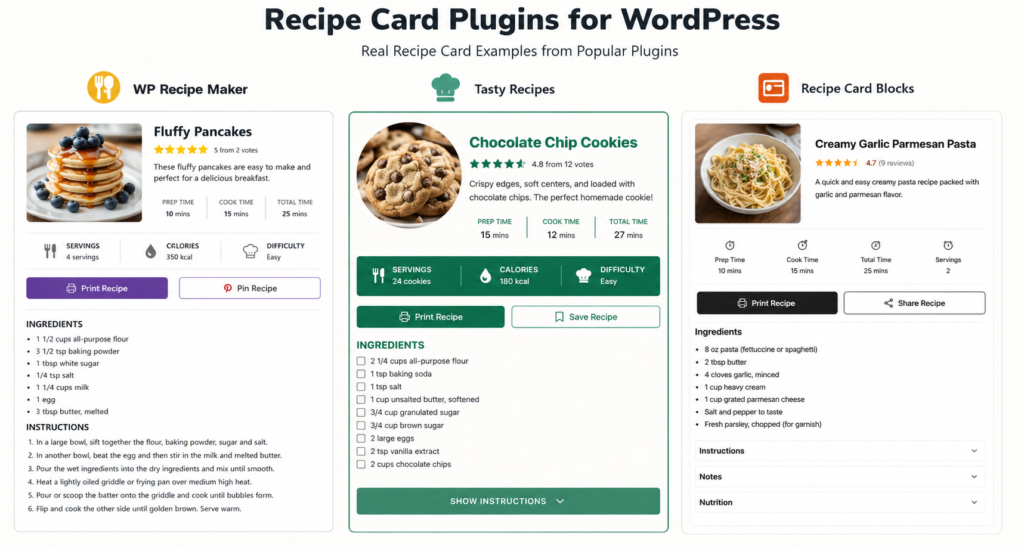
WP Recipe Maker remains one of the most complete solutions. Its free version already includes solid schema and Gutenberg support. The premium tiers unlock adjustable servings, ingredient links, nutrition labels, and powerful WP Recipe Maker shortcodes that let you display individual elements anywhere. Many sites migrate from older plugins (including the older WP Ultimate Recipe) to it because of better performance and easier workflow.
WP Tasty recipe plugin (Tasty Recipes) is popular among established food bloggers for its polished look and integration with other WP Tasty tools for Pinterest and affiliates. It has no full free version, so it suits those ready to invest.
Free recipe plugin WordPress options such as the free tiers of WP Recipe Maker, Recipe Card Blocks, or Create by Mediavine are excellent starting points. You can always upgrade later.
If you want to test before committing, most paid plugins offer demos (search for “Wp recipe maker demo” or the equivalent for others). Check the live recipe cards on real blogs to see how they look and load.
How to Choose and Set Up the Right Recipe Block for Your Blog
To start at the step you are on:
- Use a good free blog site – WP Recipe Maker free or Create by Mediavine.
- If your blog is a growing blog that is in need of some grooming and monetization, then you should probably check out WP Recipe Maker Premium or Tasty Recipes.
- Advanced or heavy users of Gutenberg who prefer to work with them visually → Recipe Card Blocks.
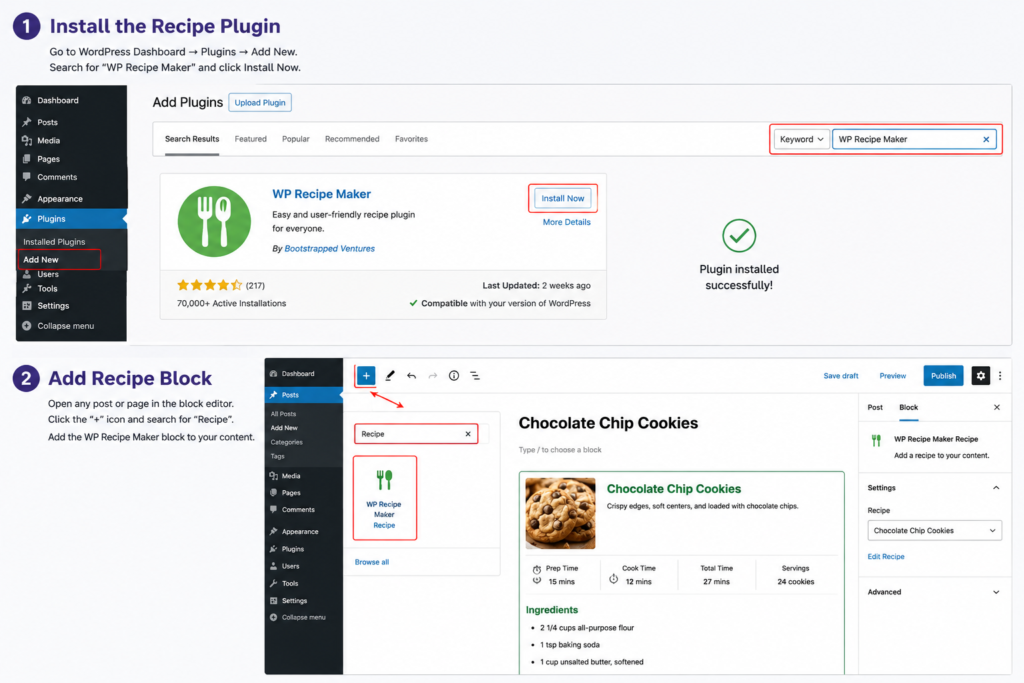
Installation is straightforward. Install the plugin, create/edit a post, enter the recipe block or use the shortcode and fill in the fields and finally publish it. Most of the plugins have a template editor to customise the card design, and this editor will be theme colours and fonts.
If you do have recipes in another system use the import tools. For instance, WP Ultimate Recipe is one of a number of older plugins that can be integrated into WP Recipe Maker. Once set up, try out a couple of recipes on Google’s Rich Results Test to verify that the schema is correct.
If you’ve published your recipe cards, create a page or section to show all of your recipe cards in a recipe index or by category and link your recipe posts to them on your recipe cards or on the roundups. This improves the topicality of the content.
Common Mistakes Food Bloggers Make (and How to Avoid Them)
Many bloggers wait too long to add a recipe block, then struggle to retrofit hundreds of posts. Others choose a plugin that looks pretty but has weak or outdated schema. A few overload the card with so many extras that it slows the page.
Avoid these by choosing a plugin with active development and current JSON-LD support, testing page speed after installation, and keeping the card focused on the essentials readers and Google care about. Also resist the urge to stuff keywords into the recipe title or description,write naturally for people first.
Make the Move and Watch the Difference
A WordPress recipe block is the way to go for any food blogger because it will help you connect the dots between the recipe you love making and how it’s found and utilized at Google and your readers.
It provides you with structured data for improved rich snippets, better print-friendly versions of your posts for people to cook from and even saves you time to create more posts.
Rather than posting plain text recipes, you need to make a decision on whether you will use a free recipe plugin WordPress or one of the best recipe WordPress plugins, such as WP Recipe Maker or the WP Tasty recipe plugin. Create a solid block, and post some of your better content, while watching for impressions, clicks and engagement.
Looking to enhance your next cook-up? Choose one of the plugins above and install it and post a first recipe card in the proper format.
You’ll make your traffic (and readers) better and happier in the future.
FAQ
Is a free recipe plugin WordPress enough to start?
Yes. Several free options deliver valid schema and usable cards. Upgrade when you need adjustable servings, better design control, or nutrition tools.
Do I still need a separate SEO plugin?
Yes. A recipe block handles recipe-specific schema. Pair it with Rank Math, Yoast, or All in One SEO for overall site optimization and additional schema types.
Can I use shortcodes instead of blocks?
Absolutely. Plugins like WP Recipe Maker offer extensive shortcodes so you can place full recipes or individual elements (image, ingredients, etc.) anywhere, including classic editor or page builders.
Will switching plugins hurt my rankings?
Usually not if the new plugin outputs correct schema. Use the import tools, then re-test a sample of recipes. Most traffic recovers quickly once Google re-crawls.
How important is the design of the recipe card?
Very. Readers decide in seconds whether the recipe looks trustworthy and easy to follow. A clean, on-brand card improves both experience and perceived quality.
Yes. Several free options deliver valid schema and usable cards. Upgrade when you need adjustable servings, better design control, or nutrition tools.
Yes. A recipe block handles recipe-specific schema. Pair it with Rank Math, Yoast, or All in One SEO for overall site optimization and additional schema types.
Absolutely. Plugins like WP Recipe Maker offer extensive shortcodes so you can place full recipes or individual elements (image, ingredients, etc.) anywhere, including classic editor or page builders.
Usually not if the new plugin outputs correct schema. Use the import tools, then re-test a sample of recipes. Most traffic recovers quickly once Google re-crawls.
Very. Readers decide in seconds whether the recipe looks trustworthy and easy to follow. A clean, on-brand card improves both experience and perceived quality.