
AIOSEO REST API Is Now Free for All Users [Big Update]
AIOSEO REST API Is Now Free for All Users [Big Update] starting with AIOSEO 4.9.8, including users of the free Lite version. The change removes the previous paid-plan requirement for REST API access and also brings the API into AIOSEO’s core plugin rather than requiring a separate REST API addon.
That is more significant than a simple pricing change. The AIOSEO REST API can now give developers and automation tools programmatic access to SEO data and actions through HTTP requests. This opens the door to custom SEO dashboards, automated workflows, headless WordPress projects, bulk metadata management, and integrations with other applications.
The update also matters in the AI era. AIOSEO 4.9.8 introduced the WordPress Abilities API and MCP support alongside the REST API changes, making it easier for AI agents and software tools to interact with WordPress SEO data.
In this guide, you’ll learn exactly what changed, what the free REST API can do, how it relates to the WordPress REST API, and what Lite users should know before getting started.
What AIOSEO REST API Is Now Free for All Users Actually Means
The easiest way to understand the update is to separate AIOSEO’s SEO functionality from the underlying WordPress REST API.
WordPress already provides a REST API that allows applications to communicate with a WordPress site. AIOSEO adds its own SEO data and capabilities to that ecosystem.
Before AIOSEO 4.9.8, access to the AIOSEO REST API features required a Plus plan or higher, along with a separate addon. With version 4.9.8, AIOSEO made the REST API available on every plan, including Lite, and merged the functionality into the core plugin.
What changed in AIOSEO 4.9.8?
| Before 4.9.8 | Starting with 4.9.8 |
|---|
| REST API required Plus or higher | REST API is available on all plans |
| Separate REST API addon | Functionality merged into core |
| Developers had a paid-plan barrier | Lite users can access the API |
| Headless SEO data was plan-gated | Supported SEO metadata is available |
| API abilities were less accessible | 28 AIOSEO abilities can be accessed through HTTP |
The important distinction is that free API access does not mean every AIOSEO feature suddenly becomes a Pro or Elite feature.
Some API abilities depend on the underlying AIOSEO feature.
For example, AIOSEO notes that Link Assistant abilities require Pro or higher, while Search Statistics abilities require Elite.
So the update removes the API access barrier, but it does not remove feature-level plan requirements.
What Can You Do With the AIOSEO REST API?
This is where the update becomes genuinely useful.
The AIOSEO REST API isn’t simply a way to retrieve information. The current implementation exposes AIOSEO’s WordPress Abilities layer, providing access to 28 SEO actions through HTTP requests.
Depending on the features available on your AIOSEO plan, developers can use the API to perform tasks such as:
- Find posts that are missing meta descriptions
- Update SEO titles and meta descriptions
- Create, update, or delete redirects
- Retrieve TruSEO scores
- Access Search Console performance data
- Identify orphaned content or internal-linking opportunities
- Read and update AIOSEO metadata
- Build custom SEO dashboards
- Connect external applications to WordPress SEO data
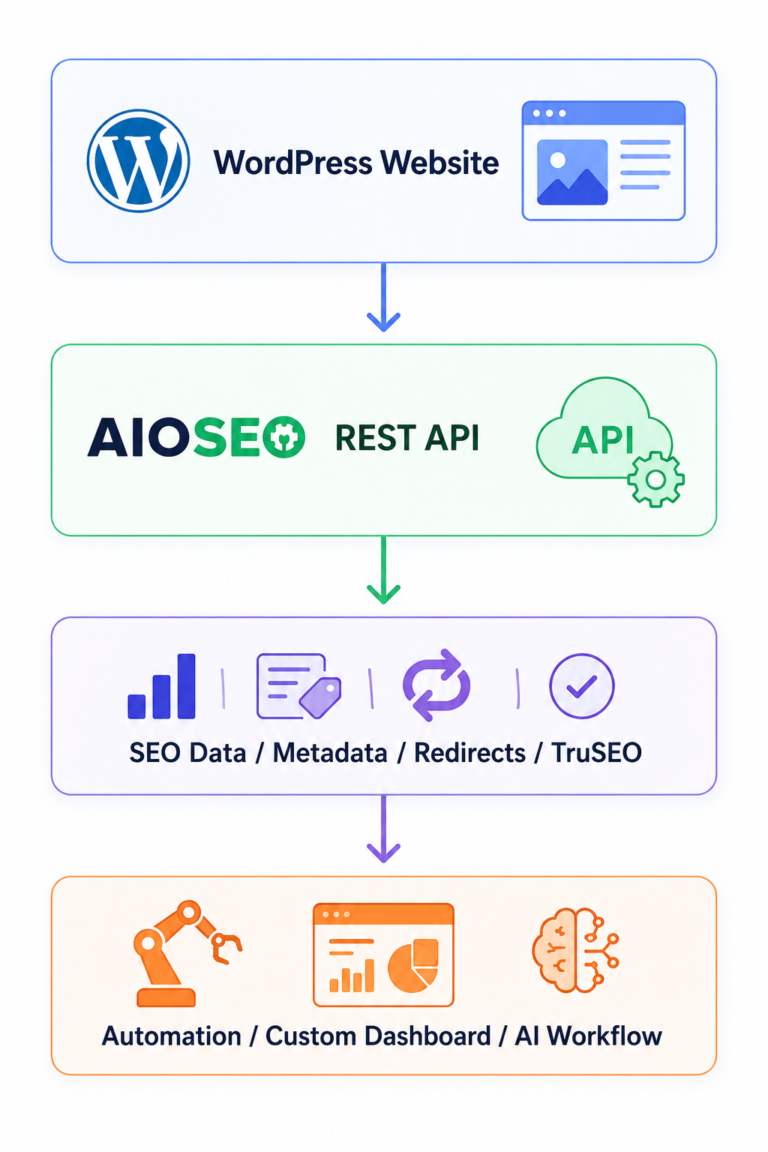
Example: bulk SEO optimization
Imagine you manage a WordPress website with 2,000 blog posts.
Instead of manually opening hundreds of posts to find missing meta descriptions, a developer could create a script that communicates with WordPress through the API.
The workflow could look like this:
WordPress → REST API → Find missing descriptions → Generate/update metadata → Return results
That doesn’t mean you should automatically generate thousands of descriptions without review. Automation can make repetitive work faster, but SEO quality still depends on the relevance and accuracy of the resulting content.
Example: custom SEO dashboard
An agency could also build an internal dashboard showing:
- URLs with missing metadata
- TruSEO scores
- Redirect status
- SEO titles
- Meta descriptions
- Internal-linking opportunities
Instead of repeatedly checking individual WordPress screens, the agency could pull the information into its own system.
This is one of the strongest practical reasons the AIOSEO REST API Is Now Free for All Users [Big Update] matters to developers and agencies.
AIOSEO REST API Is Now Free for All Users: How It Works With WP REST API
A common source of confusion is the difference between AIOSEO REST API and WordPress REST API.
They are related, but they are not exactly the same thing.
What is the WordPress REST API?
The WordPress REST API allows applications to communicate with WordPress using HTTP requests.
For example, standard WordPress REST API endpoints include:
/wp/v2/posts/wp/v2/pages/wp/v2/media/wp/v2/categories/wp/v2/tags
Custom post types can also work with the REST API when REST support is enabled.
AIOSEO adds SEO-specific information to these WordPress responses.
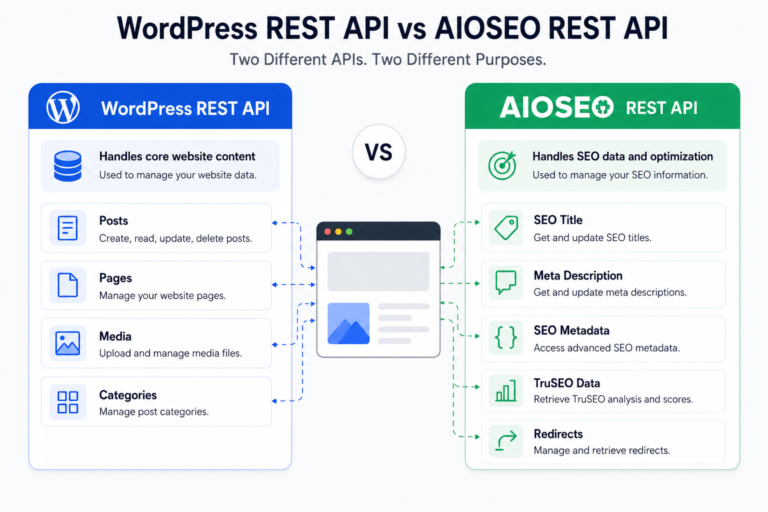
For supported content, developers can access fields including:
aioseo_headaioseo_head_jsonaioseo_meta_data
The first provides the SEO output for the page head, while the JSON version provides the same information in JSON format. The metadata field provides stored AIOSEO data that can be read and updated through the API.
Why does this matter for headless WordPress?
Consider a headless WordPress setup:
WordPress CMS → REST API → Next.js/Astro/Gatsby frontend
The WordPress site manages content, while another framework handles the frontend.
Without access to SEO metadata, developers may need to create additional systems to reproduce titles, descriptions, canonical URLs, Open Graph information, and structured data on the frontend.
AIOSEO’s REST API can return the relevant SEO output, making this workflow considerably easier. AIOSEO has supported this headless use case since version 4.1.9.
AIOSEO REST API Is Now Free for All Users: How to Get Started
Getting started doesn’t require a complicated AIOSEO-specific activation process anymore.
If you’re using AIOSEO 4.9.8 or later, the REST API functionality is already included in the core plugin. The former addon has been deprecated and merged into the plugin.
Step 1: Update AIOSEO
Log in to your WordPress dashboard and make sure AIOSEO is updated to version 4.9.8 or later.
You don’t need to reinstall the old REST API addon.
Step 2: Create a WordPress Application Password
For authenticated API requests, AIOSEO’s documentation recommends using a WordPress Application Password.
In WordPress, go to:
Users → Profile → Application Passwords
Create a dedicated application password for the application or script that needs access.
An Application Password is different from your normal WordPress login password and can be revoked independently.
Step 3: Authenticate your API request
A basic request can communicate with a standard WordPress endpoint such as:
/wp-json/wp/v2/posts/123
The request can then retrieve AIOSEO information associated with that post.
For example, the response can contain:
aioseo_head
and
aioseo_head_json
which allow a developer to work with the SEO output programmatically.
Step 4: Test before automating
Don’t immediately connect an API to a production website and allow unrestricted bulk updates.
A safer workflow is:
- Test on a staging site.
- Create a dedicated Application Password.
- Give the connected application only the access it actually needs.
- Test a single post.
- Review the result.
- Add logging.
- Only then scale the workflow.
This is especially important when an API can write data rather than simply read it.
Do You Need to Enable the WordPress REST API?
Usually, the WordPress REST API is available by default. The bigger issue is that security plugins, firewalls, CDN configurations, or hosting rules can sometimes block REST API requests.
AIOSEO itself explains that some security plugins and CDN services can block REST API communication, which can cause problems when AIOSEO needs to communicate with WordPress.
What if your REST API is blocked?
If you’re seeing REST API errors, don’t immediately start changing random WordPress REST API settings.
Check:
- Security plugins
- Firewall rules
- Cloudflare settings
- Hosting security rules
- REST API restrictions
- Whether your custom post type supports REST
AIOSEO recommends troubleshooting plugins one at a time if its REST API communication is being blocked.
AIOSEO Free vs Pro: Does the Free API Mean You Get Pro Features?
No.
This is probably the most important clarification for users searching for AIOSEO free vs Pro.
The REST API is now free across AIOSEO plans, but individual capabilities can still depend on the AIOSEO feature or module they use.
For example, AIOSEO states that Link Assistant abilities require Pro or higher, while Search Statistics abilities require Elite.
Think about it this way:
API access = free
doesn’t necessarily mean:
Every AIOSEO feature = free
The current AIOSEO free plan includes WordPress REST API functionality, while premium plans add additional SEO modules and capabilities. AIOSEO’s current pricing information lists WordPress REST API functionality among its features.
So if you’re comparing AIOSEO free vs Pro, compare the underlying SEO features you actually need—not simply whether the API is available.
What about AIO SEO Analyzer?
The AIO SEO Analyzer and REST API solve different problems.
An SEO analyzer helps you inspect and evaluate SEO factors.
The REST API is a developer interface that allows applications to communicate with AIOSEO and WordPress programmatically.
You can think of it as:
SEO Analyzer → Find and understand issues
REST API → Access or automate SEO data and actions
For developers and agencies, using both can create a more efficient technical SEO workflow.
Why This Update Matters for AI-Powered SEO
The timing of this update is particularly interesting because AIOSEO is also expanding its AI integrations.
If you’re also adapting your content for AI-powered search and generative engines, see our guide to AI SEO and GEO for a broader look at how these strategies work together.
Version 4.9.8 introduced AIOSEO MCP and WordPress Abilities API support. AIOSEO says its MCP integration allows AI clients such as Claude, Cursor, and ChatGPT to connect to a WordPress site and work with SEO data.
The REST API provides another route.
Instead of requiring an AI client specifically, a developer can build an application or automation that communicates with AIOSEO using HTTP.
![[Big Update]](https://maryamseo.blog/wp-content/uploads/2026/08/ChatGPT-Image-Aug-15-2026-10_57_11-PM-768x1152.png)
The distinction is useful:
| Technology | Best suited for |
| WordPress REST API | Applications communicating with WordPress |
| AIOSEO REST API | Programmatic access to AIOSEO SEO data and actions |
| AIOSEO MCP | Connecting compatible AI agents to AIOSEO |
| AIOSEO SEO Analyzer | Reviewing SEO performance and issues |
This means the update is not simply about making one AIOSEO feature free.
It makes the programmatic SEO layer more accessible to developers, agencies, automation builders, and WordPress users experimenting with AI-powered workflows.
What Should WordPress Users Do Now?
If you’re a normal blogger or small business owner, you don’t need to start coding just because the REST API is now free.
If AIOSEO already handles everything you need inside WordPress, you can continue using it normally.
The update becomes especially useful if you:
- Manage a large WordPress website
- Build headless WordPress sites
- Develop custom SEO tools
- Manage SEO for multiple sites
- Want to automate repetitive SEO tasks
- Build AI-powered WordPress workflows
- Need SEO data inside another application
For developers, the biggest opportunity is experimentation.
You can now test AIOSEO’s REST API functionality without first purchasing a higher-tier AIOSEO plan simply to access the API.
Final Thoughts:
AIOSEO REST API is more than a change to the pricing gate. Starting with version 4.9.8, Lite users can access AIOSEO’s REST API without upgrading simply to unlock API functionality, while the old addon has been folded into the core plugin.
For everyday WordPress users, nothing needs to change. For developers, agencies, and automation builders, however, the update removes an important barrier.
The practical next step is simple: update AIOSEO, review the official REST API documentation, create a dedicated Application Password if you need authenticated requests, and test your workflow on a staging environment before making automated changes to production.
If you’re building an AI, headless WordPress, or automated SEO workflow, this is a particularly good time to explore what the newly accessible API can do.
Frequently Asked Questions
Is the AIOSEO REST API really free for Lite users?
Yes. Starting with AIOSEO 4.9.8, the REST API is available on every AIOSEO plan, including Lite. The separate REST API addon was deprecated and its functionality was merged into the core plugin.
Do I need AIOSEO Pro to use the REST API?
No. You do not need AIOSEO Pro simply to access the REST API. However, individual API abilities can depend on the AIOSEO feature they use. Some features, such as Link Assistant and Search Statistics, remain tied to their respective premium plans.
What can I do with the AIOSEO REST API?
You can programmatically access SEO data and perform supported SEO actions, including managing metadata, redirects, TruSEO information, and other AIOSEO abilities. The current implementation exposes 28 abilities through HTTP.
How do I authenticate with the AIOSEO REST API?
AIOSEO recommends using a WordPress Application Password. You can create one under Users → Profile → Application Passwords and use it to authenticate your API requests.
Is the AIOSEO REST API the same as the WordPress REST API?
No. The WordPress REST API is the broader interface for communicating with WordPress. AIOSEO extends supported WordPress endpoints with its own SEO metadata and capabilities.
Yes. Starting with AIOSEO 4.9.8, the REST API is available on every AIOSEO plan, including Lite. The separate REST API addon was deprecated and its functionality was merged into the core plugin.
No. You do not need AIOSEO Pro simply to access the REST API. However, individual API abilities can depend on the AIOSEO feature they use. Some features, such as Link Assistant and Search Statistics, remain tied to their respective premium plans.
You can programmatically access SEO data and perform supported SEO actions, including managing metadata, redirects, TruSEO information, and other AIOSEO abilities. The current implementation exposes 28 abilities through HTTP.
AIOSEO recommends using a WordPress Application Password. You can create one under Users → Profile → Application Passwords and use it to authenticate your API requests.
No. The WordPress REST API is the broader interface for communicating with WordPress. AIOSEO extends supported WordPress endpoints with its own SEO metadata and capabilities.