
What Is E-E-A-T SEO: How to Build It for WordPress? (2026 Guide)
E‑E‑A‑T SEO is Google’s shorthand for Experience, Expertise, Authoritativeness, and Trustworthiness, the qualities that make content reliable and rank-worthy. In simple terms, E‑E‑A‑T SEO means creating web content (like your WordPress blog posts) that shows real expertise and trust.
It answers “who” made the content, “how” it was produced, and “why” it’s useful.
In this 2026 guide, you’ll learn exactly what E‑E‑A‑T SEO is and step-by-step how to build it on WordPress – from author bios and site policies to practical tips for AI-generated content. By the end, you’ll know how to measure success and give Google the trust signals it looks for.
Understanding E‑E‑A‑T SEO and Why It Matters
E‑E‑A‑T SEO stands for Experience, Expertise, Authoritativeness, and Trustworthiness. Google’s search quality guidelines use these as a framework to judge content quality, especially on important topics. Though E‑E‑A‑T isn’t a direct ranking score, pages that clearly demonstrate these qualities tend to rank higher.
- Experience: First-hand or practical knowledge (e.g. a review by someone who actually used the product).
- Expertise: Subject-matter credentials (like education, certifications, or years of experience in the topic).
- Authoritativeness: Recognition from others (backlinks from reputable sites, citations, or media mentions signal authority).
- Trustworthiness: Accuracy and honesty (facts backed by sources, secure website, clear policies). Trust is considered the most important factor.
Why it matters: Google’s algorithms and human raters favor content with strong E‑E‑A‑T, especially for sensitive topics (health, finance, etc., known as “YMYL” pages).
In practice, that means if your WordPress content clearly shows who authored it, cites reliable sources, and provides up-to-date, accurate information, Google will deem it more credible and likely rank it higher.
Key E‑E‑A‑T Signals Google Looks For on Your WordPress Site
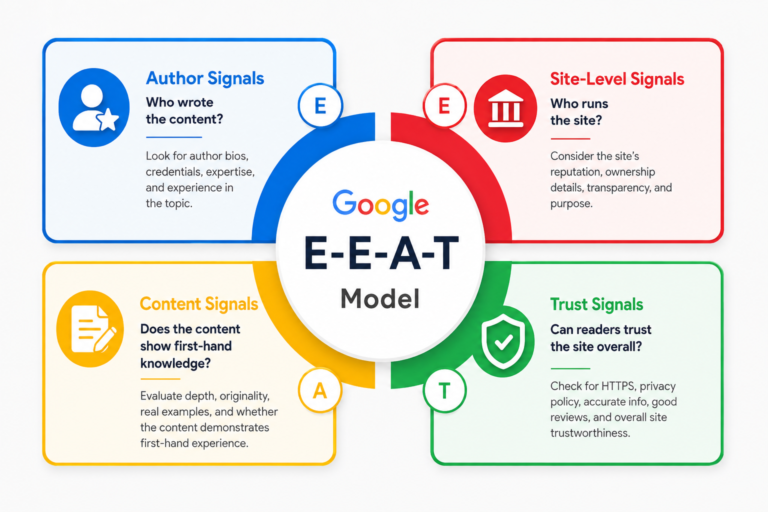
Google looks for specific signals on your site that indicate E‑E‑A‑T. For WordPress sites, these fall into four main categories:
-
Author Signals: Who wrote the content? Look for an author bio (with credentials), author schema (structured data linking to the author), and an author archive page.
For example, a blog post should display a byline with the author’s name, a short bio highlighting their qualifications, and links to their social profiles or portfolio. If visitors (or Google) can easily find “About the Author” info and expertise, that boosts your E‑E‑A‑T.
-
Site-Level Signals: Who runs the site? Your site should clearly state its identity. An About page, Contact page, and Organization schema (or Person schema for solo bloggers) are crucial.
These show Google (and visitors) that a real, accountable entity stands behind the content. Make sure your theme or footer includes links to company info or author details, reinforcing that trust.
-
Content Signals: Does the content show first-hand knowledge? This includes original images or screenshots (not just stock photos), detailed personal observations, clear publication and update dates, and cited sources for facts.
For example, in a product review, include photos you took or data you gathered, and link to official docs. Freshness counts too – showing “last updated” dates signals you maintain accuracy.
-
Trust Signals: Can readers trust the site overall? Look for an SSL-secured site (HTTPS), a visible privacy policy, disclaimers or affiliate disclosures, and an editorial policy if relevant.
For most WordPress sites, HTTPS and basic privacy/terms pages are essential. If you have ads or sponsored posts, clearly label them.These signals reassure visitors (and Google) that you run a legitimate, transparent site.
Example: A WordPress tech blog might use a plugin to display author biographies (Author Signals), enable Organization schema in its SEO settings (Site-Level Signal), update old posts with new info and cite sources (Content Signals), and include GDPR/Privacy pages (Trust Signals). All together, these elements build a strong E‑E‑A‑T profile.
Building E‑E‑A‑T on Your WordPress Site: Actionable Steps
Here’s how to put E‑E‑A‑T into action on WordPress:
-
Create Detailed Author Profiles: Use a plugin (like PublishPress Authors or an E‑E‑A‑T author box plugin) to add an author bio to every post. In the bio, highlight the author’s expertise: years of experience, credentials, notable publications.
Include links to the author’s social profiles or portfolio. Ensure each author has a complete profile page. According to Google, making “who created the content” clear aligns with E‑E‑A‑T.
2. Configure SEO Plugin for E‑E‑T Schema: Use an SEO plugin (AIOSEO, Yoast, Rank Math, etc.) to add structured data:
-
- Author schema: Automatically tag posts with the author’s info, linking it to the author profile. This is often built into plugins’ author settings.
- Organization/Person schema: In your SEO plugin’s Knowledge Graph or appearance settings, enter your site’s organization name, logo, and social links. If you are a solo blogger, switch to Person schema. This tells Google who owns the site.
- Article schema: Ensure your posts have basic
datePublishedanddateModifiedfields (many SEO plugins auto-generate these). They serve as signals that content is up-to-date.
3. Optimize Your About and Contact Pages: Write an About page focused on credibility. Include:
-
- Who you are (names, team) and why you’re qualified (degrees, awards, years in field).
- Site history and mission (shows commitment).
- How to contact you (email, phone, address) to prove accountability.
- For multi-author sites, list all authors with mini-bios linking to their profiles. Add an “Contact” page with valid contact forms or details. These pages send strong site-level trust signals.
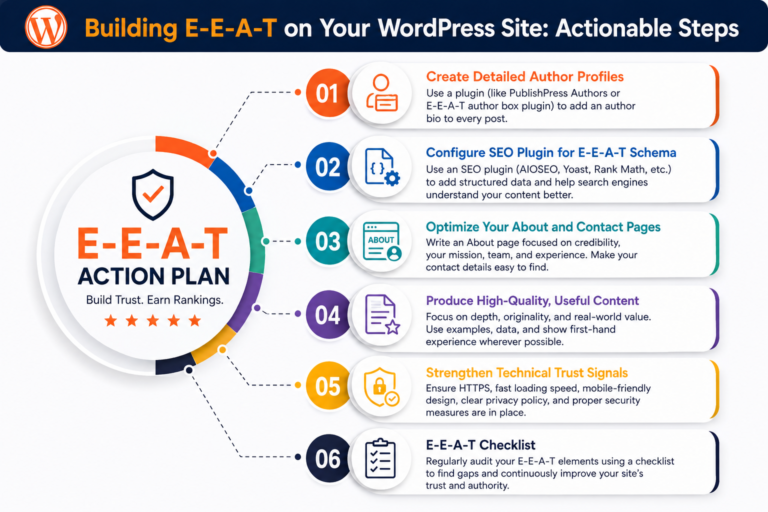
4. Produce High-Quality, Useful Content: Focus on depth and originality. Strategies include:
-
- First-person insights: Share real experiences or experiments. For example, if writing about a WordPress plugin, explain how you used it in a real project and include your screenshots.
- Cite sources: Whenever you make a factual claim (statistics, “Google says…”, etc.), link to authoritative sources (studies, official docs, reputable news) to boost authority.
- Regularly update content: Keep articles current. Google rewards freshness for many topics. Updating outdated facts or adding new sections shows ongoing expertise.
- Clear formatting: Use headings, bullet points, and easy language. Well-presented content with no obvious errors appears more trustworthy.
5. Strengthen Technical Trust Signals: Make sure your site design and policies reflect trust:
-
- Use HTTPS (SSL certificate) – browser padlocks reassure users.
- Publish clear Privacy Policy and Terms of Service pages, especially if collecting user data or using cookies.
- If running ads or affiliations, include disclosure statements on relevant pages.
- Consider adding a review or testimonial section (with schema) if you have customer feedback. While optional, genuine reviews can serve as social proof of trust.
6. E‑E‑A‑T Checklist: As a quick reference, here are practical E‑E‑A‑T-building actions:
-
- ✅ Add author biography and photos under each post.
- ✅ Link author bios to detailed profile pages with credentials.
- ✅ Fill out organization/person info in SEO plugin (name, logo, social media).
- ✅ Maintain an “About Us” page explaining expertise and purpose.
- ✅ Keep all content factually accurate, citing references.
- ✅ Update older posts to maintain relevance.
- ✅ Ensure your site has HTTPS, contact info, privacy policy.
- ✅ Use structured data (schema) for author, organization, and breadcrumbs.
Internal Linking Opportunities: Throughout your site, link contextually to other resources. For example, when discussing content updates, you could link to an internal guide on content maintenance. When mentioning security or policies, link to your company’s privacy page. These internal links reinforce E‑E‑A‑T by showing interconnected, thorough content.
How to Know If Your E‑E‑A‑T Strategy Is Working (and Moving the Needle)
E‑E‑A‑T doesn’t have a direct score to check, but you can measure its impact through performance metrics:
- Search Rankings & Visibility: Track keyword rankings and organic traffic. If, over time, your target pages start ranking higher or for more relevant queries after your E‑E‑T improvements, that’s a positive signal.
For example, if a health-related post moves up in Google SERPs after adding author credentials and sources, E‑E‑A‑T efforts likely helped.
- Google Search Console (GSC): Monitor impressions and clicks for your top pages. An uptick in impressions/clicks for important content suggests higher visibility.
Look at query performance: if branded or trust-related terms (like author name, organization name) show more clicks, that indicates stronger brand recognition (an E‑E‑A‑T proxy).
- User Engagement: Improved dwell time or lower bounce rates can indirectly reflect trust. Engaging content (with clear expertise) tends to keep users longer. For instance, adding unique images or in-depth sections might boost time-on-page.
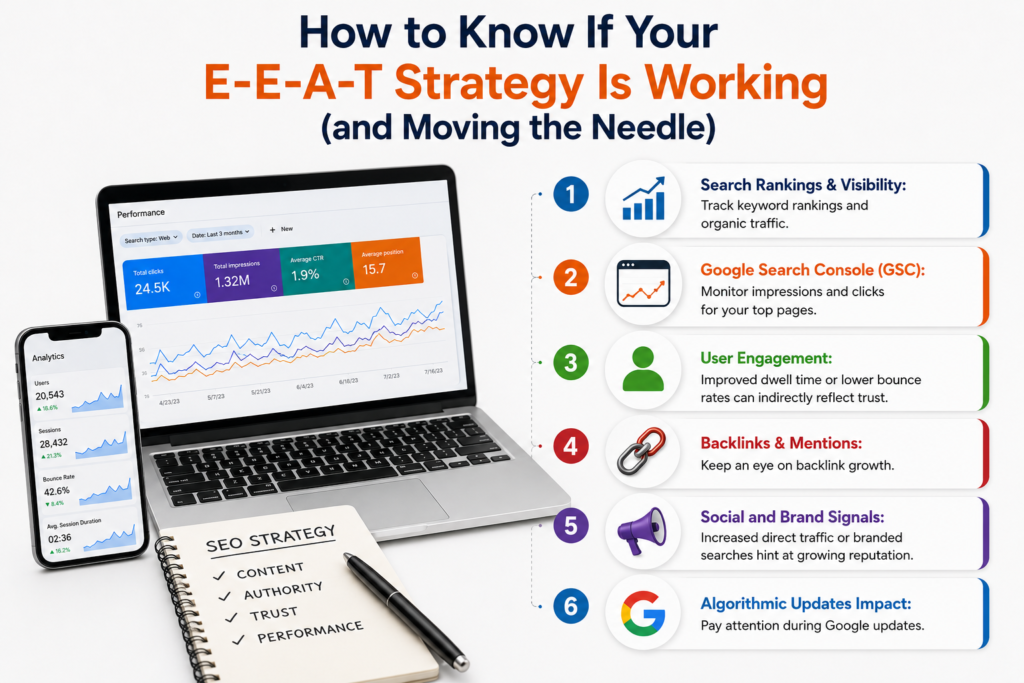
- Backlinks & Mentions: Keep an eye on backlink growth. If authoritative sites begin linking to your content or mentioning your brand, your authority is rising. Tools like Ahrefs or Moz can track new backlinks.
According to SEO research, a steady stream of quality links after publication signals “ongoing relevance” – a trust indicator.
- Social and Brand Signals: Increased direct traffic or branded searches (people typing your site/author names into Google) hint at growing reputation. Brand mentions on forums or social media also reflect authority.
- Algorithmic Updates Impact: Pay attention during Google updates. If sites with high E‑E‑A‑T (like yours) hold or gain rankings after a core update, that suggests your E‑E‑A‑T strategy is working. (For example, high E‑E‑A‑T sites saw boosts during Google’s 2026 core update.)
Featured Snippet Style Answer: You can’t get an “E‑E‑A‑T score” from Google, but check if your key pages gain rankings, traffic, or backlinks after making E‑E‑A‑T improvements.
Improvements in search visibility, user engagement, and brand mentions all indicate your strategy is moving the needle. Use Google Search Console and analytics to compare performance before and after each change.
Maintaining E‑E‑A‑T When Using AI-Generated Content
As AI writing tools become common, it’s crucial to maintain E‑E‑A‑T standards. Google’s guidance and experts agree that AI-assisted content isn’t penalized per se—but only if it still demonstrates genuine expertise and experience. Here’s how to keep high E‑E‑A‑T with AI:
- Always Attribute a Real Author: Assign each AI-assisted post to a verified human author, not a generic brand name. Ensure the author has a complete WordPress profile with photo and credentials. Google’s raters check author profiles, so using an AI-generated author image or fake bio can erode trust.
- Substantive Human Editing: Have an expert (real person) edit every AI draft. Don’t just fix typos – add first-person insights, replace any vague language with specific examples from real experience, and include unique data or personal anecdotes.
For instance, if AI drafts a tourism article, add details like “On my visit to the Eiffel Tower…” to show real experience.
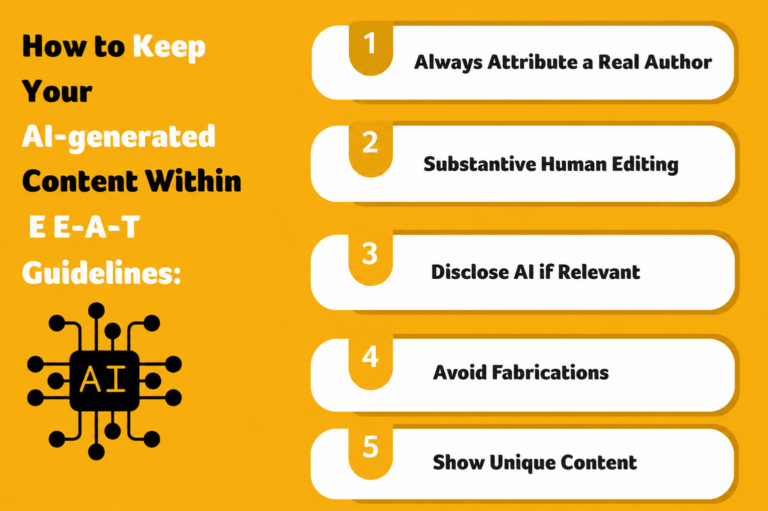
- Disclose AI if Relevant: If your site’s “How” page or editorial policy warrants it, mention that you use AI tools as an assistant in writing. Transparency aligns with Google’s advice to explain how content is created.
- Avoid Fabrications: Never invent credentials or use AI-generated headshots. Quality raters view fake author credentials as a major trust violation. Always ensure facts are accurate and that any quoted statistics or quotes come from real sources.
- Show Unique Content: Augment AI content with original elements. Include your own charts, photos, or case studies. Google values “information gain” – content that adds something new that others don’t have. This human touch ensures your posts are more than generic AI output.
By treating AI as a drafting tool and layering human expertise on top, your WordPress blog can stay helpful and trustworthy.
For example, many SEO guides suggest clearly stating the author’s name and giving context (the “Who” and “How”) even if AI wrote the first draft, so readers know there’s a real expert behind the content.
Showing E‑E‑A‑T Signals with Plugins and Themes
WordPress offers many plugins and theme features to make E‑E‑A‑T signals visible:
- Author Bio Plugins: Use an author box plugin (like Author Box & Pages for E‑E‑A‑T or PublishPress Authors) to add bio boxes with social links and credentials after each post. These tools often generate JSON-LD author schema automatically. They let you showcase experience (years in industry, certifications) and provide links to related articles by the author – exactly the kind of background Google’s raters recommend.
- SEO Plugins for Schema: All-in-one SEO plugins (AIOSEO, Yoast, Rank Math, etc.) allow you to configure schema types:
- Organization/Person: Fill in your site’s official name, logo, and social profiles to output a Knowledge Graph schema.
- Article Schema: Enable it on blog posts so Google sees publication dates and author info. Some plugins also support Review or FAQ schema, which can further boost credibility for appropriate pages.
- Trust Badges and Seals: If you run e-commerce or membership sites on WordPress, display security badges (SSL seal, payment logos) and certifications prominently. While not an SEO plugin feature, these visual trust cues help visitors feel safe.
For example, showing an “Official Partner” logo or a membership badge (if you’re part of an industry organization) on your About page can indirectly support trustworthiness.
- Theme Features: Choose a theme with built-in author profile or team sections. Many modern themes include an “Author Box” below posts or a dedicated team page layout.
If not, you can create custom blocks (in Gutenberg or Elementor) for staff bios with photos and credentials. Consistency is key: every author name should link to a page listing their bio and articles.
- Editorial Tools: Plugins like Edit Flow or Editual add editorial comments and revision tracking in WordPress. While mainly for workflow, they help maintain accuracy by making sure someone reviews facts before publishing (a practice Google praises).
Finally, don’t neglect mobile and speed: a well-functioning site (fast, mobile-friendly) also supports trust. Use performance plugins or themes to ensure a good user experience, another indirect trust factor.
Conclusion
Building strong E‑E‑A‑T for your WordPress site is about making your content and site transparent, credible, and helpful. Key takeaways: clearly credit real authors and their credentials, use structured data to link your content with your organization or brand, provide well-researched and updated articles, and maintain site security and policies to foster trust.
Regularly measure performance (rankings, traffic, engagement) to see if these changes move the needle.
By following these steps, you demonstrate genuine expertise and authoritativeness that both users and Google value. Ready to strengthen your E‑E‑A‑T?
FAQs
How often should I update content for E‑E‑A‑T?
Update whenever facts change or new information emerges. Aim to review important articles at least once a year. Google tracks “last updated” dates, so a stable history of updates shows long-term expertise.
Can testimonials or reviews on my WordPress site improve E‑E‑A‑T?
Yes. Genuine testimonials or client logos on your site act as social proof, boosting trust. If relevant, add review schema to product/service pages. Just ensure all reviews are real and solicited ethically to maintain authenticity.
Do I need to list author bios on every page?
At minimum, have authorship on every blog post and major article. You don’t need an author box on purely transactional pages (like shop checkout). However, your About page should credit site owners or key authors. Google specifically looks for author info on content where expertise matters.
How does E‑E‑A‑T apply to AI-generated content?
AI-written content can rank, but to satisfy E‑E‑A‑T, you must add human expertise. That means attributing a real author, adding personal insights or case studies, and avoiding AI gimmicks. Following Google’s “Who, How, Why” advice ensures AI is used responsibly.
Is there a quick way to tell if Google trusts my site?
Look for branded search results. For example, do knowledge panels or author carousels appear for your name or brand? These are indirect indicators of authority. Also, check Search Console for messages about “low quality” or manual actions – an absence of issues is a good sign. Ultimately, steady or improving rankings in competitive topics usually means Google is confident in your content’s E‑E‑A‑T.
Update whenever facts change or new information emerges. Aim to review important articles at least once a year. Google tracks “last updated” dates, so a stable history of updates shows long-term expertise.
Yes. Genuine testimonials or client logos on your site act as social proof, boosting trust. If relevant, add review schema to product/service pages. Just ensure all reviews are real and solicited ethically to maintain authenticity.
At minimum, have authorship on every blog post and major article. You don’t need an author box on purely transactional pages (like shop checkout). However, your About page should credit site owners or key authors. Google specifically looks for author info on content where expertise matters.
AI-written content can rank, but to satisfy E‑E‑A‑T, you must add human expertise. That means attributing a real author, adding personal insights or case studies, and avoiding AI gimmicks. Following Google’s “Who, How, Why” advice ensures AI is used responsibly.
Look for branded search results. For example, do knowledge panels or author carousels appear for your name or brand? These are indirect indicators of authority. Also, check Search Console for messages about “low quality” or manual actions – an absence of issues is a good sign. Ultimately, steady or improving rankings in competitive topics usually means Google is confident in your content’s E‑E‑A‑T.