
A visitor lands on your website and sees a language they don’t understand.
They leave.
That’s one of the simplest reasons to make a WordPress site multilingual. If your audience speaks English, Urdu, Arabic, French, Spanish, or several languages, giving people a way to read your content in their own language can make the site much easier to use.
But multilingual WordPress sites need more than a language switcher.
You have to think about translated URLs, SEO, metadata, navigation, duplicate content, hreflang, and how search engines understand each version of a page.
Get those pieces right from the beginning, and managing multiple languages becomes much easier.
What is a multilingual WordPress site?
A multilingual WordPress site publishes the same website content in 2 or more languages.
For example, you might have:
- English:
example.com/about/ - French:
example.com/fr/about/ - Spanish:
example.com/es/about/
Each language version has its own content and URL.
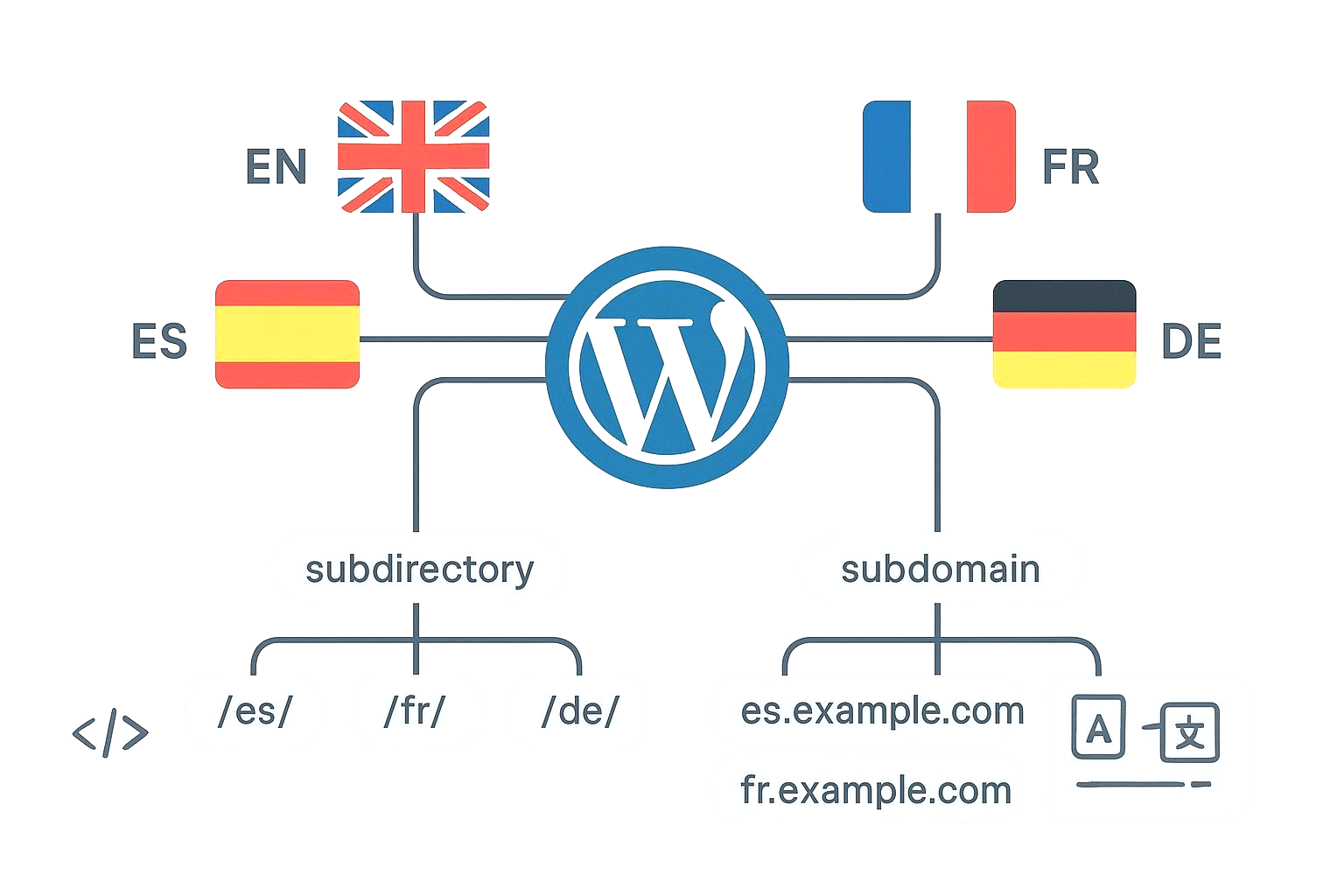
A visitor can choose their preferred language using a language switcher, and search engines can crawl and index the different versions.
The important part is that each translated page should be connected to its equivalent page in the other languages.
Should you use WordPress multisite?
You have 2 common ways to build a multilingual WordPress website.
1. A multilingual plugin
This is usually the easier option.
A plugin lets you keep one WordPress installation while creating translations for your posts, pages, menus, categories, and other content.
Popular options include:
- WPML
- Polylang
- TranslatePress
- Weglot
The exact features vary, so choose based on the size of your site and how much translation control you need.
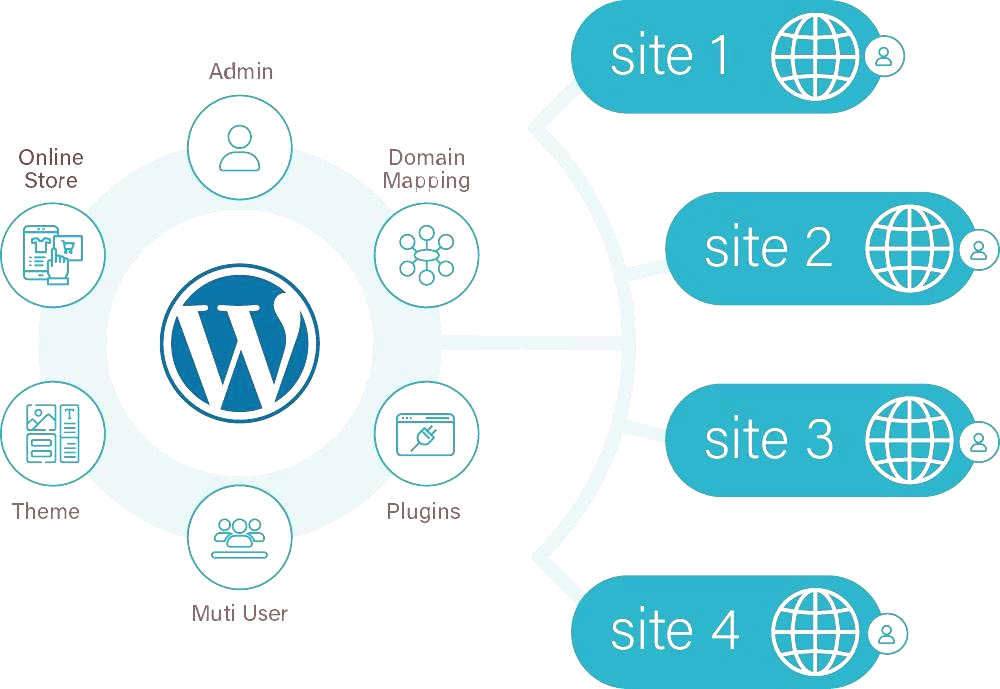
2. WordPress Multisite
WordPress Multisite lets you run multiple sites from one WordPress installation.
You could create:
example.com/en/example.com/fr/example.com/ar/
Each site can have its own content and settings.
This gives you more separation between languages, but it also creates more work. You’ll have to manage multiple site dashboards, themes, plugins, users, and content.
For most small and medium websites, a multilingual plugin is the simpler setup.
Choose your URL structure first
Your URL structure matters for SEO and site management.
You generally have 3 choices.
Language directories
Example:
example.com/fr/
This keeps everything under the same domain.
It’s a practical choice for many websites because you don’t have to buy or manage separate domains.
Language subdomains
Example:
fr.example.com
This separates languages into subdomains.
It can work, but you’ll have more technical configuration to deal with.
Country-specific domains
Example:
example.fr
This can make sense when you’re targeting specific countries rather than simply translating your website.
For example, a business targeting customers in France might use a French country domain.
For a typical multilingual WordPress site, I’d start with language directories unless you have a specific reason to use another structure.
Install a multilingual plugin
Once you’ve decided on the URL structure, install your translation plugin.
The setup will vary depending on the plugin, but the basic process looks like this:
- Install the plugin.
- Select your default language.
- Add the languages you want to support.
- Choose your URL structure.
- Configure the language switcher.
- Start translating your pages and posts.
Don’t add 10 languages just because the plugin lets you.
Every language creates more content to maintain.
Start with the languages your audience actually uses.
Translate your important pages first
You don’t need to translate every piece of content on day 1.
Start with the pages that matter most:
- Homepage
- About page
- Services
- Product pages
- Contact page
- Main landing pages
- Your best-performing blog posts
Then expand the translation library as your site grows.
This also gives you time to catch problems before hundreds of translated pages are published.
Don’t rely blindly on machine translation
Automatic translation can save a lot of time.
It can also produce awkward sentences, incorrect terminology, and strange translations.
This matters even more for commercial pages.
A translated service page should sound like something a real person in that language would write. Literal word-for-word translation often doesn’t achieve that.
Use machine translation as a starting point if it fits your workflow, then review important pages manually.
Pay particular attention to:
- Headings
- Product names
- Calls to action
- Technical terms
- Currency
- Measurements
- Internal links
- Cultural references
Translate your SEO titles and meta descriptions
Translating the visible page content isn’t enough.
Your SEO title and meta description should also be translated.
For example, your English page might target:
SEO title:
WordPress SEO Services | Improve Your Search Rankings
The French version should have its own French SEO title rather than keeping the English one.
The same applies to:
- Meta descriptions
- Open Graph titles
- Open Graph descriptions
- Image alt text
- Breadcrumbs
- Structured data where applicable
Your SEO plugin and multilingual plugin need to work together properly.
Create translated URLs
Your translated pages should have sensible URLs.
For example:
example.com/seo-services/
could become:
example.com/fr/services-seo/
A translated slug can make the URL more useful to people searching in that language.
Don’t create a translated URL and then leave the English slug in place simply because it’s easier.
Check how your multilingual plugin handles translated slugs before publishing a large number of pages.
Set up hreflang correctly
This is one of the technical parts you shouldn’t skip.
hreflang tells search engines which language and regional version of a page is intended for which audience.
For example, you might have:
- English
- French
- Spanish
- Arabic
Search engines can use these signals to understand the relationship between the different versions.
Your multilingual plugin may generate the hreflang tags automatically.
Even then, check them.
You want each translated page to reference the other relevant language versions, including itself.
For example, an English page should point to the French version, and the French version should point back to the English page.
Incorrect hreflang implementation can create confusing signals.
Use canonical URLs carefully
Canonical tags tell search engines which URL should be treated as the preferred version of a page.
With multilingual content, each language version will generally have its own canonical URL.
For example:
example.com/about/
should generally have its canonical pointing to the English URL.
And:
example.com/fr/a-propos/
should have its canonical pointing to the French URL.
Don’t automatically canonicalize every translation to the English page.
That can tell search engines that your translated pages aren’t the versions you want indexed.
Don’t translate content by changing the same URL
Each language should have its own URL.
For example, avoid having:
example.com/about/
show English to one visitor and French to another based only on their browser language.
That creates problems for crawling and indexing.
Search engines need stable URLs they can access and understand.
A better setup is:
example.com/about/ → English
example.com/fr/a-propos/ → French
example.com/ar/من-نحن/ → Arabic
The exact URL format depends on your plugin and configuration.
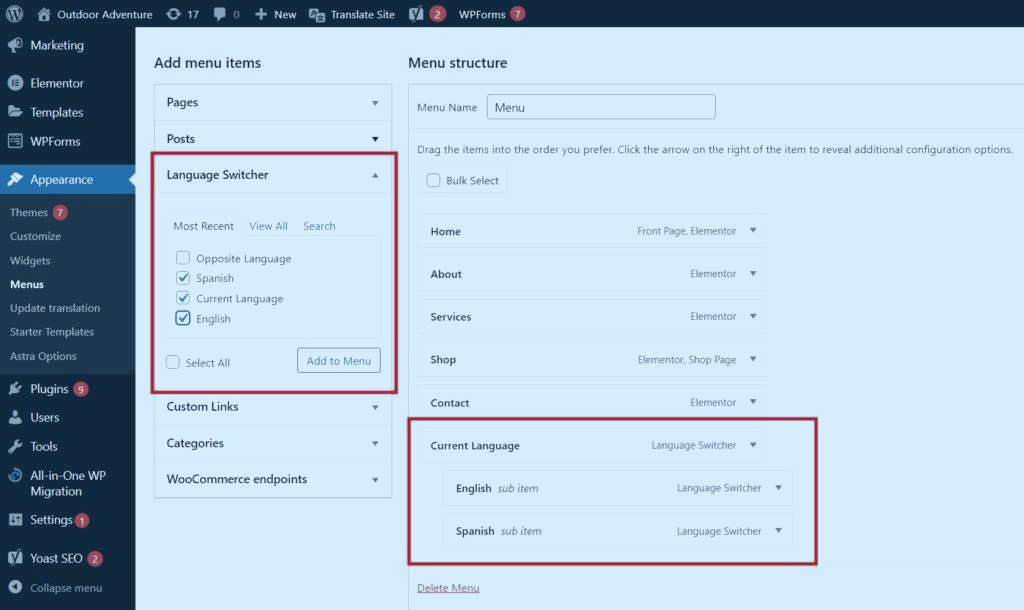
Add a language switcher
Visitors need an obvious way to change languages.
Put the language switcher somewhere people expect to find it, such as:
- Main navigation
- Header
- Mobile menu
- Footer
Use actual language names where possible.
For example:
English | Français | Español | العربية
Flags can be useful as visual cues, but a flag isn’t always the same thing as a language.
Spanish is spoken across many countries, for example.
So showing the language name is usually clearer.
Translate your WordPress menus
A common mistake is translating the pages but forgetting the navigation.
Imagine someone switches from English to French and still sees:
Home | Services | About | Contact
That’s a poor experience.
Create translated versions of your menus so the navigation changes with the selected language.
Check:
- Main menu
- Footer menu
- Mobile menu
- Dropdown items
- Call-to-action buttons
Handle images and alt text
Images can also need language-specific treatment.
The image itself might stay the same, but its alt text may need translation.
For example:
English:
alt="solar panels installed on a residential roof"
French:
alt="panneaux solaires installés sur le toit d'une maison"
Keep the alt text descriptive.
Don’t stuff keywords into it just because you’re targeting another language.
Think about internal links
Internal links need attention after translation.
Suppose your English article links to:
example.com/seo-services/
The French version shouldn’t automatically keep linking to the English page if a French equivalent exists.
Instead, it should link to:
example.com/fr/services-seo/
Go through important translated pages and check their internal links.
This is easy to overlook when translations are created automatically.
Translate categories and taxonomies
If your blog uses categories, tags, or custom taxonomies, decide how they’ll work across languages.
For example:
English:
SEO
French:
Référencement
You should also check whether the translated taxonomy pages have their own URLs, metadata, internal links, and indexation settings.
A multilingual blog can quickly become messy when posts are translated but categories remain in the original language.
Be careful with automatic language detection
Some multilingual plugins can detect a visitor’s browser language and redirect them automatically.
It sounds convenient.
But automatic redirects can cause problems if they’re implemented badly.
Search engine crawlers may not behave like normal visitors, and users sometimes want to read a different language than their browser’s default.
A visible language switcher is still useful even if you use language detection.
Test your site before publishing
Don’t wait until you’ve translated 500 pages to discover your URLs are wrong.
Test the setup with a few pages first.
Check:
- Language switcher
- Translated URLs
- Navigation
- Internal links
- Canonical tags
- Hreflang
- XML sitemap
- SEO titles
- Meta descriptions
- Images and alt text
- Mobile layout
- 404 pages
- Redirects
Open the pages in an incognito window too.
Click through the site as if you’re a visitor who speaks that language.
You’ll catch things that a plugin settings screen won’t show you.
Check your XML sitemap
Your translated URLs should be discoverable through your site’s sitemap setup.
Depending on your SEO and multilingual plugins, translated URLs may be included automatically.
Check your sitemap after publishing translations.
You can then submit the relevant sitemap through Google Search Console if needed.
Look for:
- Missing translated URLs
- Incorrect URLs
- Unexpected noindex pages
- Broken sitemap entries
Watch for duplicate or thin translations
A multilingual site can create hundreds of URLs very quickly.
That doesn’t mean every URL deserves to be indexed.
If a translated page contains almost no useful content, ask whether it should exist as a separate searchable page.
Each language version should provide a real experience for users who speak that language.
Don’t create dozens of near-empty translated pages just to increase the number of indexed URLs.
Keep your translations updated
This is where multilingual sites become a maintenance job.
You update the English service page.
Then you forget to update the French version.
A month later, the 2 pages contain different prices, services, or claims.
Create a process for translation updates.
Whenever you make a major change to an original page, check its translations too.
A simple spreadsheet can be enough:
| Page | English | French | Spanish | Last updated |
|---|---|---|---|---|
| Homepage | ✓ | ✓ | ✓ | Sep 2026 |
| Services | ✓ | ✓ | Pending | Sep 2026 |
| About | ✓ | ✓ | ✓ | Aug 2026 |
You don’t need fancy software to keep track of this.
Common multilingual WordPress mistakes
Using different plugins for different languages
Pick one main translation system and stick with it unless you have a strong technical reason to combine tools.
Translating only the visible text
SEO titles, URLs, menus, metadata, alt text, and internal links matter too.
Publishing machine translations without review
A technically correct translation can still sound terrible.
Forgetting hreflang
Search engines need clear signals about the relationship between language versions.
Canonicalizing every language to one URL
Each language version can have its own canonical URL.
Creating translations nobody needs
More languages mean more maintenance.
Ignoring mobile users
Your language switcher needs to work properly on small screens too.
A simple multilingual WordPress setup
For a small business website, I’d keep the setup fairly simple:
WordPress
↓
Multilingual plugin
↓
Language directories
↓
/en//fr//es/
↓
Translated pages + menus + metadata
↓
hreflang + canonical URLs
↓
XML sitemap + Search Console
That gives you a clean structure without turning your WordPress dashboard into a translation control room.
Final checklist
Before you launch your multilingual WordPress site, check these items:
- Choose your languages
- Choose your URL structure
- Install and configure a multilingual plugin
- Translate important pages
- Translate SEO titles and meta descriptions
- Translate URLs where appropriate
- Configure hreflang
- Check canonical URLs
- Translate menus
- Add a language switcher
- Review internal links
- Translate image alt text
- Check categories and tags
- Test mobile navigation
- Check your XML sitemap
- Review translations manually
- Test every language version before launch
A multilingual WordPress site can be clean and easy to manage when you decide the structure before you start translating.
Get the URLs, translations, SEO signals, and navigation working together first. Then scale the content.
FAQs
What is a multilingual WordPress site?
A multilingual WordPress site publishes website content in two or more languages. Each language version should have its own content and URL so visitors and search engines can understand the different versions.
What is the best way to make a WordPress site multilingual?
For most small and medium websites, using a multilingual WordPress plugin is the simplest approach. Popular options include WPML, Polylang, TranslatePress, and Weglot. The right choice depends on your site’s size and translation requirements.
Should I use WordPress Multisite for a multilingual website?
WordPress Multisite can be used to create separate sites for different languages, but it requires more management. For many small and medium websites, a multilingual plugin is easier to manage.
What is the best URL structure for a multilingual WordPress site?
Common options include language directories, subdomains, and country-specific domains. Language directories such as example.com/fr/ are a practical choice for many websites because all languages remain under the same domain.
Do multilingual WordPress sites need hreflang?
Yes. hreflang helps search engines understand the language and regional targeting of different versions of a page. Each relevant language version should correctly reference the other versions, including itself.
Should each language version have its own canonical URL?
Generally, yes. Each language version should have its own canonical URL rather than automatically pointing every translation to the English page. This helps search engines understand that the translated pages are separate versions intended for different audiences.