
Introducing AIOSEO MCP: Your AI Agents Can Now Work on Your WordPress SEO
Your AI Agents Can Now Work on Your WordPress SEO. Managing SEO on a WordPress site can be time-consuming. AIOSEO’s new MCP feature changes that – it lets you connect an AI assistant directly to your site.
In practice, you can tell your AI (for example, Claude or ChatGPT via an adapter) to find posts missing keywords, fix meta titles, create redirects, and more, and it will do it in WordPress. This article explains what AIOSEO MCP is, how it works, and how it fits into the broader SEO toolkit (free vs pro plans, reporting tools, WooCommerce SEO, and other plugins).
What is AIOSEO MCP?
AI Agents for WordPress SEO
AIOSEO MCP (Model Context Protocol) is a new feature in All in One SEO (AIOSEO) that exposes 28 SEO “abilities” to compatible AI tools. Think of an “ability” as an action your site can perform (reading or updating SEO metadata, running audits, creating redirects, etc.). MCP is an open standard “bridge” that lets an AI (like Claude, ChatGPT, or other supported clients) call those actions directly from chat. In other words, instead of manually editing each page, you can say in plain English:
- List all posts missing the focus keyword.
- Create a 301 redirect from /old-page to /new-page.
- Sort my posts by TruSEO score and fix the lowest ones first.
These tasks – among many others – are built into AIOSEO’s abilities.
AI agents can also help manage different WordPress SEO tasks, including structured data and schema-related workflows. If you want to learn more about using AIOSEO for event and job posting schema, see our guide: 3 Easy Ways to Use AIOSEO Event and Job Posting Schema.
For example, you can ask an AI agent to “Add meta descriptions to each of these posts” and it will automatically update all selected pages with new meta text in real time. In short, your AI agents can now work on your WordPress SEO without you lifting a finger.
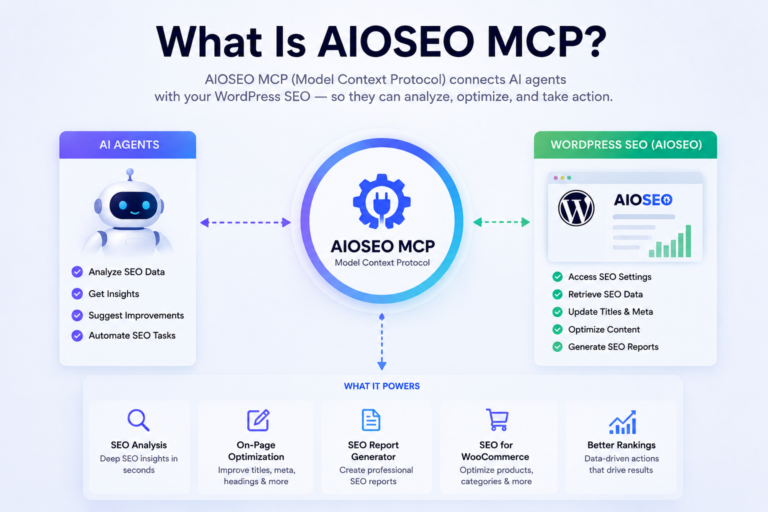
Figure: AIOSEO’s MCP abilities are grouped into categories like Posts, Settings, Robots.txt, etc. An AI client (shown here) can list all 28 abilities and then invoke any of them.
This isn’t just theory , it’s live in AIOSEO 4.9.8 and higher. Once you update AIOSEO and enable the MCP tab in the AI Suite, AIOSEO will “register 28 SEO abilities with the WordPress Abilities API” automatically. These include things like read/update post SEO data, list posts missing SEO data, manage redirects, check audit scores, and pull search performance data.
As AIOSEO explains, it’s a way to let your AI “read your site, take action, and report back” all from a chat interface. In practice, after a quick 4-step setup with an AI client, you can simply talk to your AI (e.g. via Claude Code CLI or Cursor) and it will execute those actions on your site..
- How it works: The AI client sends commands over MCP; AIOSEO interprets them and updates the site. For example, it can automatically fill missing focus keywords, bulk-update titles, set up redirects, or run an audit.
- Supports popular AI tools: AIOSEO has built-in support for clients like Claude (Desktop and CLI), Cursor, VS Code, Gemini CLI, and more. This means you can integrate with whichever AI agent you prefer.
- Free for all plans: Importantly, AIOSEO MCP is included in every plan, even the free Lite plan. There’s no extra cost to enable AI agents on your site – you only need AIOSEO v4.9.8+ and WordPress 6.9 or higher.
These capabilities mean you can delegate many SEO tasks to an AI. Instead of manually auditing each page, you might prompt your AI to “run a sitewide audit” and then review the results. Or tell it to “list all orphaned posts” and have it fix them. The possibilities grow over time as more AI clients and capabilities emerge. But the key takeaway is: AIOSEO MCP lets AI agents actually work on your WordPress SEO, not just advise what to do.
How AIOSEO MCP Works: Abilities & Setup
Setting up AIOSEO MCP is straightforward. In your WordPress dashboard (WP 6.9+), go to AIOSEO » AI Suite » MCP. AIOSEO will automatically register its SEO abilities with WordPress. You then generate an Application Password and connect your AI client (e.g. a Claude CLI or Gemini) using the supplied command snippet. Within minutes, your AI is linked.
Once connected, you can ask the AI to perform any registered ability.
For example, try asking it to list all posts missing a focus keyword, or to summarize your Google Search Console data. Below are some practical prompts (and what they do):
- List all posts missing a focus keyword. Returns a list of pages lacking keywords, so you know exactly which content to fix.
- Sort all posts with TruSEO score below 50 by score. Outputs your weakest pages first, helping you prioritize quick wins.
- Create a 301 redirect from /old to /new. Instantly sets up that redirect rule in WordPress without editing files.
- Update the SEO title for [post name] to include the keyword [keyword]. Finds that page and edits its title for you.
- List 404 errors logged in the last 30 days.Shows broken URLs and hit counts, so you can fix or redirect them.
- Run a full-site SEO audit. Produces an overview report (score, issue count, sitemap status, etc.) that you can review.
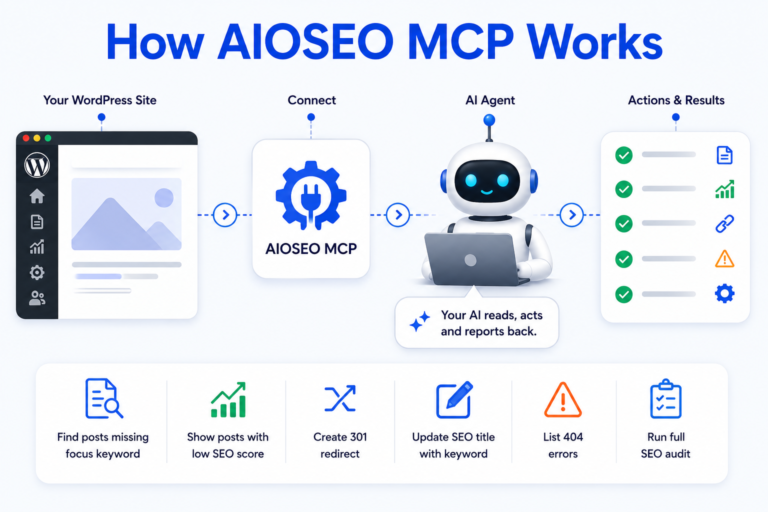
These examples illustrate how an AI can act like an SEO team member. The image above shows a typical abilities list (posts, settings, robots.txt, etc.) that the AI can access. AIOSEO’s documentation notes that your AI reads your site, takes action, and reports back – all from the chat window.
In effect, you are introducing AIOSEO MCP as the layer that makes your AI agents work on SEO tasks that would otherwise require manual clicks.
If you’re curious about setup, AIOSEO provides a detailed walkthrough. But in brief: update WordPress, install AIOSEO 4.9.8+, visit the MCP tab, generate a password, and connect your AI client.
The whole process “takes about 2 minutes” once WP is updated. The AI then loads all abilities and you’re ready to go. Importantly, no upgrade or subscription is needed – MCP is free on every plan, including Lite.
AIOSEO Free vs Pro: Which Plan Do You Need?
AIOSEO’s free (Lite) version is already very capable. It includes on-page analysis, a site audit tool, XML sitemaps (XML, HTML, RSS), and basic SEO controls for titles, descriptions, social profiles, etc..
In fact, it automatically scans your site and shows you an SEO report on the dashboard. For many small sites, the free version “comes with all the SEO features you will ever need”.
However, the premium Pro version (starting around $49.60/year) unlocks more advanced features for power users:
- Advanced Sitemaps: Video and Google News sitemaps (great for multimedia sites and publishers).
- Link Assistant: An internal link recommendation tool to boost site structure (find orphans, linking opportunities).
- Redirection Manager: A full-featured 301/302 redirect manager and 404 tracker.
- Local SEO: Easy schema for local business information (name, address, hours) and Google Maps integration.
- Schema Markup Generator: Build rich schema types (articles, FAQs, recipes, etc.) with one click.
- Image SEO: Automatic alt-text and title tags for images, saving manual work.
- WooCommerce SEO: Advanced optimization for WooCommerce stores (we’ll cover this below).
- Detailed SEO Audits: A more comprehensive site audit with a site score and priority fixes.
- Author SEO (E-E-A-T): Extra tools to showcase author credentials and content authority.
- Cornerstone Content: Topic-cluster management to build site authority around key themes.
In short, AIOSEO Pro adds automation and eCommerce-specific features beyond the basics. As the IsItWP review notes, you already get a lot for free (SEO reports, on-page checks, sitemaps), but the Pro plan streamlines workflows across multiple posts and content types.
For instance, only Pro lets you bulk-apply video/news sitemaps or easily fix all broken links at once.
Below is a quick feature comparison:
| Features | Free Version | Pro Version |
| Basic SEO & Audits | ✅ (Site audits, on-page analysis) | ✅ (Adds detailed site score & issue tracking) |
| XML Sitemaps | ✅ (Basic XML/HTML sitemaps) | ✅ (Plus video/news sitemaps) |
| Internal Links | ❌ | ✅ (Link Assistant suggests internal links) |
| Redirections | ❌ | ✅ (Redirection Manager for 301/302/404) |
| Schema Markup | ❌ (Basic) | ✅ (Rich snippet schema for articles, products, FAQs, etc.) |
| WooCommerce Support | ✅ (Basic SEO fields) | ✅ (Full WooCommerce SEO tools) |
| Automated Reports | ❌ | ✅ (Scheduled SEO reports via email) |
AIOSEO also provides an SEO Report Generator (Elite plan) that emails performance summaries. Reports can include top/losing posts and keywords, content summaries, and SEO milestones.
While email reports require an Elite subscription, the plugin’s built-in Rank Tracker and dashboard analytics give on-demand insights.
Which plan is right for you? If you run a small blog or simple business site, the Lite version covers the essentials.
If you manage a larger site, client sites, or an online store, Pro/Elite unlocks time-saving tools. Crucially, AIOSEO MCP itself is free – you can use AI agents for SEO even on the free plan. The choice of plan affects the extra tools around those AI actions.
For example, an AI agent on Free can bulk-fix keywords in posts, but an AI agent on Pro could also auto-generate product schema or redirect rules as needed.
Automated SEO Reports and Analytics
Keeping track of SEO data is easier with an SEO report generator. This is a tool that “collects and compiles essential SEO metrics into easy-to-understand reports”. Think keyword rankings, traffic stats, technical audit issues, backlinks, etc. AIOSEO itself offers several reporting features:
- SEO Performance Emails: AIOSEO Pro (Elite) can send scheduled email reports to you and your team. These reports highlight top winning/losing posts, top keywords, content summaries, posts to optimize, and SEO milestones. You simply toggle on “Email Reports” and set recipients and frequency. It’s handy for agencies or teams who want regular updates without logging in.
- Rank Tracker: AIOSEO’s dashboard can track your Google keyword positions over time. You’ll see if your keywords are moving up or down. This means you have historical data at hand to spot trends.
- Search Console Integration: Within AIOSEO’s Search Statistics, you can view clicks, impressions, and positions from Google Search Console without leaving WordPress.
- Site Audit: Both Free and Pro run site audits, but Pro gives a detailed score and flagged issues. You can export or note these issues for fixes.
In practice, AIOSEO bundles much of this data in one dashboard. For example, one click can show your overall SEO score and a list of issues to fix. The plugin’s author even calls it the “best SEO report generator for WordPress sites”. (Whether or not you use all features, it ensures you’re not flying blind.)
Beyond AIOSEO, there are also standalone report generators (like Mangools or Semrush) that produce branded PDFs of your analytics. AIOSEO’s approach is more integrated into WordPress. If you prefer an external report generator, tools like SerpCue or all-in-one tools like Semrush can pull data and email reports too.
But for a WordPress-focused, automated solution, AIOSEO’s built-in reports (and its upcoming AI-chat-based summaries) are very useful.
Key Takeaway: An SEO report generator automates collecting rankings, traffic, and audit data. AIOSEO provides automated email reports (Pro/Elite) and in-dashboard analytics, so you always have insight into your site’s SEO performance.
WooCommerce SEO: Optimizing Your Store
If you run a WooCommerce store, SEO is crucial for getting product traffic. AIOSEO Pro includes WooCommerce SEO tools that go far beyond the basics. Out of the box, WooCommerce lets you set product titles and descriptions, but that’s it.
AIOSEO “offers advanced automation that optimizes your entire product catalog including variations, attributes, and rich snippets. Our tools automatically generate optimal product schema, customize social sharing formats, and provide bulk optimization features that aren’t available in basic WooCommerce”.
In practical terms, with AIOSEO you can:
- Auto-generate Product schema (including price, stock, ratings) so Google and AI shopping bots can read your products easily.
- Bulk-set SEO titles/descriptions for products and categories, saving time on hundreds of items.
- Enable breadcrumbs, canonical URLs, and other technical SEO with one click, improving site structure for search.
- Use AIOSEO’s image SEO to automatically add alt text and titles to your product images.
- Ask your connected AI to optimize products. For example, you could prompt: “Update all product meta descriptions to include our main keywords” or “List all product pages missing alt text” and AIOSEO would do it.
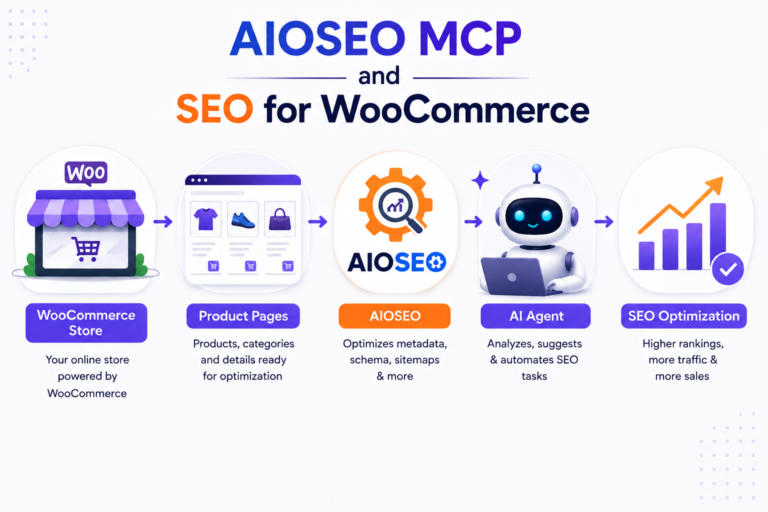
The benefit: shoppers find your products via search and AI assistants. AIOSEO’s WooCommerce features ensure each product page is as SEO-friendly as possible without manual editing. As AIOSEO notes, using its WooCommerce SEO tools is like having a dedicated SEO assistant for your store.
If your online shop uses WooCommerce, upgrading to AIOSEO Pro will let you “optimize every product page in your online store so that it ranks for relevant search queries”.
Local UK example: If you run a UK-based bakery with an online store, you can use AIOSEO to add LocalBusiness schema for the bakery and product schema for each pastry. When someone asks Google Assistant (e.g. on a phone or smart speaker), “What are your opening hours?” or “Can you buy [product] near me?”, your site is more likely to be cited or ranked. And for product searches like “buy sourdough bread online”, the rich product snippets generated by AIOSEO’s WooCommerce features can improve clicks.
Tip: Use AIOSEO’s AI Content Generator (in the AI & Content tab) to help write product descriptions. Then let the AI via MCP ensure those descriptions are set as meta descriptions on the product pages. This way the writing and SEO updates are all connected.
Beyond Traditional SEO: AEO and AI Trends
SEO is evolving beyond blue links. With AI assistants and “answer engines” (like ChatGPT, Google’s AI overviews, Bing Copilot) serving answers directly, a new strategy called Answer Engine Optimization (AEO) has emerged. The idea is to structure your content so AI systems can easily digest and cite it as answers. There’s even a WordPress plugin called Answer Engine Optimization for this purpose.
The AEO plugin’s description highlights the shift: millions of users now get answers from AI “without clicking.” It helps by adding structured data (FAQ schema, HowTo, product schema), generating AI-optimized FAQs, and even an AEO content score. The goal is to have your site’s content surface in AI chat responses.
AIOSEO naturally aligns with AEO concepts. Its new AI-focused features (like the FAQ builder, schema generator, and the MCP integration) all help make content AI-friendly. For example, you can use AIOSEO’s schema tool to add FAQPage schema, and then ask your AI assistant to “generate five common questions and answers about [topic]” – effectively boosting your chances in AI answer boxes. Even the MCP’s ability to have AI fix meta tags and summaries means your content is kept clean for AI crawlers.
Other top SEO plugins: How does AIOSEO compare? Most experts now list AIOSEO alongside Yoast SEO, Rank Math, SEOPress, etc. In fact, AIOSEO is one of the most popular WordPress SEO plugins – “used by 3 million+ sites”. Recent roundups (e.g. Zapier’s list of best plugins) highlight AIOSEO’s “all-around SEO assistance” as a standout.
Yoast remains a favoured tool for content analysis, and Rank Math is praised for rank-tracking. But AIOSEO stands out for its automation and ease of use. Its setup wizard and clear interface make SEO less daunting for beginners, while its advanced features (MCP, schema, local SEO, eCommerce SEO) satisfy power users.
In summary, if you’re comparing “One SEO plugin” for your site, AIOSEO is certainly at the top of the list. It covers all the essentials for WordPress SEO (titles, sitemaps, social, schema) and keeps innovating with AI tools. The free Lite version rivals other plugins’ premium tiers (e.g. it even includes free WooCommerce SEO that Yoast charges extra for). The Pro version then adds the extras you’d expect for a paid plugin (internal linking, redirection, etc.).
Internal link opportunity: For a deeper comparison of SEO tools, see our guide on “Best WordPress SEO plugins” . Also check our tutorial on setting up WooCommerce SEO if you run an online store.
Conclusion
Introducing AIOSEO MCP: Your AI Agents Can Now Work on Your WordPress SEO – indeed, that’s the big change. By connecting AI assistants directly to your site, MCP turns SEO into a chat command. Instead of spending hours on manual fixes, you can delegate tasks like updating meta tags or auditing pages. And since MCP is free on all plans, it’s easy to experiment without extra cost.
In summary, AIOSEO MCP represents the next step in making SEO accessible: AI tools acting as your personal SEO team. Coupled with AIOSEO’s rich feature set (automated audits, WooCommerce support, schema, etc.), it can save you time and help improve your search performance.
Next Steps: Try connecting an AI client to your site today. Check out our SEO audit guide to identify quick wins or our WooCommerce SEO tutorial if you run a store (internal link placeholders).
And if you want expert help, consider reaching out – we have SEO specialists who can set up AIOSEO and train your team on AI-driven workflows. Embrace the future of SEO and watch your WordPress rankings grow.
FAQs
What is AIOSEO MCP and how does it work?
AIOSEO MCP (Model Context Protocol) links AI assistants like ChatGPT or Claude directly to your WordPress site. It lets your AI execute core SEO tasks such as fixing missing keywords or running audits, straight through chat, saving you hours of manual work.
Is AIOSEO MCP available in the free version?
Yes! MCP is 100% free for all users running AIOSEO Lite (v4.9.8 or higher). You can connect an AI agent to handle your site tasks without upgrading to Pro.
How does AIOSEO enhance WooCommerce SEO?
AIOSEO Pro supercharges online stores with automated rich product schemas (for prices, stock, and reviews), bulk-editing tools, and AI-driven optimizations to maximize your product visibility on Google and AI shopping assistants.
What does an SEO report generator do?
It automatically aggregates your site’s metrics like rankings, traffic, and technical errors into actionable insights. AIOSEO automates this by delivering regular summary reports straight to your inbox, keeping you updated effortlessly.
Which WordPress SEO plugin is the best?
While options vary by preference, AIOSEO is a leading choice (3M+ active installs) for balancing beginner-friendly design with advanced features and cutting-edge AI integrations. (Alternatives like Yoast and Rank Math are also strong contenders depending on your workflow).
AIOSEO MCP (Model Context Protocol) links AI assistants like ChatGPT or Claude directly to your WordPress site. It lets your AI execute core SEO tasks such as fixing missing keywords or running audits, straight through chat, saving you hours of manual work.
Yes! MCP is 100% free for all users running AIOSEO Lite (v4.9.8 or higher). You can connect an AI agent to handle your site tasks without upgrading to Pro.
AIOSEO Pro supercharges online stores with automated rich product schemas (for prices, stock, and reviews), bulk-editing tools, and AI-driven optimizations to maximize your product visibility on Google and AI shopping assistants.
It automatically aggregates your site’s metrics like rankings, traffic, and technical errors into actionable insights. AIOSEO automates this by delivering regular summary reports straight to your inbox, keeping you updated effortlessly.
While options vary by preference, AIOSEO is a leading choice (3M+ active installs) for balancing beginner-friendly design with advanced features and cutting-edge AI integrations. (Alternatives like Yoast and Rank Math are also strong contenders depending on your workflow).